
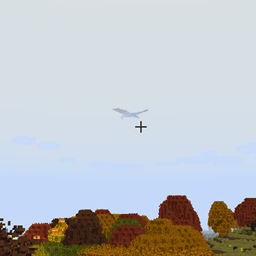
Minecraft 1.12.2用ISeeDragons MOD
RLCraftおよび古いバージョンのIce and Fireにおけるドラゴンの描画距離を修正
- ダウンロード
- 1 ダウンロード
- 閲覧
- 18 閲覧
- 更新日
- 更新日 18.10.2026
- 1.12.2
 Forge
Forge
ISeeDragons MODについて
ISeeDragons なるほど... RLCraft のドラゴンは厄介だ... しかし、プレイヤーから 64 ブロック以上離れただけで発動する個人用ステルス装置をわざわざ持つ必要があるのか?!
この MOD は Ice and Fire 1.7.1(古いバージョン)の重大なバグをいくつか修正します。Ice and Fire 1.8.x と併用すると未定義の動作(バグ、クラッシュなど)を引き起こす可能性があります! この MOD は RLCraft モッドパックでの使用を想定しています!
機能:
- Ice and Fire ドラゴンの描画距離を修正(設定可能、他の MOD エンティティでも動作する可能性あり)
- Ice and Fire のドラゴンが攻撃されても目を覚まさない問題を修正
- プレイヤーが shift/降りる操作でドラゴンの顎から逃げられる問題を修正
- Ice and Fire のシーサーペントの防具修理を修正
- Dragonbone Axe を修正
- ドラゴンがブロックを破壊する際のパーティクルを減らしてラグを防止(設定可能)
- Ice and Fire のアイテムに OreDictionary エントリを再追加(Ice and Fire はまだログを大量に出力します。TODO: ログスパムも削除する)
- まだ修理アイテムがないツールにカスタム修理アイテムを設定可能(設定可能)
- アイテムにアンデッドの敵へのカスタム追加ダメージを与えられる(設定可能)
この MOD はクライアントとサーバーの両方にインストールする必要がありますが、ほとんどの修正はサーバーにのみインストールしても機能します(クライアントへのインストールは必須ではありません)。
RLCraft モッドパック: https://www.curseforge.com/minecraft/modpacks/rlcraft Ice and Fire MOD: https://www.curseforge.com/minecraft/mc-mods/ice-and-fire-dragons
この MOD をインストールするには、jar ファイルを Minecraft インスタンスフォルダの mods フォルダに配置してください。Minecraft インスタンスフォルダの場所は、使用しているランチャーによって異なります!
ソースコード: https://github.com/xcube16/ISeeDragons
ISeeDragonsのインストール方法
With Millida Launcher
Install Millida Launcher
The launcher is free: download it at millida.net/launcher and sign in with any nickname.
Click “Install” on this page
The launcher opens and installs the mod for Minecraft 1.12.2 on Forge automatically.
Launch the game
A profile with it appears in the launcher: click “Play”.
Manually
Install Forge
The loader must match the game version of the mod file, for example Minecraft 1.12.2. After installing it, a separate profile appears in your launcher.
Download the file for your version
In the version list above, pick the file ISeeDragons-1.2.1.jar (64 KB) for your game version.
Put it in the mods folder
The folder is inside .minecraft (Windows: %appdata%\.minecraft\mods). If it does not exist, create it.
Launch the loader profile
Open “Mods” in the main menu: ISeeDragons should be in the list.
Minecraft 1.12.2 runs on Java 8: with a different Java version the game may close right after launch.
バージョン
依存関係あり
| Minecraft | ローダー | ファイル | 日付 | 操作 |
|---|---|---|---|---|
| 1.12.2 | Forge | ISeeDragons-1.2.163.7 KB 1 | ||
| 1.12.2 | Forge | ISeeDragons-0.1224.4 KB | ||
| 1.12.2 | Forge | ISeeDragons6.7 KB |
FAQ
Which Minecraft versions does ISeeDragons work on?
Only Minecraft 1.12.2: there are no files for other versions.
Is ISeeDragons for Forge or Fabric?
Only for Forge: 1.12.2. There are no files for Fabric or NeoForge: a mod for another loader will not start.
Does ISeeDragons need other mods?
The author lists no required dependencies: the Forge loader is enough.
Which Java does ISeeDragons need?
Minecraft 1.12.2 runs on Java 8. If the game closes right after launch, the usual cause is the wrong Java version in the profile settings.
Where can I download ISeeDragons safely?
On this page: the file ISeeDragons-1.2.1.jar (64 KB) is stored on Millida’s server, with no link shorteners. SHA-1 checksum: 0f8c5fee7eb2b76ab4a01adb08b63147f5a2a2fe.
レビュー
ISeeDragonsの最初の評価を書きませんか


