
Minecraft 1.16.5用Ignition: HydroGel MOD
農地を潤すための単一の固体ブロックを追加するシンプルなMinecraft MOD。
概要
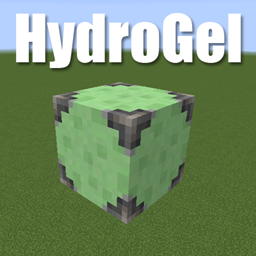
Ignition: HydroGelはHydroGelの更新版です。農地にとって固体の水ブロックとして機能するHydrogelという単一のブロックを追加します。
これで、水をせき止めたり、落ちないように水穴を塞いだりする心配なく、高台の農地を潤すブロックを持てるようになります。
スライムボール、鉄格子、水入りバケツでクラフトします。
連絡先
Discord: https://discord.gg/wdvU5Yz
Ignition: HydroGelのインストール方法
With Millida Launcher
Install Millida Launcher
The launcher is free: download it at millida.net/launcher and sign in with any nickname.
Click “Install” on this page
The launcher opens and installs the mod for Minecraft 1.16.4–1.16.5 automatically.
Launch the game
A profile with it appears in the launcher: click “Play”.
Manually
Download the file for your version
In the version list above, pick the file HydroGel-1.16.4-2.2.1.jar (10 KB) for your game version.
Put it in the mods folder
The folder is inside .minecraft (Windows: %appdata%\.minecraft\mods). If it does not exist, create it.
Launch the loader profile
Open “Mods” in the main menu: Ignition: HydroGel should be in the list.
Minecraft 1.16.5 runs on Java 8: with a different Java version the game may close right after launch.
バージョン
依存関係あり
| Minecraft | ローダー | ファイル | 日付 | 操作 |
|---|---|---|---|---|
| 1.16.5 | — | HydroGel-1.16.4-2.2.1.jar10.4 KB |
FAQ
Which Minecraft versions does Ignition: HydroGel work on?
There are files for 1.16.5, 1.16.4. The newest is 1.16.5.
Which Java does Ignition: HydroGel need?
Minecraft 1.16.5 runs on Java 8. If the game closes right after launch, the usual cause is the wrong Java version in the profile settings.
Where can I download Ignition: HydroGel safely?
On this page: the file HydroGel-1.16.4-2.2.1.jar (10 KB) is stored on Millida’s server, with no link shorteners. SHA-1 checksum: e73f5775166cc186fd11910ccc1ddc2f2d2c9208.
レビュー
Ignition: HydroGelの最初の評価を書きませんか


