

Minecraft 1.20.1, 1.21.1用Idwtialsimmoedm MOD
ライブラリをインストールしたくなかったので、自分でEnchantment Descriptions Modを作りました
 Fabric
 Quilt
Quilt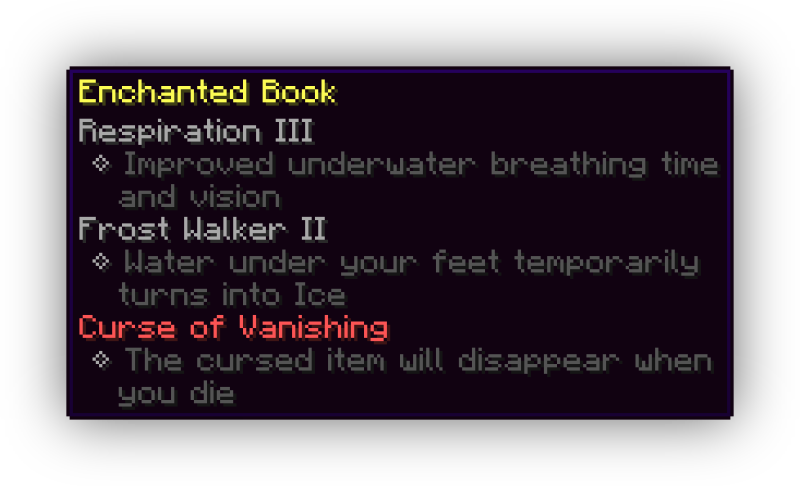
idwtialsimmoedm
idwtialsimmoedm adds descriptions to tooltips that contain enchantments or status effects. It uses the same language-key format as Enchantment Descriptions, so all mods that already have descriptions available will be compatible out of the box. idwtialsimmoedm however is completely standalone and very lightweight, yet still comes with a few config options. If you have Cloth Config and Modmenu installed, you will be able to open the config screen otherwise you can edit the file in config/idwtialsimmoedm.json.
Config Options
- Description Prefix and Indent: These options determine what kind of bullet-point style to use for displaying the descriptions. If you want to just display the text, leave both of these blank. The indent is used on the second line onwards, if the description is too long and wraps, to align with the first line which uses the prefix
- Display only when Shift is held: If this option is enabled, the description tooltip will never show on any item unless the Shift key is held on your keyboard
- Display only on Enchanted Books: If this option is enabled, the description tooltip will never be shown on items that aren't Enchanted Books
Idwtialsimmoedmのインストール方法
With Millida Launcher
Install Millida Launcher
The launcher is free: download it at millida.net/launcher and sign in with any nickname.
Click “Install” on this page
The launcher opens and installs the mod for Minecraft 1.20–1.21.8 on Fabric or Quilt automatically.
Launch the game
A profile with it appears in the launcher: click “Play”.
Manually
Install Fabric or Quilt
The loader must match the game version of the mod file, for example Minecraft 1.21.8. After installing it, a separate profile appears in your launcher.
Download the file for your version
In the version list above, pick the file idwtialsimmoedm-0.3.3+1.21.6.jar (32 KB) for your game version and loader.
Put it in the mods folder
The folder is inside .minecraft (Windows: %appdata%\.minecraft\mods). If it does not exist, create it.
Launch the loader profile
Open “Mods” in the main menu: Idwtialsimmoedm should be in the list.
Idwtialsimmoedm works on the player’s side only: there is no need to install it on a server.
Minecraft 1.21.8 runs on Java 21: with a different Java version the game may close right after launch.
バージョン
依存関係あり
| Minecraft | ローダー | ファイル | 日付 | 操作 |
|---|---|---|---|---|
| 1.21.8 | Fabric, Quilt | 1.21.832.4 KB | ||
| 1.21.5 | Fabric, Quilt | 1.21.532.3 KB | ||
| 1.21.4 | Fabric, Quilt | 1.21.432.1 KB | ||
| 1.21.1 | Fabric, Quilt | 1.21.131.6 KB | ||
| 1.21 | Fabric, Quilt | 1.2131.6 KB | ||
| 1.20.1 | Fabric, Quilt | 1.20.131.4 KB | ||
| 1.21 | Fabric, Quilt | 1.2131.5 KB | ||
| 1.20.6 | Fabric, Quilt | 1.20.631.5 KB |
動作に必要なもの
レビュー
Idwtialsimmoedmの最初の評価を書きませんか


