

Minecraft 1.20.1, 1.21.1用Food Effect Tooltips (Forge) MOD
食べるとステータス効果を付与する食料にツールチップを追加
 NeoForge
 Forge
概要
1.21.11+
これはFood Effect Tooltipsの非公式Forge版であり、LGPLv3の下でライセンスされています。オリジナルの作品を支援してください!
Modの内容
かなりの数の食料アイテムが、ステータス効果という形でプレイヤーにボーナスを与えます。
しかし、これらの効果はゲーム内で決して表示されません。これは、特にMod環境でプレイヤーがすべての食料の選択肢とその効果に詳しくない場合、厄介な問題です。
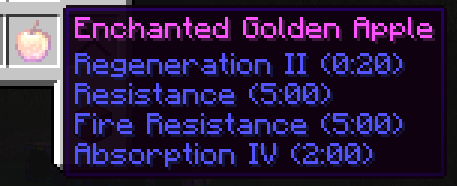
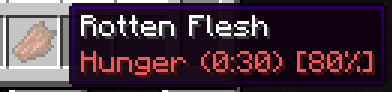
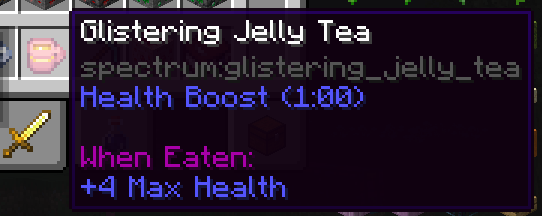
Food Effect Tooltipsを使えば、すべての効果がアイテムのツールチップに表示されます!
- 一定の確率でのみ適用される効果も含みます
- 効果によるステータス変化を表示します
- 完全にクライアント側で動作します
- AppleSkinのように食料情報を表示する他のModと互換性があります
Food Effect Tooltips (Forge)のインストール方法
With Millida Launcher
Install Millida Launcher
The launcher is free: download it at millida.net/launcher and sign in with any nickname.
Click “Install” on this page
The launcher opens and installs the mod for Minecraft 1.20.1–1.21.1 on Forge or NeoForge automatically.
Launch the game
A profile with it appears in the launcher: click “Play”.
Manually
Install Forge or NeoForge
The loader must match the game version of the mod file, for example Minecraft 1.21.1. After installing it, a separate profile appears in your launcher.
Download the file for your version
In the version list above, pick the file foodeffecttooltips+neoforge-1.21.1-1.6.0.jar (21 KB) for your game version and loader.
Put it in the mods folder
The folder is inside .minecraft (Windows: %appdata%\.minecraft\mods). If it does not exist, create it.
Launch the loader profile
Open “Mods” in the main menu: Food Effect Tooltips (Forge) should be in the list.
Minecraft 1.21.1 runs on Java 21: with a different Java version the game may close right after launch.
バージョン
依存関係あり
| Minecraft | ローダー | ファイル | 日付 | 操作 |
|---|---|---|---|---|
| 1.21.1 | NeoForge | [NEOFORGE]1.6.0+1.21.120.7 KB 1 | ||
| 1.20.1 | Forge, NeoForge | 1.6.0+1.20.120.5 KB 1 | ||
| 1.20.5 | NeoForge | [NEOFORGE]1.2.0+1.20.617.6 KB |
レビュー
Food Effect Tooltips (Forge)の最初の評価を書きませんか


