

- ダウンロード
- 6 ダウンロード
- 閲覧
- 32 閲覧
- 更新日
- 更新日 25.10.2026
- 1.8.9 — 1.12.2
 Forge
Forge
ExtraPlanets MODについて
パートナーのServerMinerからワンクリックで自分のMinecraftサーバーを作成できます:ここをクリックして、プロモコードMJRLegendsで20%オフを入手してください。技術的な知識は不要で、即時セットアップが可能です!
MJRLegendsプロジェクトの公開Discordサーバー:こちら(バグの報告やバグについての話はしないでください。バグ以外のヘルプにはDiscordを、バグにはイシュートラッカーをご利用ください!)
Modの要件:
1.12.2バージョンの場合(ここで報告し、タイトルに[1.12.2]を使用してください):Galacticraft 4ビルド(255ビルド以上)とForge 14.23.1.2555以上が必要で、MJRLegendsLibが必要です!
1.11.2バージョンの場合(ここで報告し、タイトルに[1.11.2]を使用してください):Galacticraft 4ビルド(184ビルド以上)とForge 13.20.1.2513以上が必要で、ExtraPlanets v0.5.0以降はMJRLegendsLibが必要です!
1.10.2バージョンの場合(ここで報告し、タイトルに[1.10.2]を使用してください):Galacticraft 4ビルド(184ビルド以上)とForge 12.18.3.2239以上が必要で、ExtraPlanets v0.8.6以降はMJRLegendsLibが必要です!
1.8.9バージョンの場合(ここで報告し、タイトルに[1.8]を使用してください):Galacticraft 4ビルド(184ビルド以上)とForge 11.15.1.1764以上が必要で、ExtraPlanets v1.1.9以降はMJRLegendsLibが必要です!
1.7.10バージョンの場合(ここで報告し、タイトルに[1.7]を使用してください):Galacticraft 3ビルド(502ビルド以上)とForge 10.13.4.1614が必要です!
このExtraPlanets放射線計算機は、いくつかの変数に基づいて惑星や月でどれくらい耐えられるかを計算するのに役立ちます。プレイヤーへの放射線ダメージ0%から100%まで https://mjrlegends.com/extraplanetsradiation.php
アドオンの機能:
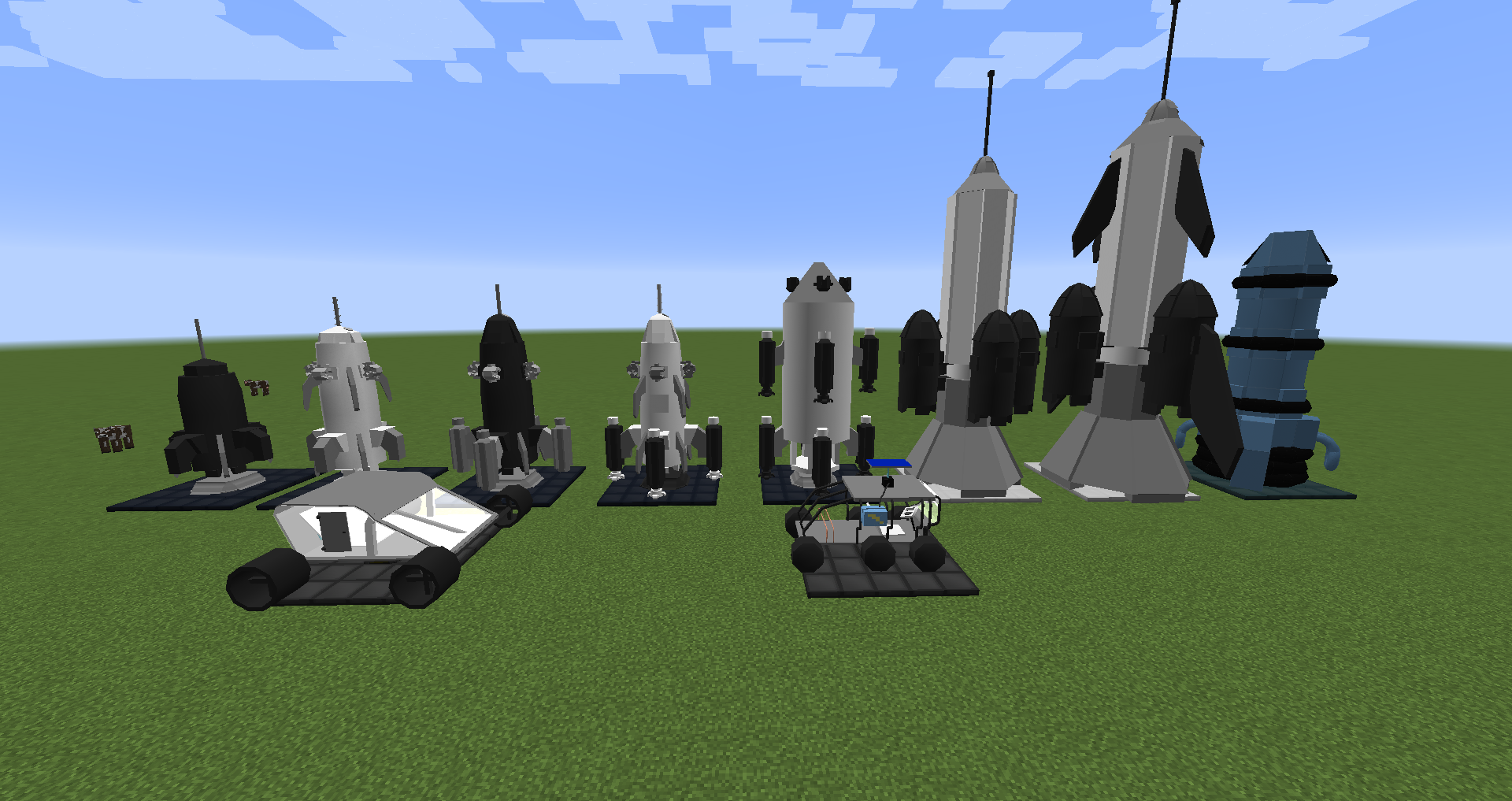
- 4~10ティアロケット
- 電気ロケット(1.8.9/1.10.2/1.11.2/1.12.2のみ!)
- カスタム発射台
- カスタムビークル
- ほとんどの月と惑星のためのマルチバイオームシステム(MC 1.7.10は現在1つのバイオームが欠けていますが、すぐに追加されます)
- 各惑星と月ごとに異なる重力/温度/一日の長さ
- ティア4~10のダンジョン(PlutoとErisはまだクリーパーボスですが、すぐに置き換えられます!)
- ティア2~4のサーマルアーマー(1.8.9/1.10.2/1.11.2/1.12.2ではティア3~5!GCがティア2を追加したため)
- ほとんどの素材用のカスタムツール
- すべての惑星と月のカスタム鉱石
- カスタムコンフィグオプション(他のGCアドオンの互換性オプションを含む)
- ほとんどの素材用のカスタムアーマー
- すべての惑星の村
- すべての月の村(v1.7.10のみ!)
- カスタムバッテリー
- カスタム非ボスモブ(エンティティ)(v1.7.10のみ!)
- カスタム実績
- 各惑星の宇宙ステーション
- カスタム宇宙服ティア1~4、グラビティブーツを含む(MC 1.8.9/1.10.2/1.11.2/1.12.2のみ!)
- 惑星用のカスタム放射線および圧力システム、オンスクリーンディスプレイを含む(MC 1.8.9/1.10.2/1.11.2/1.12.2のみ!)
- 放射線および圧力システムをサポートするカスタムマシン
- 一部のGalacticraftマシンのアップグレード版
- 追加情報を含む拡張Galacticraft銀河マップ画面
- 他の銀河/銀河セレクター(MC 1.8.9/1.10.2/1.11.2/1.12.2のみ!)
Mod互換性機能:
- Forge Microblocks対応(v1.7.10のみ!)
- NEI/JEI対応
- Extreme Reactors対応(1.10.2/1.11.2/1.12.2のみ!)
- Craft Tweaker対応(1.12.2のみ!)メソッドはこちらを参照
- Dynamic Surroundings対応 - 公式コンフィグファイルはこちら経由
- Modular Power Suits Compact、パワースーツに適用する圧力および放射線モジュールを追加
- More Planets Rocket Crusher対応
- カスタム天体マップ画面によるPlanet Progressions対応
別のGalacticraftアドオンの互換性サポート:
MC 1.7.10 - https://docs.mjrlegends.com/ExtraPlanets/1.7.10compact/
MC 1.12.2 - https://docs.mjrlegends.com/ExtraPlanets/1.12.2compact/
MC 1.8.9-1.11.2 - https://docs.mjrlegends.com/ExtraPlanets/1.8-1.11compact/
アドオンに含まれる惑星:
- Mercury
- Venus(1.7.10のみ!GCが1.8.9/1.10.2/1.11.2/1.12.2バージョンでVenusを追加したため!)
- Ceres
- Jupiter
- Saturn
- Uranus
- Neptune
- Pluto
- Eris
- Kepler 22b
- Haumea - (天体マップ画面での視覚的目的のために追加)
- Kuiper Belt - (天体マップ画面での視覚的目的のために追加)
- MakeMake - (天体マップ画面での視覚的目的のために追加)
- Kepler 47b - (天体マップ画面での視覚的目的のために追加)
- Kepler 47c - (天体マップ画面での視覚的目的のために追加)
- Kepler 62b - (天体マップ画面での視覚的目的のために追加)
- Kepler 62c - (天体マップ画面での視覚的目的のために追加)
- Kepler 62d - (天体マップ画面での視覚的目的のために追加)
- Kepler 62e - (天体マップ画面での視覚的目的のために追加)
- Kepler 62f - (天体マップ画面での視覚的目的のために追加)
- Kepler 69b - (天体マップ画面での視覚的目的のために追加)
- Kepler 69c - (天体マップ画面での視覚的目的のために追加)
アドオンに含まれる月:
Neptuneの月:
- Triton
Uranusの月:
- Oberon
- Titania
Marsの月:
- Phobos
- Deimos
Jupiterの月:
- IO
- Europa
- Ganymede
- Callisto
Saturnの月:
- Rhea
- Titan
- Iapetus
変更履歴:
1.7.10 - こちら 1.8.9 - こちら 1.10.2 - こちら 1.11.2 - こちら
1.12.2 - こちら
クレジット:
- アドオンを作成した私(MJRLegends)
- Galacticraft modを作成したmicdoodle8、radfastほか
- カスタムモデルのLegendGamer
- Custom Galaxiesの初期アイデア/コンセプトのBlesseNtumble
許可 - https://docs.mjrlegends.com/Other/permissions/
ExtraPlanetsのインストール方法
With Millida Launcher
Install Millida Launcher
The launcher is free: download it at millida.net/launcher and sign in with any nickname.
Click “Install” on this page
The launcher opens and installs the mod for Minecraft 1.8.9–1.12.2 on Forge automatically.
Launch the game
A profile with it appears in the launcher: click “Play”.
Manually
Install Forge
The loader must match the game version of the mod file, for example Minecraft 1.12.2. After installing it, a separate profile appears in your launcher.
Download the file for your version
In the version list above, pick the file ExtraPlanets-1.12.2-0.8.0.jar (8.4 MB) for your game version.
Put it in the mods folder
The folder is inside .minecraft (Windows: %appdata%\.minecraft\mods). If it does not exist, create it.
Launch the loader profile
Open “Mods” in the main menu: ExtraPlanets should be in the list.
Minecraft 1.12.2 runs on Java 8: with a different Java version the game may close right after launch.
バージョン
依存関係あり
| Minecraft | ローダー | ファイル | 日付 | 操作 |
|---|---|---|---|---|
| 1.12.2 | Forge | ExtraPlanets-1.12.2-0.8.0.jar8.4 MB 6 | ||
| 1.8.9 | — | ExtraPlanets-1.8.9-1.5.9.jar7.8 MB | ||
| 1.11.2 | — | ExtraPlanets-0.2.2-Beta-Build.jar6.7 MB | ||
| 1.8.9 | — | ExtraPlanets-0.6.5-Alpha-Build.jar4.2 MB |
FAQ
Which Minecraft versions does ExtraPlanets work on?
There are files for 1.12.2, 1.11.2, 1.8.9. The newest is 1.12.2.
Is ExtraPlanets for Forge or Fabric?
Only for Forge: 1.12.2. There are no files for Fabric or NeoForge: a mod for another loader will not start.
Does ExtraPlanets need other mods?
The author lists no required dependencies: the Forge loader is enough.
Which Java does ExtraPlanets need?
Minecraft 1.12.2 runs on Java 8. If the game closes right after launch, the usual cause is the wrong Java version in the profile settings.
Where can I download ExtraPlanets safely?
On this page: the file ExtraPlanets-1.12.2-0.8.0.jar (8.4 MB) is stored on Millida’s server, with no link shorteners. SHA-1 checksum: 58098e1ac6e46e0eedee083649552bacf4f7f0ed.
レビュー
ExtraPlanetsの最初の評価を書きませんか


