
- ダウンロード
- 8 ダウンロード
- 閲覧
- 44 閲覧
- 更新日
- 更新日 28.10.2026
- 1.12.2
 Forge
Forge
Entity Culling MODについて
Entity Culling - 1.16.5 - 2.1.4 以降のバージョンは Optifine G8 とのみ互換性があります!Entity Culling - 1.16.5 - 2.1.3 以前のバージョンは Optifine G7 とのみ互換性があります!Entity Culling - 1.12.2 - 2.0.8 以降のバージョンは Optifine G5 とのみ互換性があります!Entity Culling - 1.12.2 - 2.0.7 以前のバージョンは Optifine F5 とのみ互換性があります!
この MOD を動作させるには MixinBootstrap (curseforge, modrinth) と RenderLib (curseforge, modrinth) が必要です (MC 1.12.2 のみ)!Mixin 0.7-0.8 Compatibility (curseforge, modrinth) は、他の MOD が古い mixin バージョンを使用していてゲームを起動できない場合に役立つかもしれません (MC 1.12.2 のみ)。
Entity Culling は、隠れた (タイル) エンティティのレンダリングをスキップすることを目的としたクライアントサイドのパフォーマンス MOD です。バニラでは、プレイヤーの視野内にあるすべての (タイル) エンティティがそのままレンダリングされます。つまり、壁の後ろに隠れていて見えないのに、何百もの (タイル) エンティティが FPS を消費している可能性があります。
隠れたエンティティのカリング デフォルトでは、この MOD は OpenGL オクルージョンカリングの実装を使用しており、1 フレームの遅延とごくわずかなオーバーヘッドだけでピクセルパーフェクトなバウンディングボックスカリングを実現します。
ハードウェアが OpenGL 4.3 をサポートしていない場合、この MOD はレイトレースによるカリングの実装を使用します。レイトレースカリングはより CPU 負荷が高く、OpenGL カリングはより GPU 負荷が高いため、ハードウェアに応じてどちらかを優先したい場合があります。これにより、多くの (タイル) エンティティが画面内にあるものの遮蔽されて見えない場合に、FPS が大幅に改善される可能性があります。
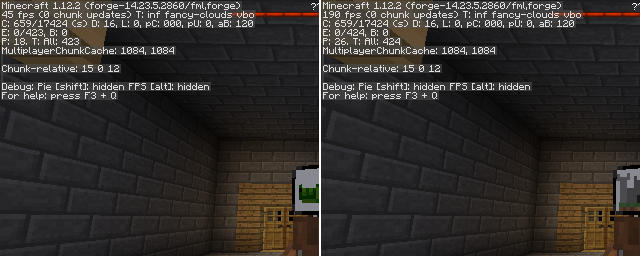
Chocolate Quest Repoured のダンジョン内で約 200 のエンティティが画面内にある状態で EntityCulling-1.12.2-6.0.2 を使ってテストしたところ、大幅な改善が見られました!
Entity Cullingのインストール方法
With Millida Launcher
Install Millida Launcher
The launcher is free: download it at millida.net/launcher and sign in with any nickname.
Click “Install” on this page
The launcher opens and installs the mod for Minecraft 1.12.2 on Forge automatically.
Launch the game
A profile with it appears in the launcher: click “Play”.
Manually
Install Forge
The loader must match the game version of the mod file, for example Minecraft 1.12.2. After installing it, a separate profile appears in your launcher.
Download the file for your version
In the version list above, pick the file EntityCulling-1.12.2-6.5.0.jar (62 KB) for your game version.
Put it in the mods folder
The folder is inside .minecraft (Windows: %appdata%\.minecraft\mods). If it does not exist, create it.
Launch the loader profile
Open “Mods” in the main menu: Entity Culling should be in the list.
Minecraft 1.12.2 runs on Java 8: with a different Java version the game may close right after launch.
バージョン
依存関係あり
| Minecraft | ローダー | ファイル | 日付 | 操作 |
|---|---|---|---|---|
| 1.12.2 | Forge | EntityCulling-1.12.2-6.5.0.jar62.4 KB 7 | ||
| 1.12.2 | — | EntityCulling-1.12.2-6.3.1.jar64.4 KB 1 | ||
| 1.12.2 | — | EntityCulling-1.12.2-6.0.2.jar54.1 KB |
FAQ
Which Minecraft versions does Entity Culling work on?
Only Minecraft 1.12.2: there are no files for other versions.
Is Entity Culling for Forge or Fabric?
Only for Forge: 1.12.2. There are no files for Fabric or NeoForge: a mod for another loader will not start.
Does Entity Culling need other mods?
The author lists no required dependencies: the Forge loader is enough.
Which Java does Entity Culling need?
Minecraft 1.12.2 runs on Java 8. If the game closes right after launch, the usual cause is the wrong Java version in the profile settings.
Where can I download Entity Culling safely?
On this page: the file EntityCulling-1.12.2-6.5.0.jar (62 KB) is stored on Millida’s server, with no link shorteners. SHA-1 checksum: cf4a4a6b11b1721fbda1edeb32bdc3b1ac3a8560.
レビュー
Entity Cullingの最初の評価を書きませんか


