
 Fabric
 NeoForge
 Forge
ForgeEnder Crop MODについて
エンダーパールを得るために収穫できる作物を追加するシンプルなMODです。MC Forums Post - Source Code - Issues ライセンス: GPLv3: このMODはどのMODパック(Curseかどうかに関わらず)にも含めることができます。クレジットは必須ではありませんが、いつでも歓迎します!
待望の1.16バージョンでの新機能:
- Vanillaの新しいFarmlandテクスチャに合わせた新しいTilled End Stoneテクスチャ。
- より良い自動化/ツール連携のための適切な種と作物のタグ付け。
作物
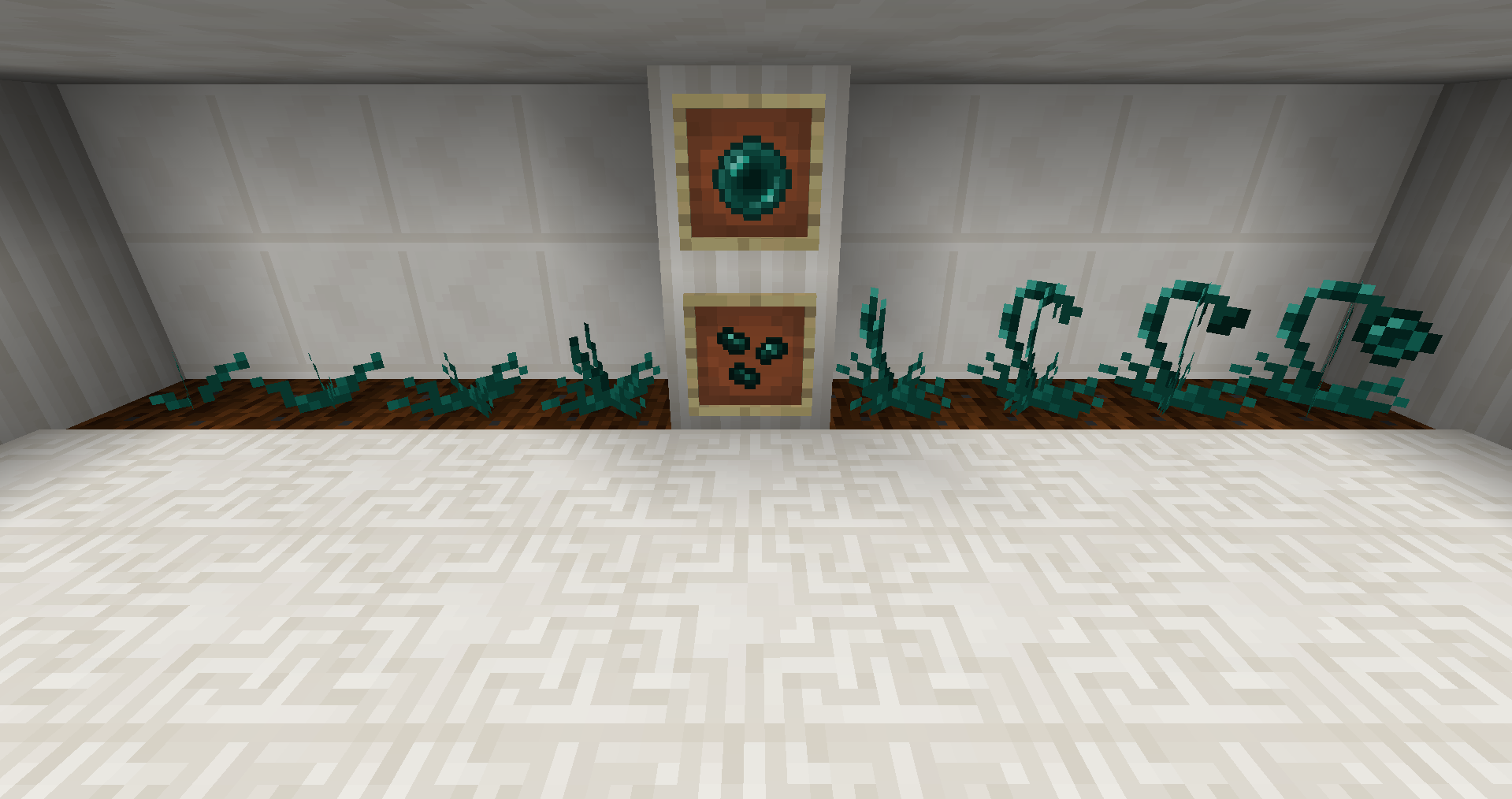
エンダー作物には8つの成長段階があります。どの段階で収穫してもEnder Seedsをドロップし、8段階目では1~2個のEnder Pearlsと時々追加の種をドロップします。
成長
Farmland上:
- Vanilla Minecraftの成長ルールに従いますが、小麦の50%の速度です。
- 成長には明るさレベル< 7が必要です(レッドストーントーチ)。
Tilled End Stone上:
- Vanilla Minecraftの成長ルールに従い、小麦と同じ速度です。
- 任意の明るさレベルで成長します。
- 収穫時に50分の1の確率でエンダーマイトがスポーンします。(設定可能)
種
- Ender seedsはダンジョンで見つけることができ、金のリンゴと同じくらいレアです。(設定可能)
- また、小麦の種を4つのエンダーパールで囲むことでクラフトできます:
Tilled End Stone(設定可能)
Tilled End Stoneを得るには、Unbreaking Iがエンチャントされたクワ、または採掘レベル1(Stone)のクワのようなツール(AIOT、Kama、Scythe)で通常のEnd Stoneを右クリックするだけです。
Waila/The One Probe連携:
いくつかのスクリーンショット
紹介動画:
Zifiv Games(フランス語)
このMODを作った理由:
MC 1.8.9用のRyRyPatPatPackPack(R2P4)をプレイ中にこのアイデアを思いつきました。当時それはExtraUtils2を持っていませんでした。エンドに行く必要があり、最初はエンダーマンを狩ろうとしましたが数が少なく、Progressive Mobs MODのせいで夜を生き延びるのは簡単ではありませんでした。そこでフラストレーションから(主に私が死ぬのが本当に得意だからですが)Ender Crop MODを作りました。
Ender Cropのインストール方法
With Millida Launcher
Install Millida Launcher
The launcher is free: download it at millida.net/launcher and sign in with any nickname.
Click “Install” on this page
The launcher opens and installs the mod for Minecraft 1.12–1.20.1 on Fabric, Forge or NeoForge automatically.
Launch the game
A profile with it appears in the launcher: click “Play”.
Manually
Install Fabric, Forge or NeoForge
The loader must match the game version of the mod file, for example Minecraft 1.20.1. After installing it, a separate profile appears in your launcher.
Download the file for your version
In the version list above, pick the file endercrop-1.20.1-2.0.0-alpha-fabric.jar (80 KB) for your game version and loader.
Put it in the mods folder
The folder is inside .minecraft (Windows: %appdata%\.minecraft\mods). If it does not exist, create it.
Launch the loader profile
Open “Mods” in the main menu: Ender Crop should be in the list.
Minecraft 1.20.1 runs on Java 17: with a different Java version the game may close right after launch.
バージョン
依存関係あり
| Minecraft | ローダー | ファイル | 日付 | 操作 |
|---|---|---|---|---|
| 1.20.1 | Fabric | endercrop-1.20.1-2.0.0-alpha-fabric.jar80 KB | ||
| 1.20.1 | NeoForge, Forge | endercrop-1.20.1-1.7.0.jar72.9 KB | ||
| 1.19.2 | Forge | endercrop-1.19.2-1.7.0-beta.jar66.7 KB | ||
| 1.12.1 | — | endercrop-1.12.2-1.6.0.jar72 KB |
FAQ
Which Minecraft versions does Ender Crop work on?
There are files for 1.20.1, 1.19.2, 1.12.2, 1.12.1, 1.12. The newest is 1.20.1.
Is Ender Crop for Forge or Fabric?
There are files for Fabric: 1.20.1, for Forge: 1.19.2–1.20.1 and for NeoForge: 1.20.1.
Does Ender Crop need other mods?
The author lists no required dependencies: the Fabric, Forge or NeoForge loader is enough.
Which Java does Ender Crop need?
Minecraft 1.20.1 runs on Java 17. If the game closes right after launch, the usual cause is the wrong Java version in the profile settings.
Where can I download Ender Crop safely?
On this page: the file endercrop-1.20.1-2.0.0-alpha-fabric.jar (80 KB) is stored on Millida’s server, with no link shorteners. SHA-1 checksum: 1ecc5a7b1e4d2211265b3231eb2105e37617e1c9.
レビュー
Ender Cropの最初の評価を書きませんか


