

 NeoForge
 Forge
Forge Fabric
 Quilt
QuiltEMI
EMIは多機能で使いやすいアイテムとレシピのビューアです。多くの新機能を備え、ユーザー体験を最適化しています。標準のFabric/Quilt API以外に依存関係は一切不要で、ゲームと一緒にシンプルかつ簡単に起動できます。
実行時のJEI互換
実行時のJEI互換には、JEIをEMIと一緒にインストールするだけで、両者が連携してレシピを共有します。JEIは非表示になります。

EMIは何をもたらすのか?
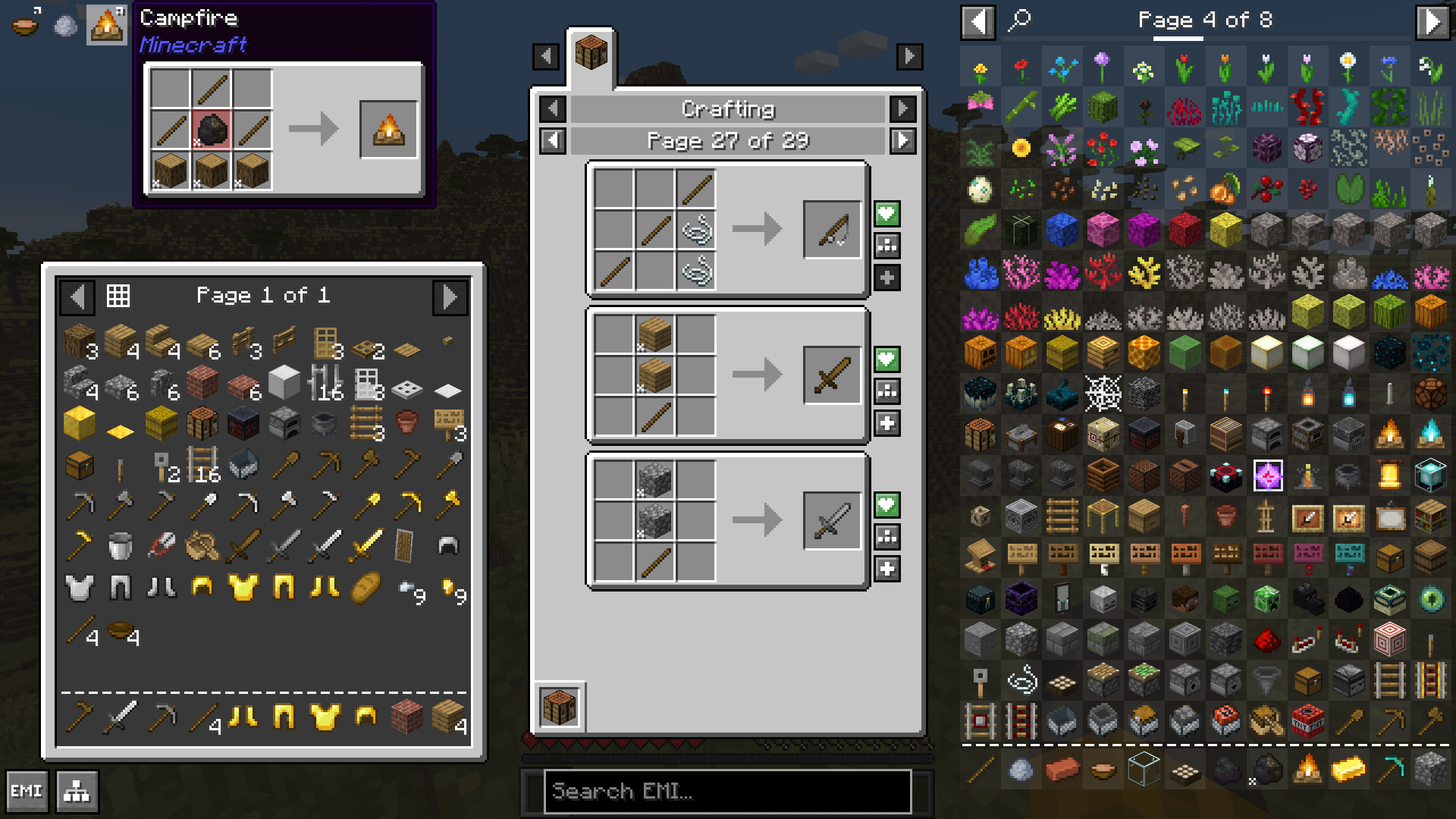
もちろんEMIには、レシピの閲覧、アイテムのお気に入り登録、検索など、最初から期待されるすべての機能が備わっています。しかし、EMIが提供する新しいものは何でしょうか?
- 作成可能なレシピを素早くクラフトするためのクラフト可能モード。トグルで使用するか、空の検索の設定として使用できます
- レシピはアイテムと一緒にお気に入り登録でき、ボタン一つで素早くクラフトするためにも使用できます
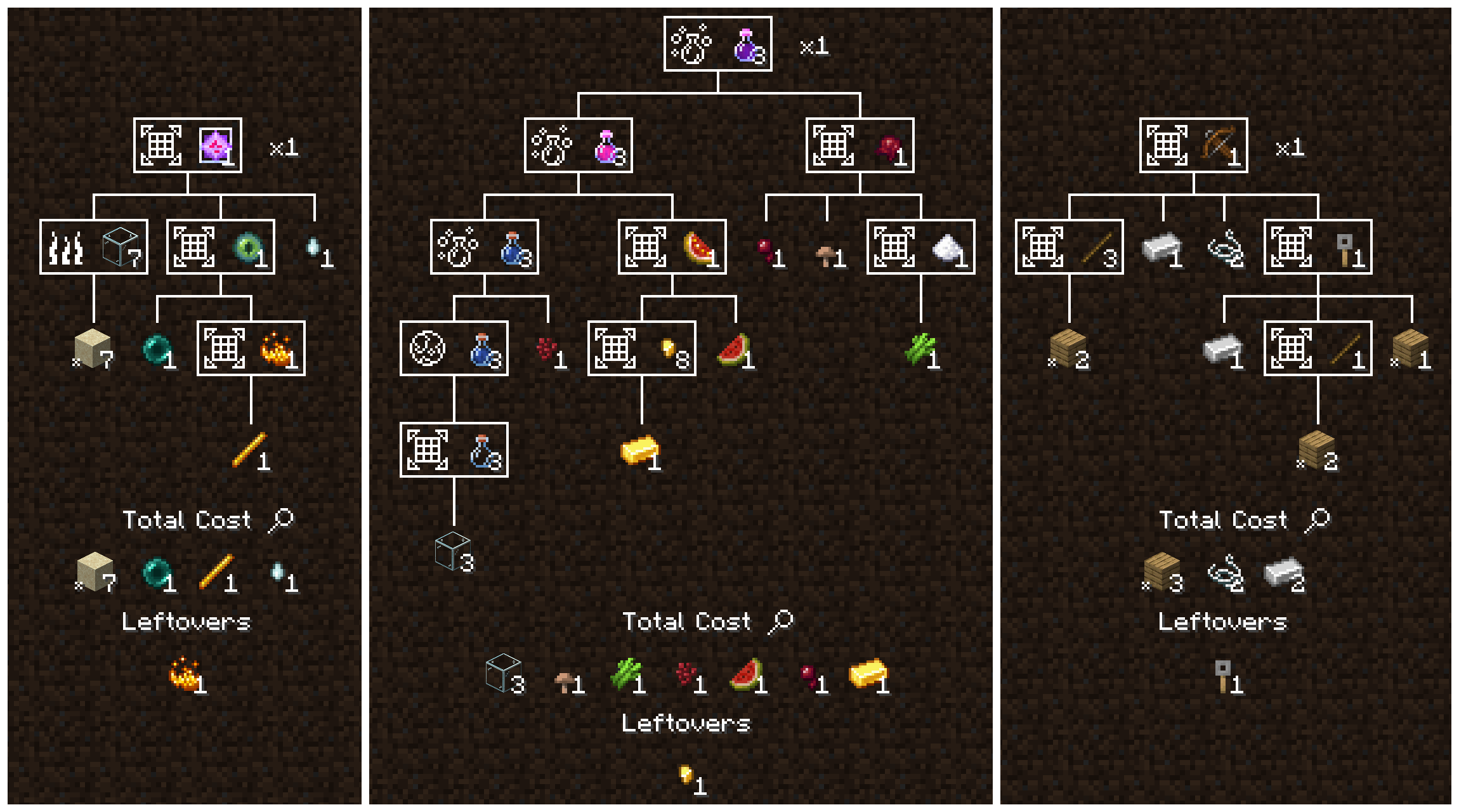
- 複雑なクラフトのコストを分解するレシピツリー。すべてのステップ、必要な基本素材の数、そして残るものを表示します
- レシピツリーのクラフトモード。タスクを完了するために必要な材料とステップを数え上げ、サイドバーに合成お気に入りを含めて、各ステップを必要な分だけ正確にクラフトできます
- タグのスマート表示。翻訳、モデル、ツールチップ付きで、ゲーム内のすべての板材をゆっくり回転させて見る代わりに「板材」のように一目で素材を表示します
- 基本コストのスマートな分解。レシピツリーが自動的に基本素材まで分解され、プレイ中に独自のデフォルトを定義できます
- レシピ、タグ、素材のツールチップ。何がクラフトされるか、素材が何で構成されているかを表示します
- レシピのお気に入りやクラフト可能モードと組み合わせて、インベントリやカーソルに直接素早くクラフトするためのキーバインド。一度に一つまたは複数
- クリーンでモダンなAPI。シンプルで強力、そしてEMIのすべての機能に適合するようゼロから構築
- サードパーティの依存関係はゼロ。EMIは標準のファーストパーティFabric/Quilt APIのみを必要とします
EMIは何の略ですか?
略ではありません。頭字語でもありません。あるいは意味のない頭字語かもしれません? 気が楽になるなら、以下のリストから選ぶか、自分で作ってみてください。
- Emi Memy Imi
- Exhaustively Many Items
- Explicitly Mandated Items
- Endless Material Information
- Expounded Minutia Introspection
- Earnestly Made Imitation
- Even More Items
- Eminence, My Inception
- Emi's Magic Inventory
- Efficiently Managed Inventory
- Exploring Modified: Iridescent
- Expropriated Matter Insights
EMIのインストール方法
With Millida Launcher
Install Millida Launcher
The launcher is free: download it at millida.net/launcher and sign in with any nickname.
Click “Install” on this page
The launcher opens and installs the mod for Minecraft 1.18.2–1.21.1 on Fabric, Forge, NeoForge or Quilt automatically.
Launch the game
A profile with it appears in the launcher: click “Play”.
Manually
Install Fabric, Forge, NeoForge or Quilt
The loader must match the game version of the mod file, for example Minecraft 1.21.1. After installing it, a separate profile appears in your launcher.
Download the file for your version
In the version list above, pick the file emi-1.1.12+1.21+neoforge.jar (985 KB) for your game version and loader.
Put it in the mods folder
The folder is inside .minecraft (Windows: %appdata%\.minecraft\mods). If it does not exist, create it.
Launch the loader profile
Open “Mods” in the main menu: EMI should be in the list.
On a server
A server on Fabric, Forge, NeoForge or Quilt
The mod only works on a server with the same loader and game version, for example 1.21.1.
File goes into the server’s mods folder
Stop the server, put the mod file into the mods folder and start the server again.
Use the “To server” button
On Millida Hosting, the button at the top of the page uploads the file to your server and restarts it for you.
Minecraft 1.21.1 runs on Java 21: with a different Java version the game may close right after launch.
バージョン
依存関係あり
| Minecraft | ローダー | ファイル | 操作 |
|---|---|---|---|
| 1.21 | NeoForge | 1.21985 KB 127 | |
| 1.20.1 | Forge | 1.20.11.1 MB 114 | |
| 1.19.2 | Forge | 1.19.21 MB 2 | |
| 1.18.2 | Fabric, Quilt | 1.18.2736 KB 1 |
これを必要とするコンテンツ
FAQ
Which Minecraft versions does EMI work on?
There are files for 1.21.1, 1.21, 1.20.1, 1.19.2, 1.18.2. The newest is 1.21.1.
Is EMI for Forge or Fabric?
There are files for Fabric: 1.18.2, for Forge: 1.19.2–1.20.1, for NeoForge: 1.21–1.21.1 and for Quilt: 1.18.2.
Does EMI need other mods?
The author lists no required dependencies: the Fabric, Forge, NeoForge or Quilt loader is enough.
Does EMI work on a server?
Yes. EMI works both in singleplayer and on a server.
Which Java does EMI need?
Minecraft 1.21.1 runs on Java 21. If the game closes right after launch, the usual cause is the wrong Java version in the profile settings.
Where can I download EMI safely?
On this page: the file emi-1.1.12+1.21+neoforge.jar (985 KB) is stored on Millida’s server, with no link shorteners. SHA-1 checksum: a496c1be4a561b4a3154b9661a126b65b14ee7cf.
レビュー
EMIの最初の評価を書きませんか


