
Minecraft 1.20.1用Dynamic Trees - Defiled Lands MOD
Dynamic treesとDefiled Landsの互換Mod
- ダウンロード
- 3 ダウンロード
- 閲覧
- 24 閲覧
- 更新日
- 更新日 25.10.2026
- 1.20.1
 Forge
Dynamic Trees | Defiled Lands | Defiled Lands Preborn
概要
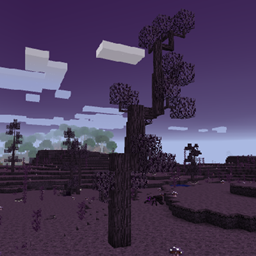
このMODはDefiled LandsをDynamic Treesと互換性を持たせ、すべての樹木の動的に成長するバージョンを追加し、ワールド生成時にそれらを完全に置き換えます。
1.20.1ではDefiled Lands Prebornを使用しました。これらのバージョンでは、樹木、その挙動、およびその生成をTree Packsを使用してカスタマイズおよび調整できます。
機能
含まれる樹木:
- Tenebra Tree
ワールド生成:
すべてのDefiled Landsバイオームに動的な樹木があります
その他のアドオン
他のMOD用のDynamic Treesアドオンは、Dynamic Treesのcurseforgeページで見つけることができます。
提案とリクエスト:
互換性のための新しいMODをリクエストするには、こちらでお願いします!! https://github.com/orgs/DynamicTreesTeam/discussions/categories/compatibility-addon-suggestions
要件
- Dynamic Trees
- Defiled Lands (1.12用)
- Defiled Lands Preborn (1.20.1用)
ライセンスとMODパック
これはどんなMODパックでも自由に使用できます! 尋ねる必要はありません。このMODはMITライセンスを持ち、そのソースはgithubで公開されています。
Dynamic Trees - Defiled Landsのインストール方法
With Millida Launcher
Install Millida Launcher
The launcher is free: download it at millida.net/launcher and sign in with any nickname.
Click “Install” on this page
The launcher opens and installs the mod for Minecraft 1.20.1 on Forge automatically.
Launch the game
A profile with it appears in the launcher: click “Play”.
Manually
Install Forge
The loader must match the game version of the mod file, for example Minecraft 1.20.1. After installing it, a separate profile appears in your launcher.
Download the file for your version
In the version list above, pick the file DynamicTreesDefiledLands-1.20.1-1.1.0.jar (843 KB) for your game version.
Put it in the mods folder
The folder is inside .minecraft (Windows: %appdata%\.minecraft\mods). If it does not exist, create it.
Launch the loader profile
Open “Mods” in the main menu: Dynamic Trees - Defiled Lands should be in the list.
Minecraft 1.20.1 runs on Java 17: with a different Java version the game may close right after launch.
バージョン
依存関係あり
| Minecraft | ローダー | ファイル | 日付 | 操作 |
|---|---|---|---|---|
| 1.20.1 | Forge | DynamicTreesDefiledLands-1.20.1-1.1.0.jar843 KB 3 |
レビュー
Dynamic Trees - Defiled Landsの最初の評価を書きませんか


