
Dung Pipe MODについて
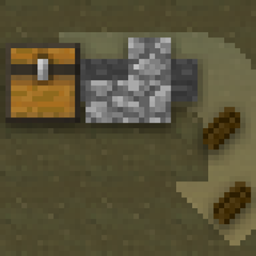
これは、ホッパーが上から引き出すのと同様に、ブロックの側面から引き出すための2つのブロックを追加します。
どちらのブロックもアイテムをワールドに排出し、そこからホッパーなどで回収できます。
Dung Pipes は木材で作られ、取り付けられたブロックから引き出します。
Sewer Pipes は鉄で拡張され、取り付けられたブロックだけでなく、その1つ後ろのブロックからも引き出すことができますが、それはブロックの固体面に取り付けられている場合に限られます。パイプは、問題のブロックを視覚的に貫通して伸び、後ろのブロックから引き出すことを示します。
どちらのパイプもレッドストーン信号には反応しませんが、Sewer Pipes は中間のブロックをピストンなどで動かすことで無効化できます。
Dung Pipeのインストール方法
With Millida Launcher
Install Millida Launcher
The launcher is free: download it at millida.net/launcher and sign in with any nickname.
Click “Install” on this page
The launcher opens and installs the mod for Minecraft 1.12–1.12.2 automatically.
Launch the game
A profile with it appears in the launcher: click “Play”.
Manually
Download the file for your version
In the version list above, pick the file Dung Pipe-1.2.jar (21 KB) for your game version.
Put it in the mods folder
The folder is inside .minecraft (Windows: %appdata%\.minecraft\mods). If it does not exist, create it.
Launch the loader profile
Open “Mods” in the main menu: Dung Pipe should be in the list.
Minecraft 1.12.2 runs on Java 8: with a different Java version the game may close right after launch.
バージョン
依存関係あり
| Minecraft | ローダー | ファイル | 日付 | 操作 |
|---|---|---|---|---|
| 1.12.1 | — | Dung Pipe-1.2.jar21 KB |
FAQ
Which Minecraft versions does Dung Pipe work on?
There are files for 1.12.2, 1.12.1, 1.12. The newest is 1.12.2.
Which Java does Dung Pipe need?
Minecraft 1.12.2 runs on Java 8. If the game closes right after launch, the usual cause is the wrong Java version in the profile settings.
Where can I download Dung Pipe safely?
On this page: the file Dung Pipe-1.2.jar (21 KB) is stored on Millida’s server, with no link shorteners. SHA-1 checksum: 0eef6e30e71f88371ec80c7a088090d4b0a2b18b.
レビュー
Dung Pipeの最初の評価を書きませんか


