
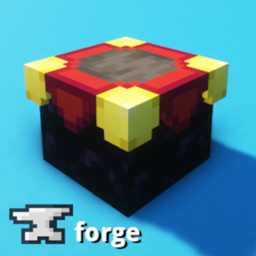
Minecraft 1.20.1, 1.16.5用DisenchantingForge MOD
アイテムをエンチャント解除し、エンチャントを本に移します
 NeoForge
 Forge
ForgeDisenchanting Forge
このMODは、エンチャントされたアイテムをエンチャント解除し、そのエンチャントを本に移せるDisenchanterブロックを追加します。Disenchanterはアイテムから最初のエンチャントを1つ取り除き、それを本に移します。出力された本をShiftクリックすると、コストを賄うのに十分な経験値と本があれば、Disenchanterは利用可能なすべての本にすべてのエンチャントを移そうとします。randomenchantment設定を使うと、入力スロットにアイテムを入れ直したり置き直したりして、目的のエンチャント本が出力に現れるまで特定のエンチャントをアイテムから引き出すことができます。実際にエンチャントを選択できるようにすることはロードマップに含まれています。
Fabric版: Disenchanting Fabric
使い方
- エンチャントされたアイテムを左のスロットに入れる
- 本、または本のスタックを中央のスロットに入れる
- エンチャントされたアイテムの最初のエンチャントが付いたエンチャント本が生成される
- 本を取り出すと、そのエンチャントがアイテムから取り除かれ、本を入手できる
レシピ
- 金床 1個
- エンチャントテーブル 1個
- 金インゴット 2個
- 黒曜石 3個
ブラックリスト
- テンプレート: DisenchantingBlacklist.zip
- チュートリアル: https://www.youtube.com/watch?v=UgHWz8kuLPo
設定オプション
- requiresxp: エンチャント解除に経験値を必要とするか?
- xpcost: Disenchanterの使用にかかるXPの相対的な規模 (1 - 10)(低いほど必要なXPが少ない)
- randomenchantment: trueの場合、Disenchanterはアイテムからランダムなエンチャントを選びます。デフォルト値はfalseで、これは従来の動作です。バージョン1.4で導入されました。
- resetAnvilCost: trueの場合、アイテムの金床作業コストがゼロにリセットされます。デフォルトはfalseです。バージョン2.0.0で導入されました。
- damageItem: エンチャント解除の過程でエンチャントされたアイテムが損傷を受けるべきか?デフォルトはfalseです。バージョン2.1.0で導入されました。
- damagePercent: エンチャント解除ごとにアイテムに与えるべき損傷の割合。デフォルトは5です。バージョン2.1.0で導入されました。
- showInUseMessage: Disenchanterが他のプレイヤーによって使用中の場合にメッセージを表示します。
バグはこちらのissue trackerに報告してください。最新情報はこちらのBlueskyをフォローしてください。
リソースパック
- Excalibur
- BDCraft
MODパック制作者の方へ
あなたのMODパックに自由に含めてください。
スペシャルサンクス
- 1.14向けのForge MOD制作チュートリアルを提供してくれたMcJty
- Fabric向けのDisenchanting MODを制作したTsudico
- BDCraftテクスチャを提供したakharding91
- Excaliburテクスチャを提供したStarlezz
フォローする
Bluesky | Twitch
DisenchantingForgeのインストール方法
With Millida Launcher
Install Millida Launcher
The launcher is free: download it at millida.net/launcher and sign in with any nickname.
Click “Install” on this page
The launcher opens and installs the mod for Minecraft 1.16.5–1.21.10 on Forge or NeoForge automatically.
Launch the game
A profile with it appears in the launcher: click “Play”.
Manually
Install Forge or NeoForge
The loader must match the game version of the mod file, for example Minecraft 1.21.10. After installing it, a separate profile appears in your launcher.
Download the file for your version
In the version list above, pick the file Disenchanting-neoforge-1.21.10-2.3.0.jar (232 KB) for your game version and loader.
Put it in the mods folder
The folder is inside .minecraft (Windows: %appdata%\.minecraft\mods). If it does not exist, create it.
Launch the loader profile
Open “Mods” in the main menu: DisenchantingForge should be in the list.
Minecraft 1.21.10 runs on Java 21: with a different Java version the game may close right after launch.
バージョン
依存関係あり
| Minecraft | ローダー | ファイル | 日付 | 操作 |
|---|---|---|---|---|
| 1.21.10 | NeoForge | Disenchanting-neoforge-1.21.10-2.3.0.jar232 KB | ||
| 1.20.1 | Forge | Disenchanting-forge-1.20.1-2.2.4.jar79.8 KB 23 | ||
| 1.18.2 | Forge | Disenchanting-forge-1.18.2-2.0.0-alpha.jar69 KB 1 | ||
| 1.16.5 | — | Disenchanting-forge-1.16.5-1.7.2.jar46.2 KB |
FAQ
Which Minecraft versions does DisenchantingForge work on?
There are files for 1.21.10, 1.20.1, 1.20, 1.18.2, 1.16.5. The newest is 1.21.10.
Does DisenchantingForge need other mods?
The author lists no required dependencies: the Forge or NeoForge loader is enough.
Which Java does DisenchantingForge need?
Minecraft 1.21.10 runs on Java 21. If the game closes right after launch, the usual cause is the wrong Java version in the profile settings.
Where can I download DisenchantingForge safely?
On this page: the file Disenchanting-neoforge-1.21.10-2.3.0.jar (232 KB) is stored on Millida’s server, with no link shorteners. SHA-1 checksum: 2e68611828f8e81f351c1e64b69cfc89352ed50d.
レビュー
DisenchantingForgeの最初の評価を書きませんか


