
Dense Ores MODについて
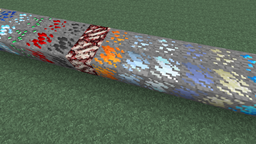
このMODは、通常の鉱石の3倍のアイテムをドロップする「高密度」版の鉱石ブロックを追加します。チャンクあたり約1~10個の高密度ブロックが生成され(すでに生成された鉱石を置き換えます)、全体として鉱石が約5%増加します。
高密度鉱石のテクスチャは、元の鉱石のテクスチャと対応する「石」のテクスチャから動的に生成されます。つまり、テクスチャパック用に新しいテクスチャを作成する必要はありません(見た目が気に入らない場合は、もちろん作成することもできます)。
さらに、コンフィグシステムを通じて新しい鉱石を追加できます。詳細と例はgithubで確認できます。これは主にMODパック開発者向けであり、一般ユーザーには推奨されないことに注意してください。
Dense Oresのインストール方法
With Millida Launcher
Install Millida Launcher
The launcher is free: download it at millida.net/launcher and sign in with any nickname.
Click “Install” on this page
The launcher opens and installs the mod for Minecraft 1.9.4–1.11.2 automatically.
Launch the game
A profile with it appears in the launcher: click “Play”.
Manually
Download the file for your version
In the version list above, pick the file denseores-1.11-1.0.2.jar (71 KB) for your game version.
Put it in the mods folder
The folder is inside .minecraft (Windows: %appdata%\.minecraft\mods). If it does not exist, create it.
Launch the loader profile
Open “Mods” in the main menu: Dense Ores should be in the list.
Minecraft 1.11.2 runs on Java 8: with a different Java version the game may close right after launch.
バージョン
依存関係あり
| Minecraft | ローダー | ファイル | 日付 | 操作 |
|---|---|---|---|---|
| 1.9.4 | — | denseores-1.11-1.0.2.jar71.2 KB 1 | ||
| 1.9.4 | — | Dense Ores 1.11 Alpha 1.0.171.1 KB |
FAQ
Which Minecraft versions does Dense Ores work on?
There are files for 1.9.4–1.11.2, 7 versions in total. The newest is 1.11.2.
Which Java does Dense Ores need?
Minecraft 1.11.2 runs on Java 8. If the game closes right after launch, the usual cause is the wrong Java version in the profile settings.
Where can I download Dense Ores safely?
On this page: the file denseores-1.11-1.0.2.jar (71 KB) is stored on Millida’s server, with no link shorteners. SHA-1 checksum: d82730649d1dea55eebeb34e8cea128a7db4477b.
レビュー
Dense Oresの最初の評価を書きませんか


