

Minecraft 1.18.2用Curious Lanterns MOD
照明付き採掘のために腰スロットを提供します!ダイナミックライトMODが必要です。
- ダウンロード
- 1 ダウンロード
- 閲覧
- 12 閲覧
- 更新日
- 更新日 18.10.2026
- 1.18.2
 Forge
Forge
Curious Lanterns MODについて
このMODはHip用のCurioスロットを追加し、LanternとSoul Lanternの両方をそこに装着できるようにします。
腰のランタンの揺れを有効にするには、configフォルダ内のクライアント設定ファイルから有効にしてください。
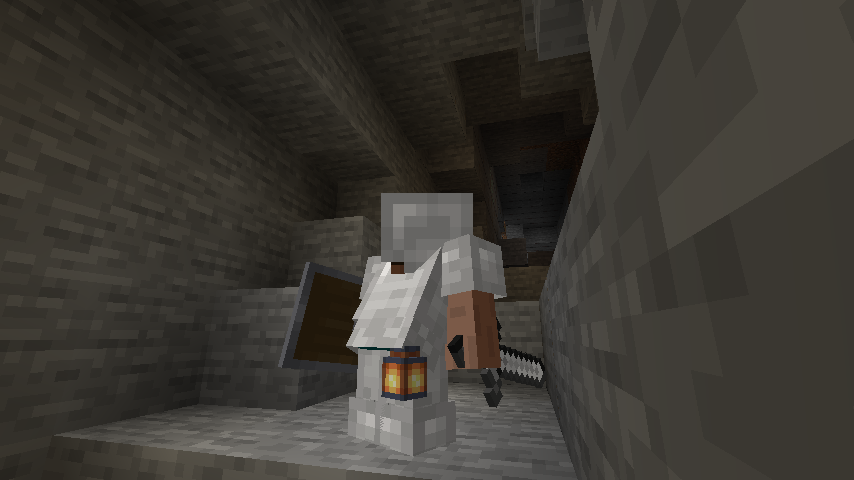
1.3.1以降、ランタンはBelt用のCurioスロットを使用します。予備のベルトスロットは共通設定ファイルを使って手動で追加する必要があります。
Minecraft 1.20.1以降、Curio'sはデータパックを使わずにスロット数を変更する機能を削除しました。そのため、共通設定ファイルは存在しなくなります。申し訳ありません。
Curios (Forge)とRadiant Gearが必要です(動的ライトMODを含む。詳細はRadiant Gearを参照)。
このMOD単体では動的ライトは追加されません。
動的ライトはRadiant Gearが担当するため、動的ライトについてはそちらのMODを参照してください。このMODはランタン用のCurioスロットを追加するだけで、それ以外はすべてRadiant Gearが処理します。
LucentはバニラとMOD製の両方のランタンに対してネイティブの動的ライトをサポートしています。
他の動的ライトMODを使用している場合は、その動的ライトMODの設定ファイルを編集し、ランタンのアイテムを手動で追加する必要があるかもしれません。
警告
現時点では、LucentはArs Nouveauと併用できません。両方を使用しようとすると、ブロックのライトが機能しなくなります。これはCurious Lanternsの問題ではなく、LucentとArs Nouveauの問題です。
これはArs Nouveauが独自のDynamic Lightsレンダリングを追加しており、競合とレンダリングエラーが発生するためです。
互換性のあるMOD
- Supplementaries + Squared
- Cyclic
- Quark
- Additional Lanterns
- Macaw's Lights and Lamps
- Skinned Lanterns
- Hardcore Torches
- Chipped
互換性は必要に応じて追加していきます。注: 比較的簡単かつクリーンに実装できる場合にのみ互換性を含めます。
これは、洞窟探索中にオフハンドで松明を持ち歩き、あちこちに誤って設置するのにうんざりしていたことと、腰にランタンを提げるというアイデアがとても美的に魅力的だったことから、特に作りました。データパックでもできたでしょうし、すでに何らかの形で誰かがやっていると思いますが、私はこれまでAPIを扱ったことがなく、試してみたかったのです。すでにMODになっているので、後々ランタンのオンオフ切り替えなど、いくつか機能を追加するつもりです。ただし、実際にいつ、あるいは実現できるかは未定です。あまり期待しないでください。
先に言っておきますが、親となるMODが追随している限り、新しいバージョンが出たら更新する予定です。バックポートはできません。Radiant Gearには以前のバージョンがありません。Fabric版を作るつもりはありません。Fabricは私の専門外ですし、それを解明する忍耐力もありません。申し訳ありません。

Curious Lanternsのインストール方法
With Millida Launcher
Install Millida Launcher
The launcher is free: download it at millida.net/launcher and sign in with any nickname.
Click “Install” on this page
The launcher opens and installs the mod for Minecraft 1.18.2 on Forge automatically.
Launch the game
A profile with it appears in the launcher: click “Play”.
Manually
Install Forge
The loader must match the game version of the mod file, for example Minecraft 1.18.2. After installing it, a separate profile appears in your launcher.
Download the file for your version
In the version list above, pick the file curiouslanterns-1.18.2-1.3.7.jar (32 KB) for your game version.
Put it in the mods folder
The folder is inside .minecraft (Windows: %appdata%\.minecraft\mods). If it does not exist, create it.
Launch the loader profile
Open “Mods” in the main menu: Curious Lanterns should be in the list.
Minecraft 1.18.2 runs on Java 17: with a different Java version the game may close right after launch.
バージョン
依存関係あり
| Minecraft | ローダー | ファイル | 日付 | 操作 |
|---|---|---|---|---|
| 1.18.2 | Forge | curiouslanterns-1.18.2-1.3.7.jar32.3 KB 1 |
FAQ
Which Minecraft versions does Curious Lanterns work on?
Only Minecraft 1.18.2: there are no files for other versions.
Is Curious Lanterns for Forge or Fabric?
Only for Forge: 1.18.2. There are no files for Fabric or NeoForge: a mod for another loader will not start.
Does Curious Lanterns need other mods?
The author lists no required dependencies: the Forge loader is enough.
Which Java does Curious Lanterns need?
Minecraft 1.18.2 runs on Java 17. If the game closes right after launch, the usual cause is the wrong Java version in the profile settings.
Where can I download Curious Lanterns safely?
On this page: the file curiouslanterns-1.18.2-1.3.7.jar (32 KB) is stored on Millida’s server, with no link shorteners. SHA-1 checksum: b7a213f52ebaa7684767659bc44cb100129b21fc.
レビュー
Curious Lanternsの最初の評価を書きませんか


