
Minecraft 1.20.1, 1.21.1用Create: Netherless ((Neo)Forge) MOD
🚫ネザーに行かずにネザーの資源を集めて自動化
 NeoForge
 Forge
Create: Netherless ((Neo)Forge) MODについて
Fabric版が必要な場合は、こちらをクリックしてください
Create: NetherlessはCreate Modのアドオンです。
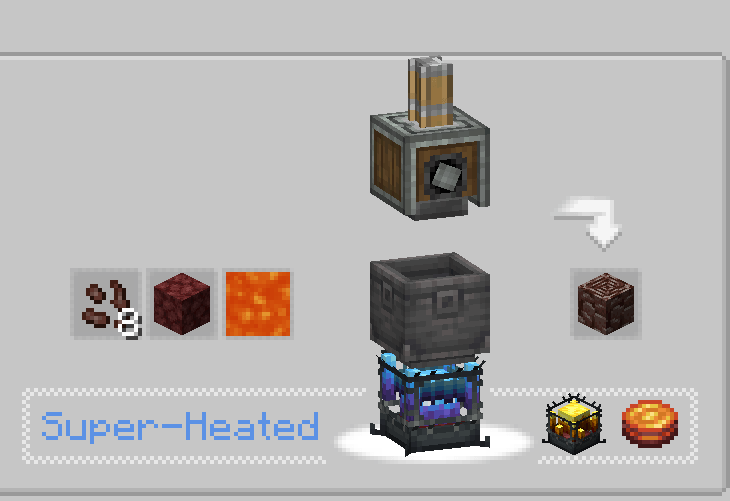
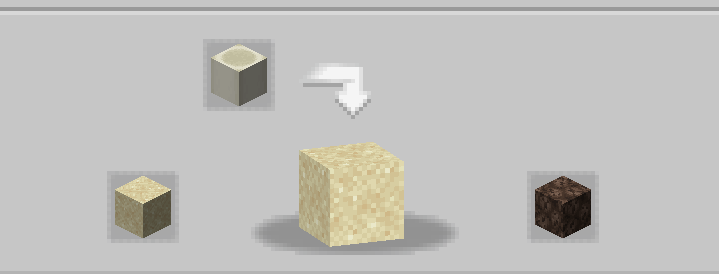
このModの目的は、ネザーにアクセスできなくても、ほとんどのネザー資源を作成および自動化できる可能性をプレイヤーに提供することです!これにはブレイズ、ネザライト、ネザーラック、またはネザーの先にしかないとあなたが思いつくあらゆるものが含まれます。レシピのバランスが悪い、動作しない、存在しないと思われる場合は、コメント欄でお知らせください💬!
よくある質問(FAQ):
▶Q: レシピはどうやって見ればいいですか? A: JEIやEMIなどのレシピ閲覧Modを使用できます。
▶Q: 既存のワールドにこのアドオンを削除/追加すると問題が発生しますか? A: どのワールドからでも問題なくこのModを安全に削除/追加できます。
▶Q: このModはFabric版が出ますか? A: 出ます!こちらをクリックしてください!
▶Q: このアドオンは6.0.xで利用できますか? A: はい、利用できます!
▶Q: このModの次は何ですか? A: 現在、他のプロジェクトに取り組んでいるため、このアドオンは一時停止中です。例えばエクトプラズムの導入など、新しいコンテンツとバランス調整が計画されていますが、今のところは待つ必要があります!
▶他に質問がありますか? Honeycomb StudioのDiscordサーバーに参加して、そこで質問できます!
間違いがあったらすみません、私はフランス人です…スペルミスを見つけたら、お知らせください!
このModはネザーを無効化しません!
Create: Netherless ((Neo)Forge)のインストール方法
With Millida Launcher
Install Millida Launcher
The launcher is free: download it at millida.net/launcher and sign in with any nickname.
Click “Install” on this page
The launcher opens and installs the mod for Minecraft 1.19.2–1.21.1 on Forge or NeoForge automatically.
Launch the game
A profile with it appears in the launcher: click “Play”.
Manually
Install Forge or NeoForge
The loader must match the game version of the mod file, for example Minecraft 1.21.1. After installing it, a separate profile appears in your launcher.
Download the file for your version
In the version list above, pick the file create_netherless-2.0.0-1.21.1.jar (30 KB) for your game version and loader.
Put it in the mods folder
The folder is inside .minecraft (Windows: %appdata%\.minecraft\mods). If it does not exist, create it.
Launch the loader profile
Open “Mods” in the main menu: Create: Netherless ((Neo)Forge) should be in the list.
Minecraft 1.21.1 runs on Java 21: with a different Java version the game may close right after launch.
バージョン
依存関係あり
| Minecraft | ローダー | ファイル | 日付 | 操作 |
|---|---|---|---|---|
| 1.21.1 | NeoForge | create_netherless-2.0.0-1.21.1.jar30.2 KB 65 | ||
| 1.20.1 | Forge | create_netherless-2.0.0-1.20.1.jar30.1 KB 19 | ||
| 1.19.2 | Forge | Create: Netherless 1.19.2-1.137.6 KB 1 |
FAQ
Which Minecraft versions does Create: Netherless ((Neo)Forge) work on?
There are files for 1.21.1, 1.20.1, 1.19.2. The newest is 1.21.1.
Is Create: Netherless ((Neo)Forge) for Forge or Fabric?
There are files for Forge: 1.19.2–1.20.1 and for NeoForge: 1.21.1. There are no files for Fabric: a mod for another loader will not start.
Does Create: Netherless ((Neo)Forge) need other mods?
The author lists no required dependencies: the Forge or NeoForge loader is enough.
Which Java does Create: Netherless ((Neo)Forge) need?
Minecraft 1.21.1 runs on Java 21. If the game closes right after launch, the usual cause is the wrong Java version in the profile settings.
Where can I download Create: Netherless ((Neo)Forge) safely?
On this page: the file create_netherless-2.0.0-1.21.1.jar (30 KB) is stored on Millida’s server, with no link shorteners. SHA-1 checksum: 2d3499b77c8bcbe8c7a301750271c3d2a0b35cbe.
レビュー
Create: Netherless ((Neo)Forge)の最初の評価を書きませんか


