
Minecraft 1.19.2用CrashBrander MOD
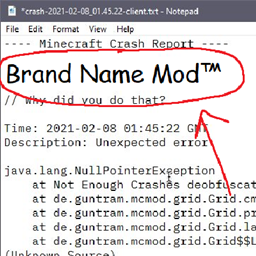
クラッシュレポートにあなたの(modpackの)ブランディングを追加する小さなmodで、デバッグに便利!
- 閲覧
- 7 閲覧
- 更新日
- 更新日 18.10.2026
- 1.19.2
 Fabric
[CrashBrander]
Why?
Debugging modpacks is difficult, and a fair bit of difficulty comes from varying modpack versions, and users using outdated versions of modpacks. This mod fixes that by allowing modpacks to include their name, version and support link directly inside the crash report!
Not only will these small debug additions help diagnose things in support, but it also adds the ability to slightly automate support by using things such as Discord bots.
This project is licensed under LGPL-3.0 (c) 2022 Deftu
CrashBranderのインストール方法
With Millida Launcher
Install Millida Launcher
The launcher is free: download it at millida.net/launcher and sign in with any nickname.
Click “Install” on this page
The launcher opens and installs the mod for Minecraft 1.19.2 on Fabric automatically.
Launch the game
A profile with it appears in the launcher: click “Play”.
Manually
Install Fabric
The loader must match the game version of the mod file, for example Minecraft 1.19.2. After installing it, a separate profile appears in your launcher.
Download the file for your version
In the version list above, pick the file CrashBrander-1.4.1.jar (59 KB) for your game version.
Put it in the mods folder
The folder is inside .minecraft (Windows: %appdata%\.minecraft\mods). If it does not exist, create it.
Launch the loader profile
Open “Mods” in the main menu: CrashBrander should be in the list.
Minecraft 1.19.2 runs on Java 17: with a different Java version the game may close right after launch.
バージョン
依存関係あり
| Minecraft | ローダー | ファイル | 日付 | 操作 |
|---|---|---|---|---|
| 1.19.2 | Fabric | [1.19] CrashBrander 1.4.159 KB |
レビュー
CrashBranderの最初の評価を書きませんか


