
 NeoForge
 Forge
ForgeFAQ | Credits
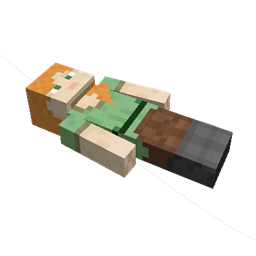
This mod brings a corpse into the game. It will spawn upon your death containing all items that you had in your inventory.
Features
The corpse will appear at the players location upon death. Your player skin will be applied to the corpse. It contains all the items you had when you died. It can hold an infinite amount of items.
You can access the items by right-clicking the corpse.
When you take out all items, the corpse will disappear. The corpse can't fall into the void or burn in lava.
After 1 hour, the corpse will turn into a skeleton, indicating that it existed for a longer time. This won't change the functionality of the corpse.
You get all your items back into their original slots when transferring the items.
Death History
You can view all your past deaths by pressing the 'U' key. You can retrieve lost items if you are in creative mode.
Viewing the Death Hisory of other Players
By typing /deathhistory <player> as an operator, you can view the death history of another player.
Recovering Lost Items
You can retrieve lost items by pressing the "Items" button in the death history GUI. Note that you can only take out items if you are in creative mode.
Teleporting to the Death Location
By clicking on the "Location" area in the death history GUI, the command to teleport you to the death location will be displayed in chat. It includes the coordinates and the dimension.
Optional Features (Config options)
- If only the owner of the corpse can access the inventory
- If everybody can access the corpse in the skeleton stage
- The time passed after a corpse despawns if it is empty
- The time passed after a corpse despawns even if it is full
- The time passed after a corpse turns into a skeleton
- If the corpse should spawn on its face
Corpseのインストール方法
With Millida Launcher
Install Millida Launcher
The launcher is free: download it at millida.net/launcher and sign in with any nickname.
Click “Install” on this page
The launcher opens and installs the mod for Minecraft 1.12.2–26.3 on Forge or NeoForge automatically.
Launch the game
A profile with it appears in the launcher: click “Play”.
Manually
Install Forge or NeoForge
The loader must match the game version of the mod file, for example Minecraft 26.3. After installing it, a separate profile appears in your launcher.
Download the file for your version
In the version list above, pick the file corpse-neoforge-1.1.19+26.3.jar (246 KB) for your game version and loader.
Put it in the mods folder
The folder is inside .minecraft (Windows: %appdata%\.minecraft\mods). If it does not exist, create it.
Launch the loader profile
Open “Mods” in the main menu: Corpse should be in the list.
バージョン
依存関係あり
| Minecraft | ローダー | ファイル | 日付 | 操作 |
|---|---|---|---|---|
| 26.3 | NeoForge | [NEOFORGE][26.3] Corpse 1.1.19+26.3246 KB 49 | ||
| 26.2 | NeoForge | [NEOFORGE][26.2] Corpse 1.1.17+26.2246 KB 8 | ||
| 1.20.1 | Forge | [FORGE][1.20.1] Corpse 1.20.1-1.0.23240 KB 324 | ||
| 1.21.4 | NeoForge | [NEOFORGE][1.21.4] Corpse 1.21.4-1.1.4241 KB 2 | ||
| 1.20.1 | Forge | [FORGE][1.20.1] Corpse 1.20.1-1.0.10237 KB | ||
| 1.19 | Forge | [1.19] Corpse 1.19-1.0.6215 KB 1 | ||
| 1.12.2 | — | [1.12.2] Corpse 1.12.2-1.0.364 KB 87 | ||
| 1.13.2 | — | [1.13.2] Corpse 1.13.2-1.0.571.4 KB 8 |
FAQ
Which Minecraft versions does Corpse work on?
There are files for 1.12.2–26.3, 7 versions in total. The newest is 26.3.
Is Corpse for Forge or Fabric?
There are files for Forge: 1.19–1.20.1 and for NeoForge: 1.21.4–26.3. There are no files for Fabric: a mod for another loader will not start.
Does Corpse need other mods?
The author lists no required dependencies: the Forge or NeoForge loader is enough.
Where can I download Corpse safely?
On this page: the file corpse-neoforge-1.1.19+26.3.jar (246 KB) is stored on Millida’s server, with no link shorteners. SHA-1 checksum: d2bde58cfbf6e36ddeba2acfc50b6fb2119aa177.
レビュー
Corpseの最初の評価を書きませんか


