
 NeoForge
 Forge
ForgeConstruction Sticks MODについて
Construction Sticksを使うと、一度に最大1024個までのブロックをまとめて設置でき、向いている方向へ建築を伸ばせます。スティックをアップグレードして能力を強化すれば、建築がより速く効率的になります。
スティック
Construction SticksにはWood、Copper、Iron、Diamond、Netheriteの5つのティアがあります。各ティアは耐久性とブロック設置能力が向上し、さらにテンプレートでアップグレードできます。
スティック 耐久性 最大ブロック数 アップグレード可能 Angel 距離 最大ブロック数(破壊)
Wood 59 3 はい 1 1
Copper 131 9 はい 2 3
Iron 250 27 はい 4 9
Diamond 1561 128 はい 8 25
Netherite 2031 1024 はい 16 81
アップグレードテンプレート
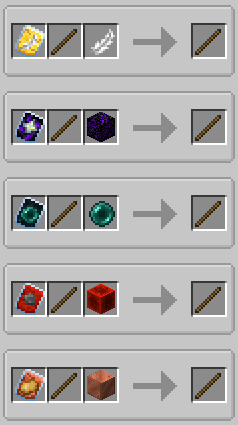
テンプレートはConstruction Sticksに特別なアップグレードを追加します。テンプレートを適用するには、スミシングテーブルでスティック、テンプレート、追加アイテムを組み合わせます。
利用可能なテンプレート:
- Angel: 向いているブロックの後ろや空中にブロックを設置します。
- Destruction: ブロックを素早く効率的に除去します。
- Unbreakable: 耐久性の消費をなくし、無限にブロックを設置できるようにします。
- Battery: 耐久性の代わりにRFを使用できるようにします。
追加機能
- Shulker Boxes、Bundles、その他のコンテナ: 建築ブロックの供給源として使用できます。
- オフハンド設置: 見ている場所ではなくオフハンドからブロックを設置します。
免責事項
これはMITライセンスのオリジナルConstructionWand modのフォークです。新しいティア、テンプレート、機能など、新機能と改善を追加するために改変されています。オリジナルのmodはTheta-Devによって作成されました。
サーバーが必要ですか?プロモコード「mrbysco」を使用すると、最初の1か月が20%オフになります。
ご質問があれば、お気軽に私のDiscordにご参加ください。
私たちを支援したいですか?
-Mrbysco
-ShyNieke
Construction Sticksのインストール方法
With Millida Launcher
Install Millida Launcher
The launcher is free: download it at millida.net/launcher and sign in with any nickname.
Click “Install” on this page
The launcher opens and installs the mod for Minecraft 1.20.1–26.1.2 on Forge or NeoForge automatically.
Launch the game
A profile with it appears in the launcher: click “Play”.
Manually
Install Forge or NeoForge
The loader must match the game version of the mod file, for example Minecraft 26.1.2. After installing it, a separate profile appears in your launcher.
Download the file for your version
In the version list above, pick the file ConstructionSticks-26.1.2-3.2.1.jar (264 KB) for your game version and loader.
Put it in the mods folder
The folder is inside .minecraft (Windows: %appdata%\.minecraft\mods). If it does not exist, create it.
Launch the loader profile
Open “Mods” in the main menu: Construction Sticks should be in the list.
バージョン
依存関係あり
| Minecraft | ローダー | ファイル | 日付 | 操作 |
|---|---|---|---|---|
| 26.1.2 | NeoForge | ConstructionSticks-26.1.2-3.2.1.jar264 KB | ||
| 1.21.1 | NeoForge | ConstructionSticks-1.21.1-1.5.0.jar259 KB 5 | ||
| 1.20.1 | Forge, NeoForge | ConstructionSticks-1.20.1-1.2.7.jar253 KB 5 | ||
| 1.20.1 | Forge, NeoForge | ConstructionSticks-1.20.1-1.2.6.jar253 KB | ||
| 1.21.1 | NeoForge | ConstructionSticks-1.21.1-1.0.0.jar189 KB |
FAQ
Which Minecraft versions does Construction Sticks work on?
There are files for 26.1.2, 1.21.1, 1.20.1. The newest is 26.1.2.
Is Construction Sticks for Forge or Fabric?
There are files for Forge: 1.20.1 and for NeoForge: 1.20.1–26.1.2. There are no files for Fabric: a mod for another loader will not start.
Does Construction Sticks need other mods?
The author lists no required dependencies: the Forge or NeoForge loader is enough.
Where can I download Construction Sticks safely?
On this page: the file ConstructionSticks-26.1.2-3.2.1.jar (264 KB) is stored on Millida’s server, with no link shorteners. SHA-1 checksum: 145147e476b514d63faaaf2801421f22bc68eb0d.
レビュー
Construction Sticksの最初の評価を書きませんか


