

Minecraft 1.12.2, 1.16.5用Construct's Armory MOD
防具の世界に足を踏み入れたい人のためのTinkers' Constructアドオン
- ダウンロード
- 6 ダウンロード
- 閲覧
- 28 閲覧
- 更新日
- 更新日 27.10.2026
- 1.12.2 — 1.16.5
 Forge
Forge
Construct's Armory MODについて
概要
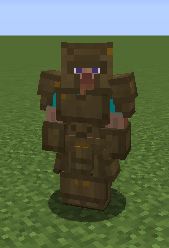
Construct's ArmoryはTinkers' Constructのアドオンモッドで、4種類の防具アイテムを追加します: Helmet、Chestplate、Leggings、Boots。これらの防具タイプはTinkers' Constructのツールと同じようにカスタマイズでき、異なる素材で異なる防具パーツを作って、完全にオリジナルの防具アイテムを組み上げることができます。
はじめかた
必要な情報はすべてゲーム内の本「Materials and You - Armory Addendum」に載っています。スポーン時にMaterials and Youの本を入手する設定になっている場合、この追録も同時に入手できます。そうでない場合のクラフトレシピは次のとおりです:
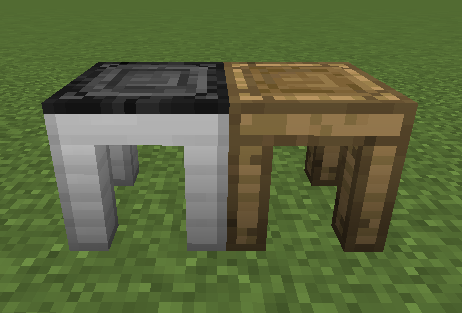
この本には、新たに必要となるティンカリングテーブルであるArmor StationとArmor Forgeの情報、および素材のステータスと利用可能な修飾子の情報が載っています。
動画ガイド
Mischief of Mice Spotlight:
Danny & Son Let's Play Tutorial:
FAQ
Q. <ここにMOD名を挿入> に対応する修飾子/素材を追加してもらえますか?
A. いいえ。やろうと思えばできますが、やりません。ひとつのMODへの対応を追加した時点で、あらゆるMODに対応しない理由がなくなるからです。可能性の範囲を考えると、これは膨大な作業であり、結局は大量の任意機能でこのMODを肥大化させるだけに終わります。さらに、対応するかどうか、どのような連携を導入するかを完全に制御できるのは相手側なので、他のMODが自ら対応を追加してくれたほうがよいと考えています。
Q. 異なる防具タイプを用意する予定はありますか?
A. いいえ。防具はツールほど抽象的ではなく、防具を差別化する方法として私が思いつくものはすべて特性/修飾子システムで既に扱われています。ただし、アドオンが外見上の代替品を実装する余地はあります。
Q. <ここにTinkers'のアドオン名を挿入> との連携はありますか?
A. Tinkers' Tool Levelingのみです。他のアドオンはすべて自ら連携を行う必要があります。私が基本的に取り入れたいのは、ベースのTinkers' Constructにある機能だけだからです。
Q. 防具の染色を追加してもらえますか?
A. いいえ。実はやりたかったのですが、実装を正しく動作させることができず、この機能については行き詰まっています。
Q. 盾を追加する予定はありますか?
A. いいえ。盾は防具というよりツールに近く、Tinkers' Constructのbattlesignがその十分な実装だと思います。
クレジット
- 多くのコードとアセットは親MODであるTinkers' Construct 2 (MIT License)から改変されています
Construct's Armoryのインストール方法
With Millida Launcher
Install Millida Launcher
The launcher is free: download it at millida.net/launcher and sign in with any nickname.
Click “Install” on this page
The launcher opens and installs the mod for Minecraft 1.12.2–1.16.5 on Forge automatically.
Launch the game
A profile with it appears in the launcher: click “Play”.
Manually
Install Forge
The loader must match the game version of the mod file, for example Minecraft 1.16.5. After installing it, a separate profile appears in your launcher.
Download the file for your version
In the version list above, pick the file constructsarmory-forge-2.0.0-alpha.2+1.16.5.jar (577 KB) for your game version.
Put it in the mods folder
The folder is inside .minecraft (Windows: %appdata%\.minecraft\mods). If it does not exist, create it.
Launch the loader profile
Open “Mods” in the main menu: Construct's Armory should be in the list.
Minecraft 1.16.5 runs on Java 8: with a different Java version the game may close right after launch.
バージョン
依存関係あり
| Minecraft | ローダー | ファイル | 日付 | 操作 |
|---|---|---|---|---|
| 1.16.5 | Forge | constructsarmory-forge-2.0.0-alpha.2+1.16.5.jar577 KB 1 | ||
| 1.12.2 | Forge | conarm-1.12.2-1.2.5.10.jar874 KB 5 | ||
| 1.12.2 | — | conarm-1.12.2-1.2.5.9.jar874 KB | ||
| 1.12.2 | — | conarm-1.12.2-1.2.5.8.jar874 KB | ||
| 1.12.2 | — | conarm-1.12.2-0.0.16-a.jar526 KB |
FAQ
Which Minecraft versions does Construct's Armory work on?
There are files for 1.16.5, 1.12.2. The newest is 1.16.5.
Is Construct's Armory for Forge or Fabric?
Only for Forge: 1.12.2–1.16.5. There are no files for Fabric or NeoForge: a mod for another loader will not start.
Does Construct's Armory need other mods?
The author lists no required dependencies: the Forge loader is enough.
Which Java does Construct's Armory need?
Minecraft 1.16.5 runs on Java 8. If the game closes right after launch, the usual cause is the wrong Java version in the profile settings.
Where can I download Construct's Armory safely?
On this page: the file constructsarmory-forge-2.0.0-alpha.2+1.16.5.jar (577 KB) is stored on Millida’s server, with no link shorteners. SHA-1 checksum: b5c416af6d2b0611baf2c356c48fc05e5ab91432.
レビュー
Construct's Armoryの最初の評価を書きませんか


