

Minecraft 1.20.1用Compressed Creativity MOD
CreateとPneumaticCraft: Repressurizedを橋渡し
 NeoForge
 Forge
ForgeCompressed Creativity MODについて
This mod adds various interactions and integrations between Create and PneumaticCraft: Repressurized.
For now, it adds following content:
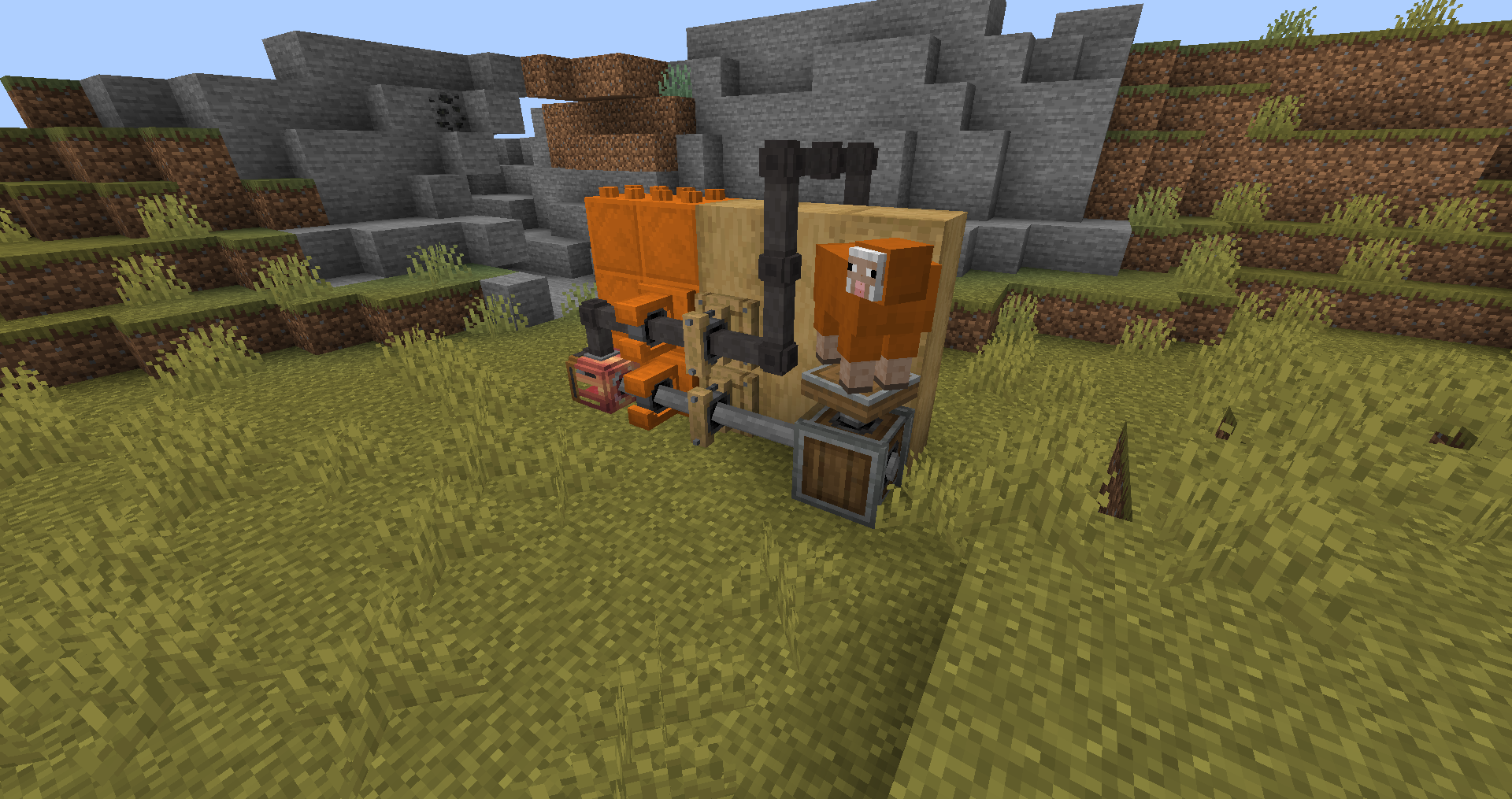
Machines:
- Rotational Compressor: Use rotational to create pressure!
- Compressed Air Engine: Opposite of compressor, use pressurized air to create rotation!
- Air Blower: Use pressurized air to create Air Current that processes items twice as fast when under high pressure!
- Industrial Air Blower: four times the processing speed! But short distance. Install Meshes to save up space!
Blocks and Items:
- Mechanical Visor Upgrade: When installed in helmet, allows displaying tooltip like Engineer's Goggles can, as well as shows it in Block Tracker Upgrade!
- Plastic Brackets: Fancy alternative to wooden and metal ones!
- Compressed Iron Casing: crafting ingredient.. and a fancy block!
Features:
- Charge Copper Backtank in Charging station!
- ...Or just use it as compressor instead!
- Use air from your Pneumatic Chestplate (requires Charging Upgrade) when firing that Potato Cannon (Or using Extendo Grip)!
Planned content:
- Upgraded Potato Cannon that uses pressurized air.
- and more, feel free to suggest on the GitHub page or in comments!

Compressed Creativityのインストール方法
With Millida Launcher
Install Millida Launcher
The launcher is free: download it at millida.net/launcher and sign in with any nickname.
Click “Install” on this page
The launcher opens and installs the mod for Minecraft 1.20.1 on Forge or NeoForge automatically.
Launch the game
A profile with it appears in the launcher: click “Play”.
Manually
Install Forge or NeoForge
The loader must match the game version of the mod file, for example Minecraft 1.20.1. After installing it, a separate profile appears in your launcher.
Download the file for your version
In the version list above, pick the file compressedcreativity-1.20.1-0.2.0-all.jar (732 KB) for your game version and loader.
Put it in the mods folder
The folder is inside .minecraft (Windows: %appdata%\.minecraft\mods). If it does not exist, create it.
Launch the loader profile
Open “Mods” in the main menu: Compressed Creativity should be in the list.
Minecraft 1.20.1 runs on Java 17: with a different Java version the game may close right after launch.
バージョン
依存関係あり
| Minecraft | ローダー | ファイル | 日付 | 操作 |
|---|---|---|---|---|
| 1.20.1 | NeoForge, Forge | compressedcreativity-1.20.1-0.2.0-all.jar732 KB 2 | ||
| 1.20.1 | NeoForge, Forge | compressedcreativity-1.20.1-0.2.0-alpha-all.jar739 KB |
FAQ
Which Minecraft versions does Compressed Creativity work on?
Only Minecraft 1.20.1: there are no files for other versions.
Is Compressed Creativity for Forge or Fabric?
There are files for Forge: 1.20.1 and for NeoForge: 1.20.1. There are no files for Fabric: a mod for another loader will not start.
Does Compressed Creativity need other mods?
The author lists no required dependencies: the Forge or NeoForge loader is enough.
Which Java does Compressed Creativity need?
Minecraft 1.20.1 runs on Java 17. If the game closes right after launch, the usual cause is the wrong Java version in the profile settings.
Where can I download Compressed Creativity safely?
On this page: the file compressedcreativity-1.20.1-0.2.0-all.jar (732 KB) is stored on Millida’s server, with no link shorteners. SHA-1 checksum: 0a87cacce547e6d96364b5376e0b415c90f17b59.
レビュー
Compressed Creativityの最初の評価を書きませんか


