
Minecraft 1.20.1, 1.21.1用Blue Flame Burning MOD
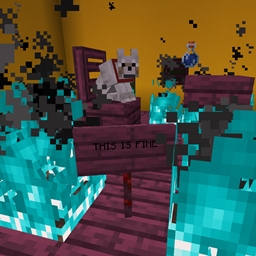
ソウルファイアがエンティティを通常の炎ではなく青い炎で燃やすようにします
 NeoForge
 Forge
ForgeBlue Flame Burning MODについて
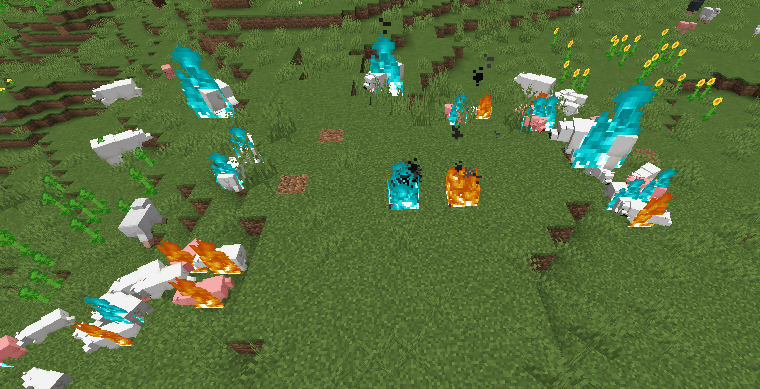
ソウルファイアの発生源で着火されたエンティティが、通常の退屈な黄色い炎ではなく青い炎で燃えるようにします。
- ソウルファイアでプレイヤーやエンティティが着火すると、そのエンティティは青い炎で燃える
- 青い炎で燃えているゾンビが他のエンティティに着火すると、それらのエンティティも青い炎で燃える
- プレイヤーに着火させるMod導入済みの液体に対応
このModによって追加される変更は純粋に見た目だけです。
このModは両側に必要です。
ヘルプが必要な場合や質問がある場合はDiscordへどうぞ: https://discord.gg/69YVMbvhTC
このModの制作過程で多くのホッキョクグマが犠牲になりました
Blue Flame Burningのインストール方法
With Millida Launcher
Install Millida Launcher
The launcher is free: download it at millida.net/launcher and sign in with any nickname.
Click “Install” on this page
The launcher opens and installs the mod for Minecraft 1.18.2–1.21.1 on Forge or NeoForge automatically.
Launch the game
A profile with it appears in the launcher: click “Play”.
Manually
Install Forge or NeoForge
The loader must match the game version of the mod file, for example Minecraft 1.21.1. After installing it, a separate profile appears in your launcher.
Download the file for your version
In the version list above, pick the file blueflame-1.21.1-1.1.1.jar (18 KB) for your game version and loader.
Put it in the mods folder
The folder is inside .minecraft (Windows: %appdata%\.minecraft\mods). If it does not exist, create it.
Launch the loader profile
Open “Mods” in the main menu: Blue Flame Burning should be in the list.
Minecraft 1.21.1 runs on Java 21: with a different Java version the game may close right after launch.
バージョン
依存関係あり
| Minecraft | ローダー | ファイル | 日付 | 操作 |
|---|---|---|---|---|
| 1.21.1 | NeoForge | blueflame-1.21.1-1.1.1.jar17.5 KB 1 | ||
| 1.20.1 | NeoForge, Forge | blueflame-1.20.0-1.0.3.jar26 KB | ||
| 1.18.2 | Forge | blueflame-1.18.2-0.1.0.0.jar26.2 KB |
FAQ
Which Minecraft versions does Blue Flame Burning work on?
There are files for 1.21.1, 1.20.1, 1.20, 1.18.2. The newest is 1.21.1.
Is Blue Flame Burning for Forge or Fabric?
There are files for Forge: 1.18.2–1.20.1 and for NeoForge: 1.20–1.21.1. There are no files for Fabric: a mod for another loader will not start.
Does Blue Flame Burning need other mods?
The author lists no required dependencies: the Forge or NeoForge loader is enough.
Which Java does Blue Flame Burning need?
Minecraft 1.21.1 runs on Java 21. If the game closes right after launch, the usual cause is the wrong Java version in the profile settings.
Where can I download Blue Flame Burning safely?
On this page: the file blueflame-1.21.1-1.1.1.jar (18 KB) is stored on Millida’s server, with no link shorteners. SHA-1 checksum: 0e78defafd6cf08759c656a54f8a33315e3ab924.
レビュー
Blue Flame Burningの最初の評価を書きませんか


