
Minecraft 26.2用Advanced Sound Control MOD
サウンドごとの制御、3D空間ゾーン、リアルタイムのサウンド検出 — Fabric、NeoForge、Quilt対応
 NeoForge
 Fabric
 Quilt
QuiltAdvanced Sound Control MODについて

Individual sound control, one-key muting, world-specific audio zones, and real-time sound discovery.
Sound Control lets you mute unwanted sounds, adjust their volume, organize settings into configuration profiles, and create quiet areas without silencing the rest of your world. Supports vanilla sounds and sounds added by other mods.
Sound Management
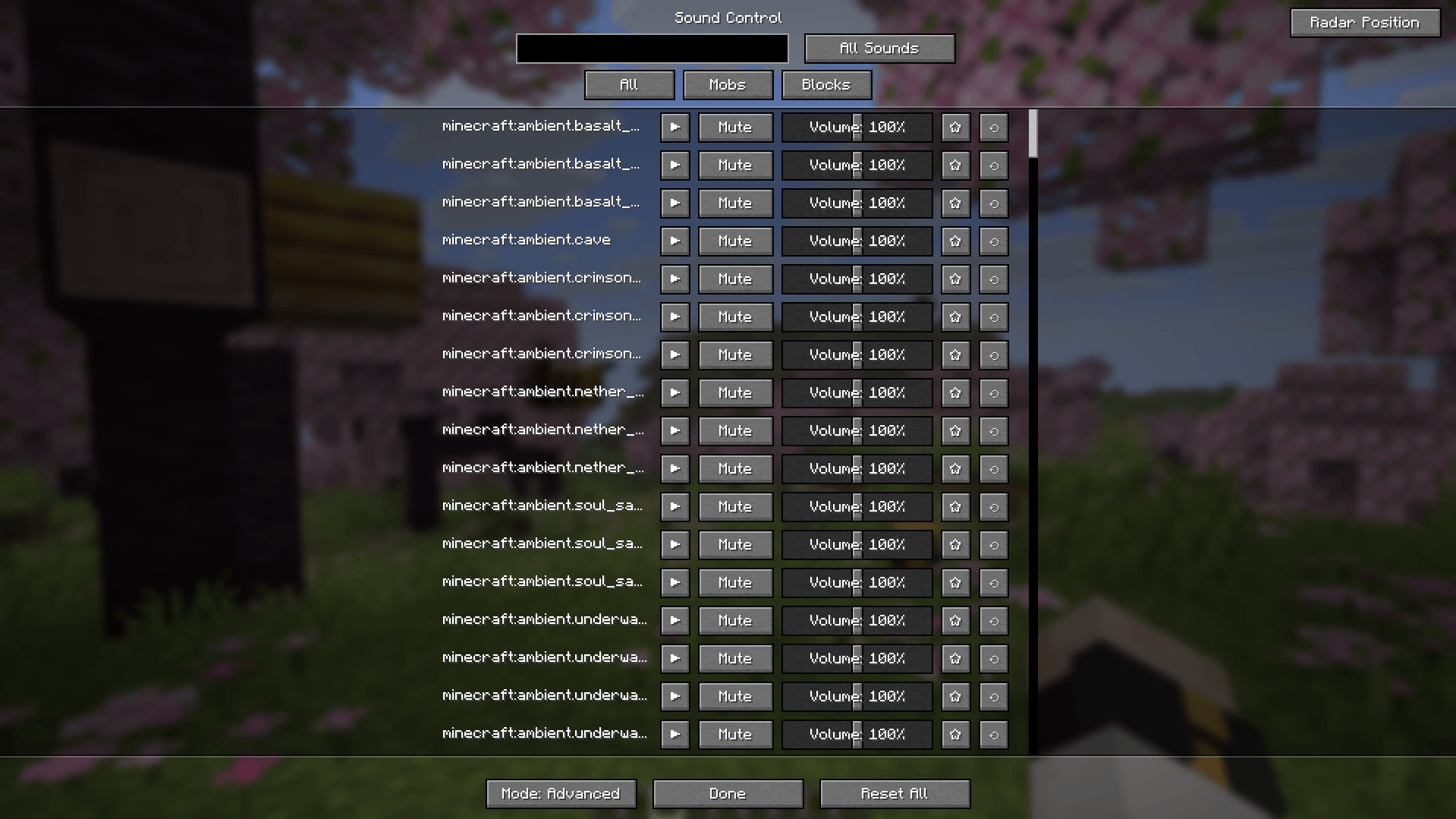
Press V to open the main menu and choose how you want to manage sounds:
Mode Description
Basic Adjust entire sound groups, such as zombie sounds
Advanced Control individual sound events
Mods Browse sounds by mod namespace
The main menu includes:
- Volume controls — adjust individual sounds and groups.
- Mute toggles — silence sounds without removing their saved volume settings.
- Global controls — manage footsteps, block breaking, and common mob sound categories.
- Favorites — keep frequently used sounds easy to find.
- Search and filters — browse all sounds, edited entries, or favorites.
- Sound previews — play and stop sounds directly from the menu.
- Copy sound IDs — copy identifiers for configuration or troubleshooting.
- Reset controls — restore sound settings when needed.
One-Key Muting
Silence a noisy block or mob without searching through the sound menu.
- Assign a key to Mute/Unmute Targeted Block or Mob in Minecraft's Controls menu.
- Aim at the block or mob.
- Press the key to mute its detected sound group.
- Press again to unmute.
For a zombie, this targets its sound family rather than only the sound it is currently making.
This changes per-sound settings globally: muting a zombie sound group affects other zombies using the same sounds. Use Sound Anchors when you only want to silence a specific area.
Modded mob detection supports common naming patterns. NeoForge also uses mob sound getters and unambiguous playback observations to identify additional sounds. Unusual mod implementations may require the mob to make a sound before it can be identified.
Sound Anchors
Create spatial audio zones that apply sound overrides only to sources inside their boundaries.
Available across all supported version branches in 1.6.0 — no longer exclusive to Minecraft 26.x.
Feature Description
Zone shapes Sphere with a radius or box with independent width, height, and depth
Sound overrides Mute selected sounds or adjust their volume from 0–200%
Sound selection Add individual sounds, basic groups, or global categories
Discovery integration Choose sounds through Browse or Recent
Visible boundaries Show or hide each anchor's outline
Management Create, rename, enable, disable, and delete anchors
World isolation Separate lists for singleplayer save folders and multiplayer server addresses
Persistence Keep anchors and their settings between sessions
Example uses:
- Silence a nether portal near your storage room.
- Reduce machine noise inside a workshop.
- Mute mob sounds around a farm without affecting distant areas.
- Create quiet zones for building, recording, or roleplay.
Anchors use the sound source's position, not the listener's position. Overlapping zones use the quietest matching override, and an anchor does not override a global/profile mute.
Boundary rendering uses screen clipping to avoid unnecessary off-screen drawing.
Existing Anchors
Upgrading from an older version? Previously saved anchors had no world identity.
Open their intended world and use Move old anchors into this world to assign the old list. Until imported, those legacy anchors remain saved but inactive.
Singleplayer identity is based on the save-folder path. Multiplayer identity is based on the server address and port; separate server-side worlds behind the same address and dimension cannot be distinguished automatically.
Configuration Profiles
Keep different sound setups instead of editing the same configuration every time.
- Create profiles for building, exploration, recording, or different modpacks.
- Rename and edit profiles from the profile panel.
- Switch profiles directly in the sound menu.
- Open the configuration folder from the menu.
- Back up or share configurations using their JSON files.
Configuration files are stored in:
Location Contents
config/soundcontrol/configs/ Sound configuration profiles
config/soundcontrol/settings.json General settings, active profile selection, and world-specific anchors
Sound profiles and anchors are separate: switching profiles does not move anchors between worlds.
Back up your configuration before manually editing files or downgrading the mod.
Recent Sounds
Review sounds recorded during your current session.
- Play or stop a sound preview.
- Mute sounds and adjust their volume.
- Mark favorites and reset entries.
- See recorded source coordinates.
- Select recent sounds when editing an anchor.
- Clear the history at any time.
Useful when you hear an unfamiliar sound and do not know its ID.
Discovery Overlays
Press Y to cycle between the available overlays:
State Description
3D Sound Radar Display tracked sound sources around you
SoundList Show detected sounds associated with the block or entity under your crosshair
Off Hide both overlays
SoundList uses registered sound families and supported detection methods. Modded sounds are supported, but Minecraft does not provide a universal list of every sound an arbitrary modded entity can emit.
Minecraft and Loader Support
Quilt uses the same JAR as Fabric. Install only the file matching your Minecraft version and loader.
Minecraft Fabric / Quilt NeoForge Forge
26.3 Yes Yes —
26.2 Yes Yes —
26.1.x Yes Yes —
1.21.9–1.21.11 Yes Yes —
1.21.6–1.21.8 Yes — —
1.21.4–1.21.5 Yes — —
1.21.2–1.21.3 Yes — —
1.21–1.21.1 Yes Yes —
1.20.1 Yes Yes Yes
On Minecraft 1.20.1, Forge and NeoForge use the same JAR. Fabric and Quilt use a separate shared JAR.
Some Fabric files cover multiple Minecraft versions. Check the compatibility labels on the download page.
Controls
Default key Action
V Open Sound Control
Y Cycle Sound Radar → SoundList → Off
Unassigned Mute/unmute the targeted block or mob's sound group
All key bindings can be changed in Minecraft's Controls menu.
Languages
Interface translations are available in 12 languages:
Ukrainian · English · German · Spanish · French · Polish · Chinese (Simplified) · Portuguese (Brazil) · Russian · Japanese · Korean · Italian
Some newly added labels may use English until their translations are updated.
Documentation and Support
- Sound Wiki — browse vanilla sound IDs by category.
- GitHub Issues — report bugs or request features.
- Discord — ask questions and share feedback.
When reporting a bug, include your Minecraft version, loader, Sound Control version, and the relevant crash report or log.
Advanced Sound Controlのインストール方法
With Millida Launcher
Install Millida Launcher
The launcher is free: download it at millida.net/launcher and sign in with any nickname.
Click “Install” on this page
The launcher opens and installs the mod for Minecraft 26.1–26.2 on Fabric, NeoForge or Quilt automatically.
Launch the game
A profile with it appears in the launcher: click “Play”.
Manually
Install Fabric, NeoForge or Quilt
The loader must match the game version of the mod file, for example Minecraft 26.2. After installing it, a separate profile appears in your launcher.
Download the file for your version
In the version list above, pick the file soundcontrol-neoforge-26.2-1.6.0-neo-26.2.jar (188 KB) for your game version and loader.
Put it in the mods folder
The folder is inside .minecraft (Windows: %appdata%\.minecraft\mods). If it does not exist, create it.
Launch the loader profile
Open “Mods” in the main menu: Advanced Sound Control should be in the list.
バージョン
依存関係あり
| Minecraft | ローダー | ファイル | 日付 | 操作 |
|---|---|---|---|---|
| 26.2 | NeoForge | Sound Control 1.6.0-neo-26.2188 KB | ||
| 26.2 | Fabric | Sound Control v1.5.1 (26.2)771 KB 1 | ||
| 26.2 | Fabric, Quilt | soundcontrol-fabric-26.2-1.4.2-26.2.jar743 KB | ||
| 26.1 | NeoForge | soundcontrol-1.4.0+neo-26.1.1.jar742 KB |
レビュー
Advanced Sound Controlの最初の評価を書きませんか


