

Minecraft 1.21.1, 1.16.5用God stick データパック
God Stickは、棒8本とダイヤモンド1個という安価な価格で完全な無敵を手に入れられるデータパックです。溶岩、クリーパー、終端速度でも涼しい顔で生き延びられる、露骨なパワートリップです。
- 閲覧
- 29 閲覧
- 更新日
- 更新日 26.09.2026
- 1.16 — 1.21.6
 データパック
- クライアントとサーバー
⚡ The God Stick: Absolute Power in the Palm of Your Hand! ⚡
Tired of creepers blowing up your masterpiece? Sick of taking random fall damage or running from hordes of zombies in the dead of night? What if you could become completely untouchable with just one item? Welcome to the ultimate power fantasy. Say hello to the God Stick.

🌟 What Does It Do?
It's simple: Hold the stick. Become a God. The moment you equip the God Stick in your hand, you are granted epic, game-breaking God Mode. No commands, no cheats enabled required—just pure, unadulterated invincibility built right into a simple Data Pack.
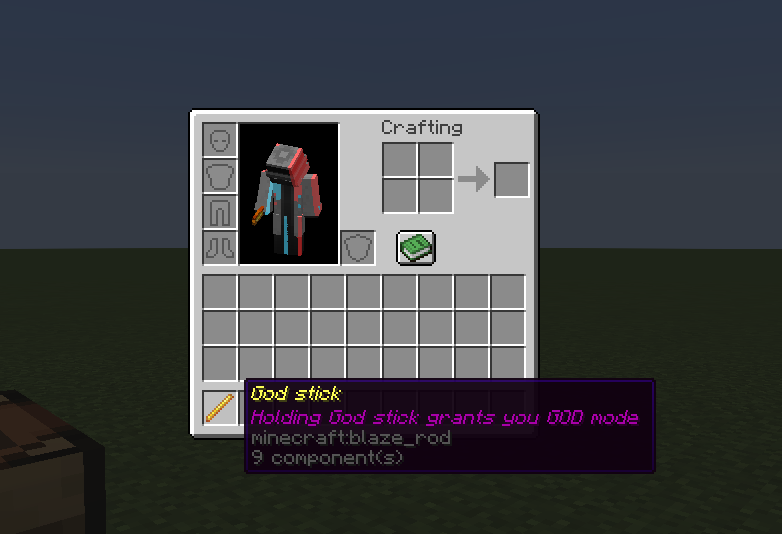
🛠️ How to Craft Your Power
You don't need a Nether Star or an Elytra to achieve immortality. You just need a little bit of wealth and some wood. The Recipe:
- Center Slot: 1x Diamond 💎
- Surrounding Slots: 8x Sticks 🪵
- Result: 1x God Stick 🔥
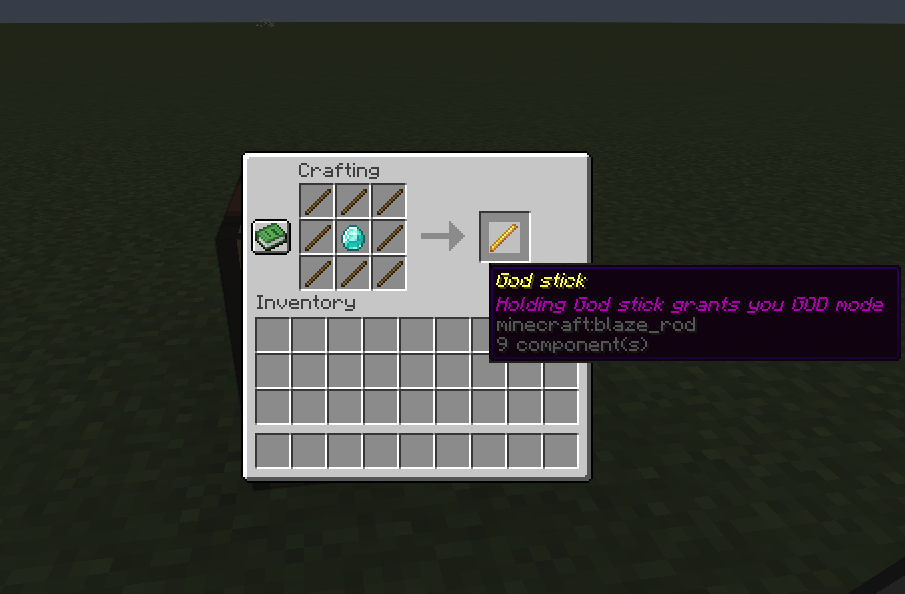
🎮 The "God Mode" Challenge: What Will You Do First?
Once you craft the God Stick, the Minecraft world is your playground. We challenge you to try these out and let us know in the comments if you survived:
- [ ] The Lava Bath: Take a casual swim in the deepest Nether lava lakes.
- [ ] The Creeper Hug: Find a supercharged creeper and give it a big, explosive hug.
- [ ] The Warden Whisperer: Walk right into the Deep Dark and trigger a Warden... then just stand there.
- [ ] The Skyfall: Jump off the highest peak in the new 1.21 mountains without a water bucket.

⚙️ Technical Details & Compatibility
- Versions: Fully compatible with Java Edition 1.16.x all the way up to 1.21+!
- Type: Data Pack (Lightweight and easy to install).
- Multiplayer: Perfect for trolling your friends on a private server!
👇 Ready to become invincible? Hit that download button and claim your God Stick today! 👇
------MADE BY ERROR6119-------
God stickのインストール方法
With Millida Launcher
Install Millida Launcher
The launcher is free: download it at millida.net/launcher and sign in with any nickname.
Click “Install” on this page
The launcher opens and installs the data pack for Minecraft 1.16–1.21.6 automatically.
Launch the game
A profile with it appears in the launcher: click “Play”.
Manually
Download the archive
Pick the file God stick (1.21.6).zip (3 KB) for your game version.
New world: “Data Packs”
When creating a world, click “Data Packs”, drag the archive into the window, then move it to “Selected”.
Existing world: the datapacks folder
Put the archive into saves/<world>/datapacks and type /reload in game.
On a server
Archive goes into the server world’s datapacks
The world/datapacks folder on the server; players do not need to install anything.
Reload the data
Type /reload in the server console or restart the server.
Use the “To server” button
On Millida Hosting, the button at the top of the page uploads the file to your server and restarts it for you.
バージョン
依存関係あり
| Minecraft | ローダー | ファイル | 日付 | 操作 |
|---|---|---|---|---|
| 1.21.6 | データパック | 1.21.63.2 KB | ||
| 1.21.5 | データパック | 1.21.53.5 KB | ||
| 1.21.4 | データパック | 1.21.43.5 KB | ||
| 1.21.3 | データパック | 1.21.33.5 KB | ||
| 1.21.1 | データパック | 1.21.13.5 KB | ||
| 1.20.6 | データパック | 1.20.63.5 KB | ||
| 1.20.4 | データパック | 1.20.43.5 KB | ||
| 1.20.2 | データパック | 1.20.23.5 KB |
FAQ
Which Minecraft versions does God stick work on?
There are files for 1.16–1.21.6, 18 versions in total. The newest is 1.21.6.
Does God stick work on a server?
Yes: the data pack goes into the datapacks folder of the server world, and players do not need to install anything.
Where can I download God stick safely?
On this page: the file God stick (1.21.6).zip (3 KB) is stored on Millida’s server, with no link shorteners. SHA-1 checksum: 9a9e2601c7759e88facee63784c622d042f369d4.
レビュー
God stickの最初の評価を書きませんか


