
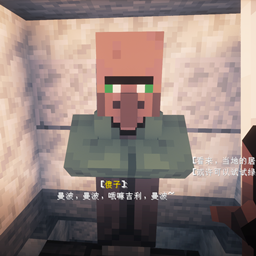
True Nitwit Texture pour Minecraft 1.20.1, 1.21.1
Rend la texture du nigaud plus sage.
Wise Green Robe Elder - Texture Pack
Description
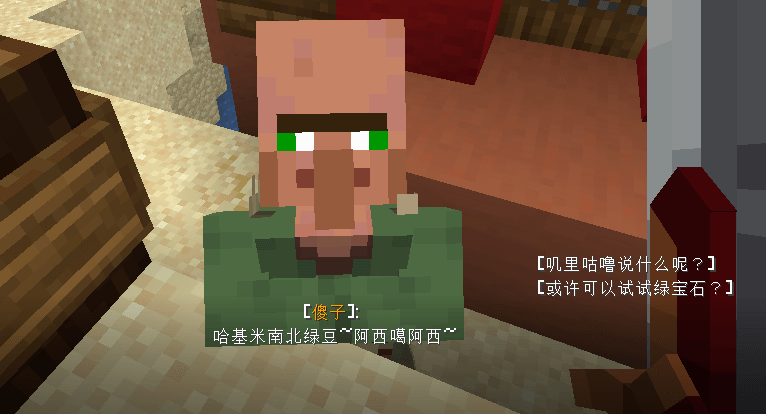
Tired of the Nitwit villager's vacant stare and aimless wandering, despite its majestic green robe? This texture pack solves that identity crisis!
In the Chinese Minecraft community, Nitwits are respectfully called "绿袍尊者" (Green Robe Elder). However, their behavior hardly matches this dignified title. I've given this special villager a visual upgrade to make them look as wise as their name suggests!
What's Changed
- Visual Enhancement: Completely redesigned the Nitwit villager's texture
- Wiser Appearance: Added more intelligent facial expressions and refined the green robe
- Lore-Friendly: Maintains the original green color scheme while elevating their presence
- Behavior Note: This only changes appearance, not AI behavior - they'll still wander and refuse to trade, because true wisdom cannot be rushed!
Perfect For
- Adding a sage-like presence to your villages
- Roleplay servers needing wise elder characters
- Making your village feel more authentic with a respected "Green Robe Elder"
- When you want your Nitwits to look like they're contemplating deep mysteries rather than just being lazy
Installation
- Download the texture pack
- Place it in your resourcepacks folder
- Activate it in-game
- Find a Nitwit villager and witness their transformation!
"My villagers now have a wise elder who looks like he could teach me ancient secrets!" - Satisfied User
"Finally, the Green Robe Elder looks the part! Even if he still won't work..." - Village Enthusiast
Comment installer True Nitwit Texture
With Millida Launcher
Install Millida Launcher
The launcher is free: download it at millida.net/launcher and sign in with any nickname.
Click “Install” on this page
The launcher opens and installs the resource pack for Minecraft 1.14–1.21.10 automatically.
Launch the game
A profile with it appears in the launcher: click “Play”.
Manually
Download the archive
Pick the file true_nitwit_texture.zip (5 KB) for your game version. No need to unpack it.
Put it in the resourcepacks folder
The easiest way: “Options”, then “Resource Packs”, then “Open Pack Folder”, and drag the archive there.
Enable the pack
In the same window, move the pack to the right-hand “Selected” column and click “Done”.
Versions
Avec dépendances
| Minecraft | Loader | Fichier | Date | Actions |
|---|---|---|---|---|
| 1.17.1 | — | true_nitwit_texture.zip4.7 Ko 1 |
FAQ
Which Minecraft versions does True Nitwit Texture work on?
There are files for 1.14–1.21.10, 42 versions in total. The newest is 1.21.10.
Where can I download True Nitwit Texture safely?
On this page: the file true_nitwit_texture.zip (5 KB) is stored on Millida’s server, with no link shorteners. SHA-1 checksum: 0193ab2e0af5762d4cf032192c291821676f0a13.
Avis
Soyez le premier à noter True Nitwit Texture



