
Ocean Ui Pack de ressources pour Minecraft 1.21, 26.30
Pack de ressources océan pour Mcpe
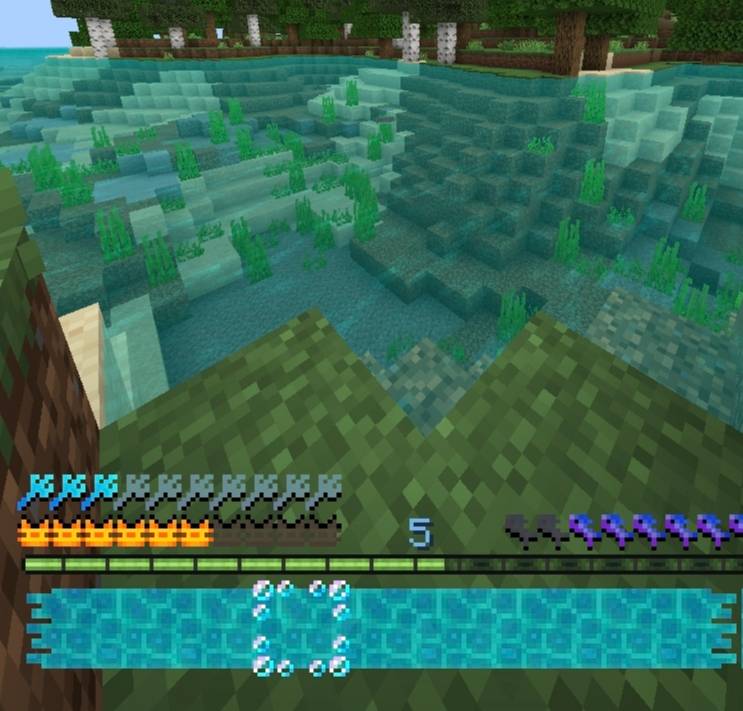
What's Added: Axolotl Heart, Fish Hunger, Inventory Water Bars and Bubbles of the Selected Slot, Bubbles Instead of Fire (Block), Trident armor icon, blue experience color, clear water
Comment installer Ocean Ui
With Millida Launcher
Install Millida Launcher
The launcher is free: download it at millida.net/launcher and sign in with any nickname.
Click “Install” on this page
The launcher opens and installs the resource pack for Minecraft 1.18–26.30 automatically.
Launch the game
A profile with it appears in the launcher: click “Play”.
Manually
Download the archive
Pick the file oceanui.mcpack (72 KB) for your game version. No need to unpack it.
Put it in the resourcepacks folder
The easiest way: “Options”, then “Resource Packs”, then “Open Pack Folder”, and drag the archive there.
Enable the pack
In the same window, move the pack to the right-hand “Selected” column and click “Done”.
Versions
Avec dépendances
| Minecraft | Loader | Fichier | Date | Actions |
|---|---|---|---|---|
| 1.18 | — | oceanui.mcpack71.9 Ko |
FAQ
Which Minecraft versions does Ocean Ui work on?
There are files for 26.30, 26.0, 1.21, 1.20, 1.19, 1.18. The newest is 26.30.
Where can I download Ocean Ui safely?
On this page: the file oceanui.mcpack (72 KB) is stored on Millida’s server, with no link shorteners. SHA-1 checksum: b46c59cc9529aa2b3736a7d25044116be714a02a.
Avis
Soyez le premier à noter Ocean Ui



