
Lead Knot 3D Pack de ressources pour Minecraft 1.20.1, 1.21
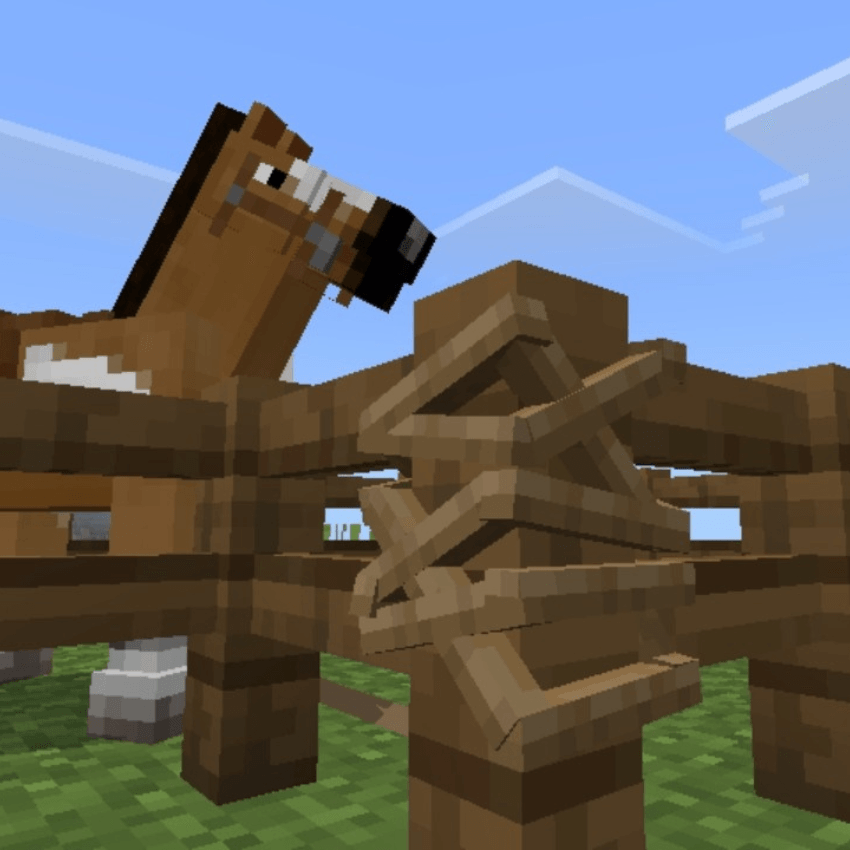
3D Lead Knot - pack de ressources qui remplace le nœud de laisse par défaut dans Minecraft Bedrock Edition par un modèle 3D personnalisé plus propre, plus net et plus naturel. Dites adieu aux visuels plats — apportez une touche de réalisme à votre gameplay✨
À propos du pack de ressources Lead Knot 3D

3D Lead Knot - resource pack that replaces the default lead knot in Minecraft Bedrock Edition with a custom 3D model that looks cleaner, sharper, and more natural. Say goodbye to flat visuals - bring a touch of realism to your Gameplay✨
• This Pack is survival friendly and No experimental features required👌
🖼️ Screenshot


Comment installer Lead Knot 3D
With Millida Launcher
Install Millida Launcher
The launcher is free: download it at millida.net/launcher and sign in with any nickname.
Click “Install” on this page
The launcher opens and installs the resource pack for Minecraft 1.20–1.21.90 automatically.
Launch the game
A profile with it appears in the launcher: click “Play”.
Manually
Download the archive
Pick the file lead knot 3d.mcpack (5 KB) for your game version. No need to unpack it.
Put it in the resourcepacks folder
The easiest way: “Options”, then “Resource Packs”, then “Open Pack Folder”, and drag the archive there.
Enable the pack
In the same window, move the pack to the right-hand “Selected” column and click “Done”.
Versions
Avec dépendances
| Minecraft | Loader | Fichier | Date | Actions |
|---|---|---|---|---|
| 1.20.40 | — | lead knot 3d.mcpack5.3 Ko |
FAQ
Which Minecraft versions does Lead Knot 3D work on?
There are files for 1.20–1.21.90, 28 versions in total. The newest is 1.21.90.
Where can I download Lead Knot 3D safely?
On this page: the file lead knot 3d.mcpack (5 KB) is stored on Millida’s server, with no link shorteners. SHA-1 checksum: 38396955025b52a83a69a3120901b120e3f4a8f9.
Avis
Soyez le premier à noter Lead Knot 3D



