

Flower Clusters Pack de ressources pour Minecraft 1.20.1, 1.21.1
Les fleurs couvrent mieux le sol, étant placées en groupes plutôt qu'individuellement
- téléchargements
- 4 téléchargements
- vues
- 60 vues
- Mis à jour
- Mis à jour 27.09.2026
- 1.13 — 26.3
 Jeu vanilla
- Client
À propos du pack de ressources Flower Clusters
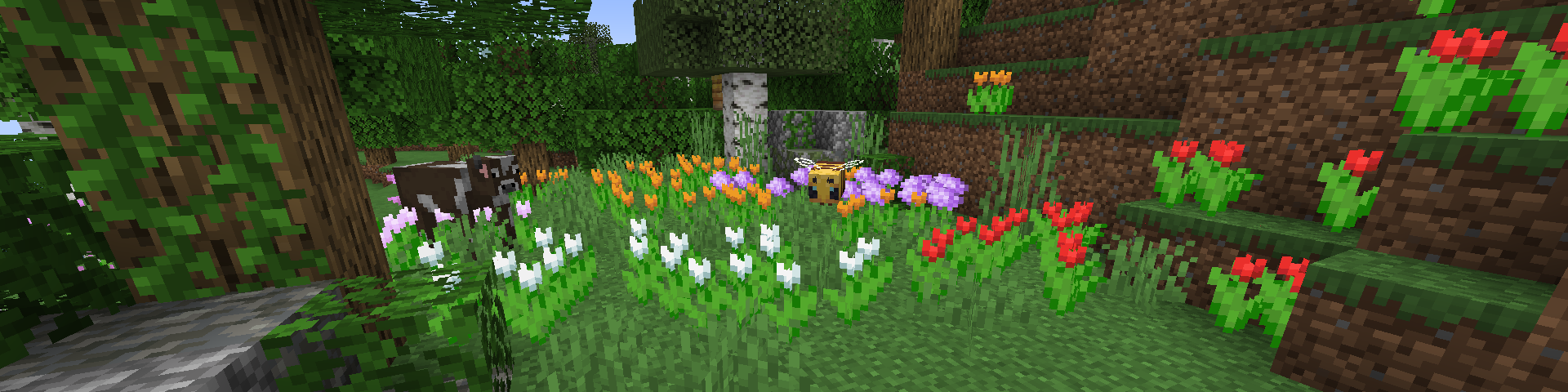
Flowers placed on the ground don’t fill in enough space to look good on their own. This resource pack aims to fix that by making flowers be in clusters rather than individual, filling in the empty spaces between flowers and making the world generally much prettier.
Because this only changes models and not textures, it should be compatible with any pack that changes the flowers' textures. However, it won't be compatible with packs that change the flowers' models, for example packs that give flowers a 3D model rather than a 2D cross shape.
There's also support for various mods to make the flowers that they add placed as clusters too. Here's the full list of supported mods:
Supported Mod List
Currently supported mods:
- Biomes O' Plenty (burning blossom, glowflower, orange cosmos, pink hibiscus, rose, wilted lily)
- The Aether (white flower, purple flower)
- Wilder Wild (carnation, marigold, seeding dandelion, pasqueflower)
- Trailier Tales (cyan rose)
- Nature's Spirit (anemone, black iris, blue iris, hibiscus)
- No Man's Land (aconite, starflower, thistle, blue lupine, red lupine, yellow lupine, pink lupine, autumn crocus, wild mint)
- Verdance (violet)
- Friends & Foes (buttercup)
- Atmospheric (firethorn, gilia, yucca flower)
- Environmental (violet, bluebell, dianthus, yellow hibiscus, orange hibiscus, red hibiscus, pink hibiscus, magenta hibiscus, purple hibiscus, red lotus flower, white lotus flower, tasselflower)
- Autumnity (autumn crocus)
- Buzzier Bees (buttercup, pink clover, white clover)
What flowers should or shouldn't be placed in clusters is determined by how much the default flower model covers the block it's on. That's why some larger flowers aren't placed in clusters, for example hibiscuses in Wilder Wild.
February 7th 2026 : 100k downloads, that's crazy!

Comment installer Flower Clusters
With Millida Launcher
Install Millida Launcher
The launcher is free: download it at millida.net/launcher and sign in with any nickname.
Click “Install” on this page
The launcher opens and installs the resource pack for Minecraft 1.13–26.3 automatically.
Launch the game
A profile with it appears in the launcher: click “Play”.
Manually
Download the archive
Pick the file Flower Clusters 1.2.1.zip (138 KB) for your game version. No need to unpack it.
Put it in the resourcepacks folder
The easiest way: “Options”, then “Resource Packs”, then “Open Pack Folder”, and drag the archive there.
Enable the pack
In the same window, move the pack to the right-hand “Selected” column and click “Done”.
Versions
Avec dépendances
| Minecraft | Loader | Fichier | Date | Actions |
|---|---|---|---|---|
| 26.3 | — | 26.3138 Ko 4 | ||
| 26.1 | — | 26.1137 Ko | ||
| 1.21.11 | — | 1.21.11137 Ko | ||
| 26.2 | — | 26.2137 Ko | — | |
| 1.18.2 | — | 1.18.2137 Ko | — | |
| 1.16.5 | — | 1.16.5137 Ko | — |
FAQ
Which Minecraft versions does Flower Clusters work on?
There are files for 1.13–26.3, 51 versions in total. The newest is 26.3.
Does Flower Clusters need mods?
No, the resource pack works in the plain game without loaders: put it into the resourcepacks folder and enable it in the options.
Where can I download Flower Clusters safely?
On this page: the file Flower Clusters 1.2.1.zip (138 KB) is stored on Millida’s server, with no link shorteners. SHA-1 checksum: 9fd52f472ef18b0de3a8618632c97173331faf0d.
Avis
Soyez le premier à noter Flower Clusters



