

FerreMcDurabilityOverlay Pack de ressources pour Minecraft 1.20.1, 1.21.1
Ce pack affiche la durabilité de l'armure.
- téléchargements
- 45 téléchargements
- vues
- 201 vues
- Mis à jour
- Mis à jour 03.09.2026
- 1.16 — 1.21.11
 Jeu vanilla
- Client
🛡️ FerreMcDurabilityOverlay (Variant CIT UPDATED)
Created specifically for PvP fights, this resource pack offers a great visualization of how durable your armor is, making it easier for you to decide while in battle.
🔧 Features:
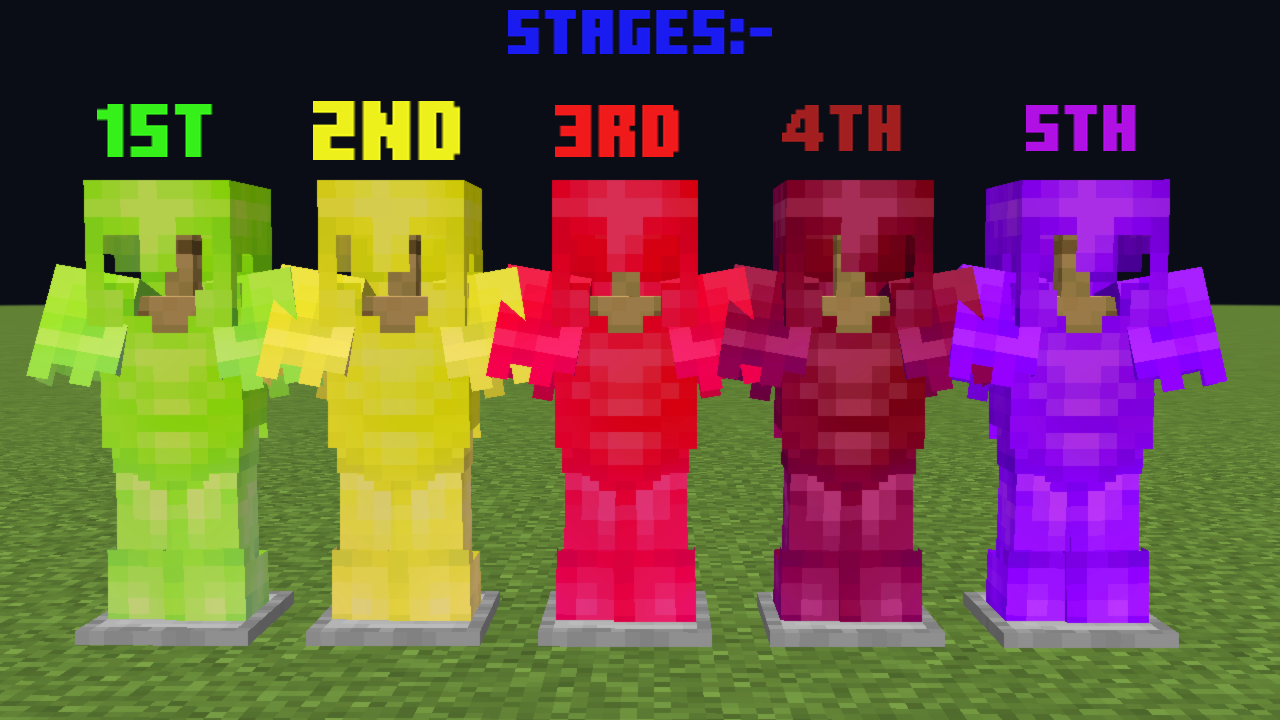
Dynamic Armor Textures: Armor textures change color based on durability levels:
- 🟩 **Green (80%–100%): Slightly worn**
- 🟨 **Yellow (60%–79%): Moderately damaged**
- 🟥 **Red (40%–59%): Significantly damaged**
- 🟥 **Dark Red (20%–39%): Critical condition**
- 🟪 **Purple (0%–19%): Broken**
- **PvP Focused: Best suited for PvP situations since it allows quick assessment of armor status with visual aids.**
- **Compatibility: Designed for use with CIT Resewn , Variants CIT on Fabric or Optifine.**
- **Supported Armor Types: Applicable to Diamond and Netherite armor sets.**
⚠️ Installation Requirements:
- **For Fabric Users: Install the CIT Resewn mod or Variants CIT.**
- **For Optifine Users: Install Optifine and ensure it's properly configured.**
⚠️ Notice:
Some of the servers might limit durability-themed visual resource packs. Use only where allowed. I am not responsible for any actions taken by servers.
Comment installer FerreMcDurabilityOverlay
With Millida Launcher
Install Millida Launcher
The launcher is free: download it at millida.net/launcher and sign in with any nickname.
Click “Install” on this page
The launcher opens and installs the resource pack for Minecraft 1.16–1.21.11 automatically.
Launch the game
A profile with it appears in the launcher: click “Play”.
Manually
Download the archive
Pick the file FMDO.zip (81 KB) for your game version. No need to unpack it.
Put it in the resourcepacks folder
The easiest way: “Options”, then “Resource Packs”, then “Open Pack Folder”, and drag the archive there.
Enable the pack
In the same window, move the pack to the right-hand “Selected” column and click “Done”.
Versions
Avec dépendances
| Minecraft | Loader | Fichier | Date | Actions |
|---|---|---|---|---|
| 1.21.11 | — | 1.21.1181.2 Ko 18 | ||
| 1.19.2 | — | 1.19.289.4 Ko | — | |
| 1.18.2 | — | 1.18.289.4 Ko | — | |
| 1.16.5 | — | 1.16.589.4 Ko | — |
FAQ
Which Minecraft versions does FerreMcDurabilityOverlay work on?
There are files for 1.16–1.21.11, 35 versions in total. The newest is 1.21.11.
Does FerreMcDurabilityOverlay need mods?
No, the resource pack works in the plain game without loaders: put it into the resourcepacks folder and enable it in the options.
Where can I download FerreMcDurabilityOverlay safely?
On this page: the file FMDO.zip (81 KB) is stored on Millida’s server, with no link shorteners. SHA-1 checksum: f89409ceb2dc77ccb2eae4cccce2bd5d40255dce.
Avis
Soyez le premier à noter FerreMcDurabilityOverlay



