
Better Shadows Pack de ressources pour Minecraft 26.50
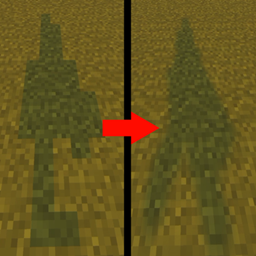
Better Shadows rend les ombres de votre jeu aussi fluides que du beurre
À propos du pack de ressources Better Shadows
Better Shadows makes your ingame shadows smooth as butter, making them feel more realistic, by adding depth and atmosphere.
Make sure you have Vibrant Visuals enabled

For support, other projects or project requests join my discord: https://discord.gg/6PFMrzS3sG
Comment installer Better Shadows
With Millida Launcher
Install Millida Launcher
The launcher is free: download it at millida.net/launcher and sign in with any nickname.
Click “Install” on this page
The launcher opens and installs the resource pack for Minecraft 26.30–26.50 automatically.
Launch the game
A profile with it appears in the launcher: click “Play”.
Manually
Download the archive
Pick the file Better-ShadowsRP.mcpack (509 KB) for your game version. No need to unpack it.
Put it in the resourcepacks folder
The easiest way: “Options”, then “Resource Packs”, then “Open Pack Folder”, and drag the archive there.
Enable the pack
In the same window, move the pack to the right-hand “Selected” column and click “Done”.
Versions
Avec dépendances
| Minecraft | Loader | Fichier | Date | Actions |
|---|---|---|---|---|
| 26.30 | — | Better-ShadowsRP.mcpack509 Ko |
FAQ
Which Minecraft versions does Better Shadows work on?
There are files for 26.50, 26.40, 26.30. The newest is 26.50.
Where can I download Better Shadows safely?
On this page: the file Better-ShadowsRP.mcpack (509 KB) is stored on Millida’s server, with no link shorteners. SHA-1 checksum: fd4ab1f7c97beb060418ee1765760c63cc883920.
Avis
Soyez le premier à noter Better Shadows


