

Pixelated Shaders pour Minecraft 1.20.1, 1.21.1
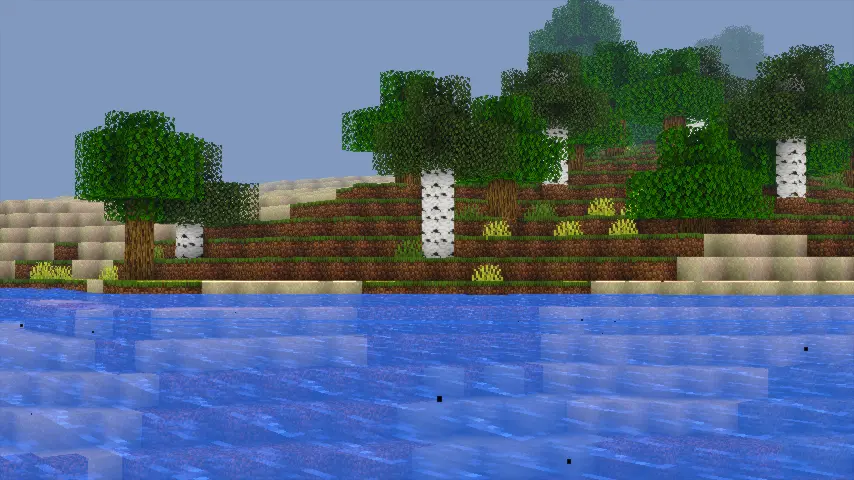
Pixelated Shaders apporte un éclairage naturel, des couleurs douces et des performances fluides à Minecraft. Léger, propre et magnifique sur n'importe quel appareil.
 Fabric
 OptiFine
À propos des shaders Pixelated Shaders
ABOUT
Pixelated Shaders is a lightweight, beautifully enhanced shader pack designed to bring natural lighting, soft colors, and smooth performance to every device. Built with clean code, optimized effects, and a focus on stability, Pixelated Shaders delivers a realistic visual upgrade without sacrificing FPS. Whether you're exploring landscapes or playing competitive modes, Pixelated Shaders keeps your world bright, vibrant, and immersive — all while staying incredibly fast.

Features
- 90s-Themed Water Waves: Nostalgic, retro-inspired water animation for a classic feel.
- 90s-Themed Waving Leaves: Smooth, natural leaf movement reminiscent of old-school visuals.
- Natural Lighting & Colors: Soft, realistic lighting that enhances Minecraft’s world.
- Optimized Performance: Lightweight and efficient for smooth gameplay on most devices.
- Immersive Experience: Brings a nostalgic yet natural atmosphere to your game.
How to report BUGS!!
Our GlacierDevelopment Discord server is Live you can report bugs and Chat with other GlacierShaders users, report bugs, get help with issues, and join exciting giveaways — all in one place!
OFFER!!

Comment installer Pixelated Shaders
With Millida Launcher
Install Millida Launcher
The launcher is free: download it at millida.net/launcher and sign in with any nickname.
Click “Install” on this page
The launcher opens and installs the shaders for Minecraft 1.20–26.2 automatically.
Launch the game
A profile with it appears in the launcher: click “Play”.
Manually
Install Iris or OptiFine
Without a shader mod the game cannot see shaders. Install it for the same Minecraft version.
Download the shader archive
Pick the file PixelatedShaders_v1.zip (79 KB) and do not unpack it.
Put it in the shaderpacks folder
“Options”, then “Video Settings”, then “Shader Packs”, then “Open Shader Pack Folder”, and drag the archive there.
Select the shaders
In the same window, click the pack name and “Apply”.
Versions
Avec dépendances
| Minecraft | Loader | Fichier | Date | Actions |
|---|---|---|---|---|
| 1.21 | Iris, OptiFine | 1.2179.1 Ko | ||
| 1.20.1 | Iris, OptiFine | 1.20.179.1 Ko 1 | ||
| 26.2 | Iris, OptiFine | 26.279.1 Ko | — | |
| 26.1 | Iris, OptiFine | 26.179.1 Ko | — | |
| 1.21.11 | Iris, OptiFine | 1.21.1179.1 Ko | — |
FAQ
Which Minecraft versions does Pixelated Shaders work on?
There are files for 1.20–26.2, 23 versions in total. The newest is 26.2.
What do I need to run Pixelated Shaders?
Shaders are loaded through Iris or OptiFine: without one of them the game cannot see them.
Where can I download Pixelated Shaders safely?
On this page: the file PixelatedShaders_v1.zip (79 KB) is stored on Millida’s server, with no link shorteners. SHA-1 checksum: 27ae3988fcb7e0d32ecb428dcfb9e92bd6baece8.
Avis
Soyez le premier à noter Pixelated Shaders


