

Terrain Control Plugin pour Minecraft 1.6.4
Ce plugin permet un contrôle total du générateur de monde normal
À propos du plugin Terrain Control
Source on GitHub | Changelog | TerrainControl forums
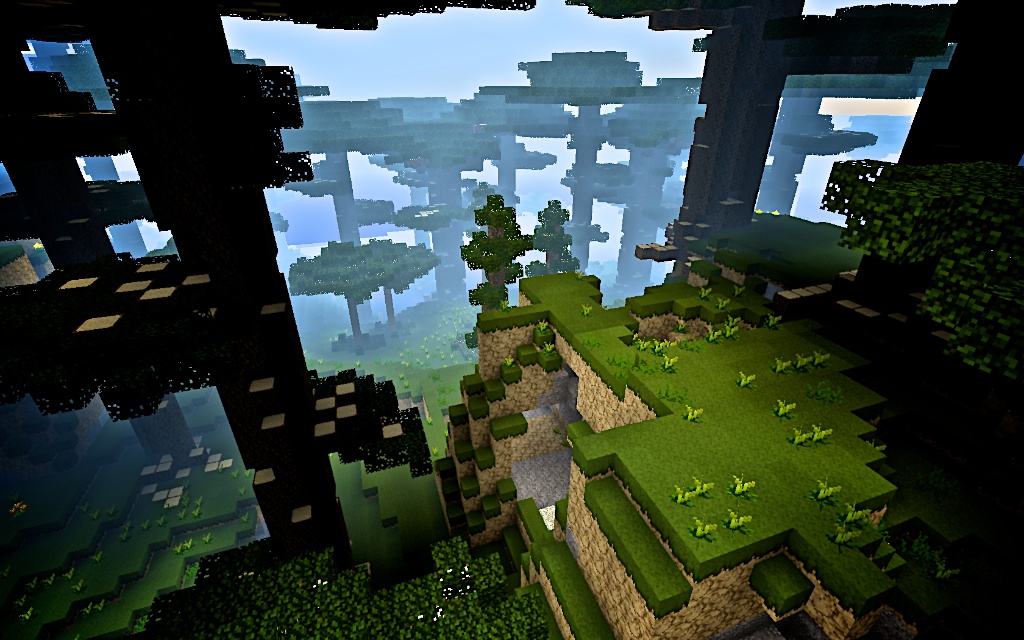
Pictures (top to bottom, left to right):Floating island by LanToaster, Arches by mysource, Extreme Hills by IRSmoh, Island by Piginabag, Alternative Nether by IRSmoh
TerrainControl is an advanced world generator. Through various configuration files it gives the user control over almost every aspect of Minecraft terrain generation, with no knowledge of Java required. It can be used on Bukkit or Forge servers and on singleplayer with Forge. TerrainControl is the successor to the old PhoenixTerrainMod, which was based on the popular BiomeTerrainMod.
Quote:
Spigot 1.8
All updates for Spigot 1.8 won't be posted here, but on the Spigot forums instead: http://www.spigotmc.org/resources/terraincontrol.2214/
See you there!
Features
- Control horizontal and vertical noise of terrain generation
- Control terrain height and volatility per biome
- Generating biome maps from images
- Control the size of biomes, islands and continents
- Custom biomes
- Many options for caves, canyons
- Control vanilla structures like mineshafts, strongholds and villages
- Full control of ores, plants, dungeons, ponds and many more
- Custom trees and other objects (BO2 and BO3)
- Block replacement
- Visual settings like custom foliage colors (TerrainControl client required)
...and many more!
whitespace hack
Metrics
As of Terrain Control 2.4.13, the plugin sends some stats to mcstats.org, a service by Hidendra and others. You can view the stats here. Terrain Control won't upload your configs, it will only send your BiomeMode along with some information of your computer. You can toggle it off by setting opt-out to true in the metrics config file. More information is available on this wiki page.
Showcase
Pictures
Videos
Also check out the showcase thread in our forums!
How to use
TerrainControl is more complex than most Bukkit plugins, so it may take a while to get into - but the results are worth it. If you want to create your own world, be sure to check our documentation. If you have done some reading and still have problems using TerrainControl, just post to our forums and we'll try to figure it out.
Tutorials
Installation guide | TerrainControl Wiki | First steps TerrainControl Analysis | mysource's tutorial
Tutorial Videos
Useful tools
- TerrainControl User Interface
- BetterBOB for creating BO2-objects
- Notepad ++ for easier editing of config files
- Minutor for viewing generated maps
- Eihort for viewing your generated maps
- WorldBorder for pregenerating your map
- BO3-Tweaks by Elzaar and LanToaster. Command-line application to tweak BO3-objects.
- BO3Tools for ingame creation of BO3-objects
- ClimateChanger for mass-changing biome ids in an existing world
- BiomeEdit.py to edit biomes side by side.
Team
Active staff hack to display table correctly
Khoorn Maintainer, Coding
Timethor Coding
Rutger Kok Coding
Burckhart Support, Documentation
Retired staff
Mysource Support, Documentation
Cayorion Coding
Additional Credits
Bucyruss Creator of the BiomeTerrainMod
R-T-B Creator of PhoenixTerrainMod
More contributors on GitHub
Users contributing to the wiki are found here
Get involved!
Commit code on GitHub | Contribute to the wiki | Share your configuration Report bugs and request features on GitHub
Downloads
You'll always find the newest approved stable builds here. As of 2.4, the files will work on both Bukkit and Forge servers (without the need of something like MCPC+) and on singleplayer with Forge. Installation instructions can be found here.
Development builds of this project can be acquired at the provided continuous integration server. These builds have not been approved by the BukkitDev staff. Use them at your own risk.
Development builds at mctcp.com
You can find all user-created world configurations, biomes and custom objects that are currently available here.
Important - please do not post your questions in the comments section below, head to the forums instead! We do not answer questions here as it would only result in chaos. Feel free to use the wall for general comments!
Comment installer Terrain Control
A server on Paper or Spigot
The plugin runs on the server core for Minecraft 1.6.4; players do not need to install anything.
File goes into the plugins folder
Download the file TerrainControl.jar (504 KB) and put it into the server’s plugins folder.
Restart the server
On startup the plugin creates its own settings folder in plugins.
Use the “To server” button
On Millida Hosting, the button at the top of the page uploads the file to your server and restarts it for you.
Minecraft 1.6.4 runs on Java 8: with a different Java version the game may close right after launch.
Versions
Avec dépendances
| Minecraft | Loader | Fichier | Date | Actions |
|---|---|---|---|---|
| — | — | Terrain Control v2.6.3541 Ko | ||
| 1.6.4 | — | Terrain Control v2.5.0504 Ko |
FAQ
Which Minecraft versions does Terrain Control work on?
Only Minecraft 1.6.4: there are no files for other versions.
Do players need to install Terrain Control?
No, the plugin goes only on the server, into the plugins folder: players do not need to download anything.
Which Java does Terrain Control need?
Minecraft 1.6.4 runs on Java 8. If the game closes right after launch, the usual cause is the wrong Java version in the profile settings.
Avis
Soyez le premier à noter Terrain Control


