

Player Statistics | PlayerStats Plugin pour Minecraft 1.20.1, 1.21.1
Voyez comment vos statistiques se comparent à celles des autres sur votre serveur !
À propos du plugin Player Statistics | PlayerStats
About PlayerStats is a Minecraft server plugin that adds a command to view player statistics in top-10 format or individually. Currently supports version 1.16.5 to 1.21.8 on platforms:
- Bukkit
- Spigot
- Paper
- Purpur

(It's possible PlayerStats works on other platforms too, but these are the ones I have explicitly tested.)
Features
Easy to use
- One central command that can:
- Explain how to use the plugin with /statistic
- Show you the top 10 on your server for all possible statistics with /statistic ... top
- See those same statistics for any individual player with /statistic ... player
- Or look up the combined total of everyone on your server
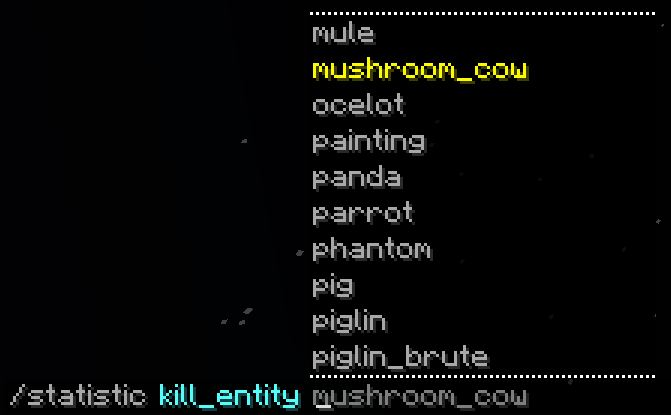
- Guide you through the available options while you type with an extensive tab-complete feature
- See the output in a readable format that makes sense in the Minecraft world, with more information in hover-text:
- Share statistics that you look up with the other players in chat:
No set-up required
- PlayerStats will work correctly regardless of how long your server has already existed - it doesn't have to be present when you start a new world
- Data is retrieved directly from already existing playerfiles, so you don't have to set up a database, use scoreboards, or anything of the sort
PlaceholderAPI support
- Placeholders are added in a separate expansion, which can be found here on GitHub, in the PlaceholderAPI eCloud, or downloaded in-game with /papi ecloud download PlayerStats
- For more information about the placeholders, see the expansion's GitHub!
Safe
- PlayerStats uses multi-threading to ensure server performance does not suffer and players cannot crash the server by spamming its commands
- This also means that calculating statistics will be very fast
Customizable
- You can customize the following (and more):
- Choose which range of units you want to display your time-, damage- and distance-based statistics in:
- Automatically translate statistics to the language of the client that views them, or customize the statistic-names through the language.yml file
- Use festive formatting, or enable rainbow mode whenever!
- Only show statistics for whitelisted players
- Exclude statistics from banned players
- Exclude statistics from specific players with /statexclude
- Limit statistics based on when a player last joined. This option can be particularly useful if you have had a lot of players join your server in the past whose statistics aren't of particular interest to your current player-base. On top of that, limiting the amount of players shown in the top 10 can greatly increase performance speed.
- The colors you want the output to be
- You can go for default Minecraft chat colors, or use hex colors
- Whether you want the output to have additional style, such as italics
- You can configure the following permissions:
- playerstats.stat for using the general command (true for everyone by default)
- playerstats.share for sharing statistics in chat (true for everyone by default)
- playerstats.reload for reloading the config (only for OP players by default)
- playerstats.exclude to exclude players from top- and server-statistics (only for OP players by default)
Author Info I am a relatively new programmer, and this is one of my first projects. I greatly enjoyed making it, and I tried to make it as efficient as I could. If you have any questions, remarks, or suggestions, please let me know! You can find me here on GitHub.
Comment installer Player Statistics | PlayerStats
A server on Paper or Spigot
The plugin runs on the server core for Minecraft 1.16–1.21.8; players do not need to install anything.
File goes into the plugins folder
Download the file PlayerStats-2.5.jar (1.4 MB) and put it into the server’s plugins folder.
Restart the server
On startup the plugin creates its own settings folder in plugins.
Use the “To server” button
On Millida Hosting, the button at the top of the page uploads the file to your server and restarts it for you.
Minecraft 1.21.8 runs on Java 21: with a different Java version the game may close right after launch.
Versions
Avec dépendances
| Minecraft | Loader | Fichier | Date | Actions |
|---|---|---|---|---|
| 1.20.6 | — | v2.51.4 Mo |
FAQ
Which Minecraft versions does Player Statistics | PlayerStats work on?
There are files for 1.16–1.21.8, 26 versions in total. The newest is 1.21.8.
Do players need to install Player Statistics | PlayerStats?
No, the plugin goes only on the server, into the plugins folder: players do not need to download anything.
Which Java does Player Statistics | PlayerStats need?
Minecraft 1.21.8 runs on Java 21. If the game closes right after launch, the usual cause is the wrong Java version in the profile settings.
Where can I download Player Statistics | PlayerStats safely?
On this page: the file PlayerStats-2.5.jar (1.4 MB) is stored on Millida’s server, with no link shorteners. SHA-1 checksum: 89d2a511b58932f2b27f949f83eb6beb475ebfcd.
Avis
Soyez le premier à noter Player Statistics | PlayerStats


