

Nametags++ Plugin pour Minecraft 1.20.1, 1.21.1
Plugin de nametag qui vous permet de changer l'étiquette au-dessus de votre tête et dans la tablist
 Bukkit
 Paper
Paper Spigot
Nametags++
The Nametags plugin is a tool that allows you to fully manage the display of players' prefix,suffix etc. above their heads in the game. Thanks to this plugin, you can customize the appearance of nametags, their colors, fonts, additional information and other details that allow you to personalize the way players see each other.
Supported APIs: EssentialsX, PlaceHolderAPI
Supported versions: 1.13.x - 1.21.x (RGB nametags works only on versions 1.16+)
/tag prefix - Changes your prefix above the head
/tag suffix - Changes your suffix above the head
/tag silentprefix - allows you to set a prefix without any information in the chat
/tag subtitle - allows you to set text next to the player's number of lives
/tag rgbsubtitle - allows you to set rgb text next to the player's number of lives
/tag silentsuffix - allows you to set a suffix without any information in the chat
/tag rgbprefix - allows you to set a prefix with a gradient (e.g. &#HEXCOLOR...) [1.16+]
/tag rgbsuffix - allows you to set a suffix with a gradient (e.g. &#HEXCOLOR...) [1.16+]
/tag reset - Reset your prefix/suffix above the head
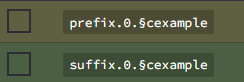
/tag luckperms-sync - Synchronizes the prefix and suffix from the luckperms group and adds them to the nametags (To use color, use § instead of &)
/tag luckperms-autosync - Synchronizes the prefix and suffix just like the /tag luckperms-sync command, but it does it automatically every 5 seconds and for every online player
/tags reload - Reload the plugin
/tag reload - Reload the plugin
Permissions:
staff.settag
staff.reloadtags
Showcase:
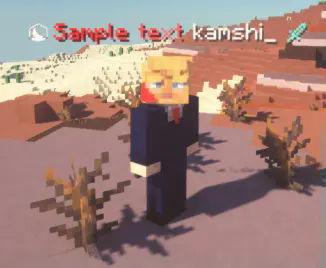
Example usage of the /tag luckperms-sync command to make it work
Comment installer Nametags++
A server on Paper, Spigot or Bukkit
The plugin runs on the server core for Minecraft 1.13–1.21.10; players do not need to install anything.
File goes into the plugins folder
Download the file Nametagsplusplus-1.2.4-stable.jar (14 KB) and put it into the server’s plugins folder.
Restart the server
On startup the plugin creates its own settings folder in plugins.
Use the “To server” button
On Millida Hosting, the button at the top of the page uploads the file to your server and restarts it for you.
Minecraft 1.21.10 runs on Java 21: with a different Java version the game may close right after launch.
Versions
Avec dépendances
| Minecraft | Loader | Fichier | Actions |
|---|---|---|---|
| 1.16.5 | Bukkit, Paper, Spigot | 1.16.514 Ko |
Avis
Soyez le premier à noter Nametags++


