
À propos du plugin Dynmap-Regios
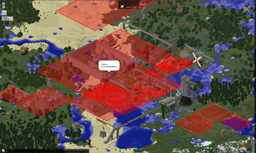
Dynmap-Regios is an add-on to Dynmap that allows visibility of Regios regions from the Dynmap web map. This plugin requires that you have both Dynmap and Regios installed on your server. The regions on the map are updated every 300 seconds (5 minutes) by default, but is configurable in the config.yml. Regions can be hidden from showing up on the map by adding the region name to the 'hiddenregions' section of the config.yml or of you only want to show a few regions you can use the 'visibleregions' section of the config.yml to limit what regions will be shown.
The global region outline is configurable with the 'regionstyle' section, but per region configuration is also available with the 'custstyle' section. You can modify both the outline color, opacity, and thickness as well as the fill color and opacity in both sections.
You can also set the region highlights to show the height of the region as well instead of just the width and depth by setting the 'use3dregions' setting to 'true.'
Installation: Drop Dynmap-Regios.jar in your servers plugins folder. Restart you server.
Requirements: Dynmap v0.36 or later Regios v5.0.4 or later
This plugin is based on the Dynmap-WorldGuard plugin by mikeprimm and FrozenCow2.
Comment installer Dynmap-Regios
A server on Paper or Spigot
The plugin runs on the server core; players do not need to install anything.
File goes into the plugins folder
Download the file Dynmap-Regios.jar (19 KB) and put it into the server’s plugins folder.
Restart the server
On startup the plugin creates its own settings folder in plugins.
Use the “To server” button
On Millida Hosting, the button at the top of the page uploads the file to your server and restarts it for you.
Versions
Avec dépendances
| Minecraft | Loader | Fichier | Date | Actions |
|---|---|---|---|---|
| — | — | v0.618.9 Ko | ||
| — | — | v0.310.3 Ko |
FAQ
Do players need to install Dynmap-Regios?
No, the plugin goes only on the server, into the plugins folder: players do not need to download anything.
Where can I download Dynmap-Regios safely?
On this page: the file Dynmap-Regios.jar (19 KB) is stored on Millida’s server, with no link shorteners. SHA-1 checksum: 9b4ee9fe3722813fd6ec7d0335f09980cba0fe31.
Avis
Soyez le premier à noter Dynmap-Regios


