
ChatColors Plugin pour Minecraft
Message Rainbowizer, analyseur de couleurs et référence.
ChatColors
Features
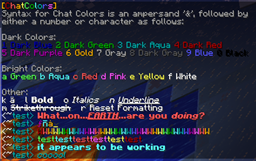
ChatColors parses all color passed through player chat, so that when you type &a&oHey, that Hey comes out green and italicized. It includes a color reference "/colors" and a feature to rainbowize messages. Pretty sweet huh?
Commands
- /rb <message> - Rainbowize your chat message
- /colors - View all the chat colors and their codes.
- /colours - View all the chat colors and their codes.
Permissions
- chatcolors.* - All commands
- chatcolors.format - Format text in chat messages
- chatcolors.colors - View the /colors menu
- chatcolors.rainbow - Use the /rb rainbow command
Source
https://github.com/proxa/ChatColors
Comment installer ChatColors
A server on Paper or Spigot
The plugin runs on the server core; players do not need to install anything.
File goes into the plugins folder
Download the file ChatColors.jar (5 KB) and put it into the server’s plugins folder.
Restart the server
On startup the plugin creates its own settings folder in plugins.
Use the “To server” button
On Millida Hosting, the button at the top of the page uploads the file to your server and restarts it for you.
Versions
Avec dépendances
| Minecraft | Loader | Fichier | Date | Actions |
|---|---|---|---|---|
| — | — | ChatColors v1.5.35.4 Ko |
Avis
Soyez le premier à noter ChatColors



