
BukkitColors Plugin pour Minecraft
Un plugin pour afficher tous les codes de couleur de Bukkit.
À propos du plugin BukkitColors
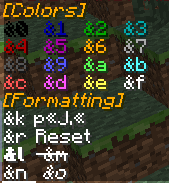
This plugin allow you to see all chat color codes/formatting codes for the people who are sick of having to pull up their browser constantly while trying to do things in-server. Have Essentials? You don't need this plugin! Use /info Colors or /einfo Colors, they give the same information as this plugin! An example of what it looks like shown below.
MAKE SURE TO UPDATE! The latest update adds support to USE these color codes! Its in version 1.4.1, so we gotta wait for it to be approved. Big thanks to AlreadyCoded for helping me with it(link to profile in update description)
Commands
- /colors [args] - Currently the one and only command. Permission to use given by default, but can be taken away.
- Currently valid arguments: [Red, Blue, Green, Purple, Pink, Gray/Grey, White, Black, Yellow, Gold]
- Aliases: [color, colours, colour]
Permissions
- bcolors.use - Allows use of /colors. Given to all users by default.
- bcolors.book - Allows use of /colors book to get a book with all color codes inside. Given to all users by default. [Added in v1.6]
- bcolors.chat.colors - Allows use of the color codes in chat.
- bcolors.chat.format - Allows use of the format codes in chat.
- bcolors.admin - Users with this permission will get a message about BukkitColors upon join. Given to OP users by default. Can be disabled in config [Added in v1.5]
Looking for a little more?
This is my first fully put-together plugin, and first released plugin, so I appreciate all the input I can get. Yes, this is not the most original plugin, but I do plan to add more things to this plugin as said above and it is good practice for me, and some might benefit from it.
Comment installer BukkitColors
A server on Paper or Spigot
The plugin runs on the server core; players do not need to install anything.
File goes into the plugins folder
Download the file BukkitColors.jar (16 KB) and put it into the server’s plugins folder.
Restart the server
On startup the plugin creates its own settings folder in plugins.
Use the “To server” button
On Millida Hosting, the button at the top of the page uploads the file to your server and restarts it for you.
Versions
Avec dépendances
| Minecraft | Loader | Fichier | Date | Actions |
|---|---|---|---|---|
| — | — | BukkitColors v1.616 Ko |
FAQ
Do players need to install BukkitColors?
No, the plugin goes only on the server, into the plugins folder: players do not need to download anything.
Where can I download BukkitColors safely?
On this page: the file BukkitColors.jar (16 KB) is stored on Millida’s server, with no link shorteners. SHA-1 checksum: 8ef1320f2bbdc3f3c5d5825989478e70666dde89.
Avis
Soyez le premier à noter BukkitColors



