
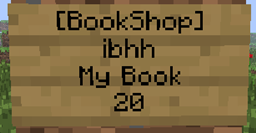
BookShop Plugin pour Minecraft 1.8.1
Les joueurs peuvent publier leurs livres écrits via une boutique, afin que d'autres joueurs puissent acheter le livre écrit.
À propos du plugin BookShop
Players can publish their written books in a shop, so other players can buy the written books. There are two ways of creating a BookShop:
- When the player holds a book and quill item while hitting the sign, the text in the book is copied.
- When the player places some books in the chest beneath the sign, the plugin will duplicate the item in the chest every time it is sold. Thus nobody has to write books more than once.
Please note:
- AdminShops always duplicate the book!
It works the same way than a publisher: It copies the book in the chest and sells it to the player.
Features
- Publication of written books
- backup of books into a file
- Restoring books
- Give a default book to every new player
- Give a book to every player who joined the server before.
- Give a book to a player
- Statistics for every book (how often it was sold)
- Admins can impose taxes.
- Player can only publish written books.
- Admins can create AdminShops that always duplicate the book regardless of the settings in the config file.
Dependencies
- iConomy 5 or iConomy6 or Vault or Register
- PermissionsEX or bPermissions or GroupManager or BukkitPermissions
The shop
To create a shop, you have to place an empty chest first. Then you can create a sign with following content
Please note: Only ONE book per shop is allowed!
Line Text
1 [BookShop]
2
3 The books name (automatically added after closing the chest with the book), but you can let it empty ;)
4 price of the book
OR:
Line Text
1 [BookShop]
2
3 The books name (automatically added after closing the chest with the book), but you can let it empty ;)
4 price of the book:price of the book if the player has a book and quill in the hand
To create an AdminShop:
Line Text
1 [BookShop]
2 AdminShop
3 The books name (automatically added after closing the chest with the book), but you can let it empty ;)
4 price of the book
To create a Newspaper shop:
Line Text
1 [BookShop]
2 Newspapers
3 The books name (automatically added after closing the chest with the book), but you can let it empty ;)
4 price of the newspapers
With the newspaper shop you are able to sell several books at a time. E.g. a book with rules and a book with a plugin info. If the player hits the sign he receives the two books.
If you don't like the keywords on the sign, you can edit them in the Shopconfig.yml´file!
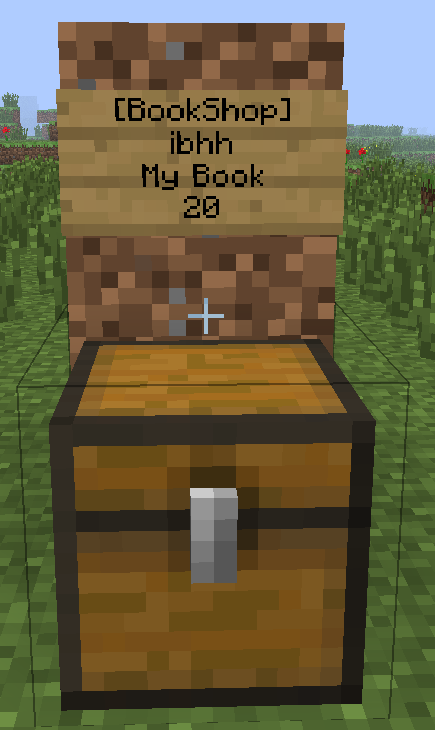
At the end it should look like this:
Permission nodes
Action Permission node
Create a shop BookShop.create
Create a shop of an other player BookShop.create.other
Sell books of other players BookShop.sell.other
Create a Adminshop BookShop.create.admin
Use the shop BookShop.use
Destroy own shop BookShop.create
Destroy shop of someone else or AdminShop BookShop.create.admin
Message to admins that someone created a shop BookShop.admin
Command Permission node Explanation
/BookShop setwelcomebook BookShop.setwelcomebook Sets a book which has every new player in the inventory
/BookShop removewelcomebook BookShop.removewelcomebook Unsets a book which has every new player in the inventory
/BookShop giveall BookShop.giveall Gives a book to every player who joined the server before
/BookShop give BookShop.give Gives a book to a player
/BookShop backupbook BookShop.backupbook Backups a book
/BookShop loadbook BookShop.loadbook Loads a book
/BookShop reload BookShop.reload Reloads the plugin
/BookShop debugfile BookShop.debugfile Turn the debugfile on and off
/BookShop internet BookShop.internet Turns the internet access on and off
/BookShop version BookShop.version Shows the current version of BookShop
/BookShop update BookShop.admin Updates the plugin to the latest vesrsion on dev.bukkit.org
/BookShop deletedebug BookShop.admin Deletes the debugfile to give you free space on the hdd
/BookShop log BookShop.admin Returns the current size of the debugfile
/BookShop toggle BookShop.admin Turns BookShop immediately off
/BookShop language <language> BookShop.admin Select the ingame language (by default english)
/BookShop help BookShop.help Returns all command which the player can execute
/BookShop showdebug BookShop.showdebug Shows you console messages ingame
Comment installer BookShop
A server on Paper or Spigot
The plugin runs on the server core for Minecraft 1.7.4–1.8.1; players do not need to install anything.
File goes into the plugins folder
Download the file BookShop.jar (113 KB) and put it into the server’s plugins folder.
Restart the server
On startup the plugin creates its own settings folder in plugins.
Use the “To server” button
On Millida Hosting, the button at the top of the page uploads the file to your server and restarts it for you.
Minecraft 1.8.1 runs on Java 8: with a different Java version the game may close right after launch.
Versions
Avec dépendances
| Minecraft | Loader | Fichier | Date | Actions |
|---|---|---|---|---|
| 1.7.4 | — | BookShopversion5.2113 Ko |
FAQ
Which Minecraft versions does BookShop work on?
There are files for 1.8.1, 1.7.4. The newest is 1.8.1.
Do players need to install BookShop?
No, the plugin goes only on the server, into the plugins folder: players do not need to download anything.
Which Java does BookShop need?
Minecraft 1.8.1 runs on Java 8. If the game closes right after launch, the usual cause is the wrong Java version in the profile settings.
Where can I download BookShop safely?
On this page: the file BookShop.jar (113 KB) is stored on Millida’s server, with no link shorteners. SHA-1 checksum: 34e8d3188fa02aac90192e21719bf1d9de85df73.
Avis
Soyez le premier à noter BookShop


