
Autocrafter Plugin pour Minecraft 1.7.4
Transformez les droppers en tables de fabrication automatiques alimentées par la redstone.
Autocrafter
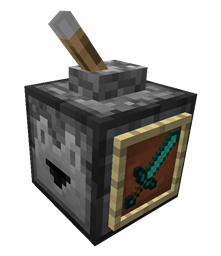
Autocrafter lets you turn a regular minecraft dropper into an automatic redstone-powered crafting table. By attaching an Item Frame to a Dropper and placing an item in the frame, it will attempt to craft and dispense a copy of that item every time it recieves a redstone signal.
Features
- Multi-world support
- per-recipe creation permissions.
Commands
- None
Permissions
- 'autocrafter.create.*' - players with this permission can place any item in the frame attached to a dropper.
Tutorial
Source Code & Development Builds
Source code is available on Github
Development builds of this project can be acquired at the provided continuous integration server. These builds have not been approved by the BukkitDev staff. Use them at your own risk.
Autocrafter Development Builds
Other Plugins
- Build-in-a-Box - self-constructing buildings that can be picked up and relocated.
- Scribe - Transfer enchantments from items to books using an anvil
- JukeLoop - Makes jukesboxes loop, rotate through nearby chests, activated by redstone and much more,
- EnhancedFishing - Adds tons of fishing enhancements including complete control over the bite chance.
- PotatoBombs - Allows players to craft poisonous potatoes into devastating and hillarious magical landmines.
- SilentAlarms - Makes note blocks silent except to select people, who can hear them at any distance.
- Saddlebags - Adds an inventory to saddled pigs.
- Compressors - Turn hoppers into 'block compressors'.
- SalvageSmelter - Allows furnaces to smelt down tools and armor.
Comment installer Autocrafter
A server on Paper or Spigot
The plugin runs on the server core for Minecraft 1.6.4–1.7.4; players do not need to install anything.
File goes into the plugins folder
Download the file Autocrafter-0.1.1.jar (29 KB) and put it into the server’s plugins folder.
Restart the server
On startup the plugin creates its own settings folder in plugins.
Use the “To server” button
On Millida Hosting, the button at the top of the page uploads the file to your server and restarts it for you.
Minecraft 1.7.4 runs on Java 8: with a different Java version the game may close right after launch.
Versions
Avec dépendances
| Minecraft | Loader | Fichier | Date | Actions |
|---|---|---|---|---|
| 1.7.2 | — | Autocrafter v0.1.129.1 Ko |
Avis
Soyez le premier à noter Autocrafter


