

xNICEx Mod pour Minecraft 1.20.1, 1.21.1
De belles améliorations créatives innovantes
 NeoForge
 Forge
ForgeÀ propos du mod xNICEx
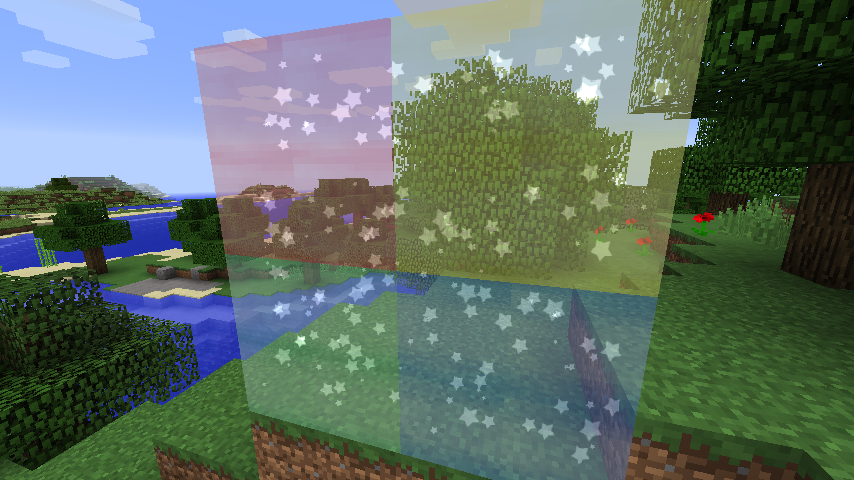
NICE est un mod de décoration. Il ajoute un certain nombre de blocs ressemblant à du verre fantaisie (des cylindres et des cubes pour l'instant) qui peuvent être remplis avec quatre types de systèmes de particules. C'est la première version du mod. D'autres décorations sont prévues à l'avenir. Ce mod est une coopération entre McJty et xVipstarx qui réalise le design artistique.
Actuellement, le mod possède deux blocs : un cylindre à particules et un bloc à particules. Chacun d'eux a deux variantes. Une verte et une bleue. Vous pouvez les fabriquer et les placer dans le monde. Pour assigner des particules, vous pouvez utiliser de la laine (pour la fumée), un diamant (pour les étincelles), un seau d'eau (pour les bulles) et un poisson (pour les poissons).
Comme dit précédemment, beaucoup d'autres effets sont prévus.
Comment installer xNICEx
With Millida Launcher
Install Millida Launcher
The launcher is free: download it at millida.net/launcher and sign in with any nickname.
Click “Install” on this page
The launcher opens and installs the mod for Minecraft 1.12.2–1.21.1 on Forge or NeoForge automatically.
Launch the game
A profile with it appears in the launcher: click “Play”.
Manually
Install Forge or NeoForge
The loader must match the game version of the mod file, for example Minecraft 1.21.1. After installing it, a separate profile appears in your launcher.
Download the file for your version
In the version list above, pick the file nice-1.21-5.0.0.jar (345 KB) for your game version and loader.
Put it in the mods folder
The folder is inside .minecraft (Windows: %appdata%\.minecraft\mods). If it does not exist, create it.
Launch the loader profile
Open “Mods” in the main menu: xNICEx should be in the list.
Minecraft 1.21.1 runs on Java 21: with a different Java version the game may close right after launch.
Versions
Avec dépendances
| Minecraft | Loader | Fichier | Date | Actions |
|---|---|---|---|---|
| 1.21.1 | NeoForge | Nice - 1.21-5.0.0345 Ko | ||
| 1.20.1 | Forge | Nice - 1.20-4.0.2322 Ko | ||
| 1.19.3 | Forge | Nice - 1.19-3.1.2322 Ko | ||
| 1.12.2 | — | Nice - 1.12-0.4.081.6 Ko | ||
| 1.12.2 | — | Nice - 1.12-0.3.0-alpha58.6 Ko |
FAQ
Which Minecraft versions does xNICEx work on?
There are files for 1.21.1, 1.20.1, 1.19.4, 1.19.3, 1.19.2, 1.12.2. The newest is 1.21.1.
Is xNICEx for Forge or Fabric?
There are files for Forge: 1.19.2–1.20.1 and for NeoForge: 1.21.1. There are no files for Fabric: a mod for another loader will not start.
Does xNICEx need other mods?
The author lists no required dependencies: the Forge or NeoForge loader is enough.
Which Java does xNICEx need?
Minecraft 1.21.1 runs on Java 21. If the game closes right after launch, the usual cause is the wrong Java version in the profile settings.
Where can I download xNICEx safely?
On this page: the file nice-1.21-5.0.0.jar (345 KB) is stored on Millida’s server, with no link shorteners. SHA-1 checksum: 97e9cb10a736856fe16a655c75b2e7ab9d964188.
Avis
Soyez le premier à noter xNICEx


