

Vanillin Mod pour Minecraft 1.20.1, 1.21.1
Rendu instancié pour les entités et les entités de bloc via Flywheel
 NeoForge
 Fabric
 Forge
ForgeHow it Works
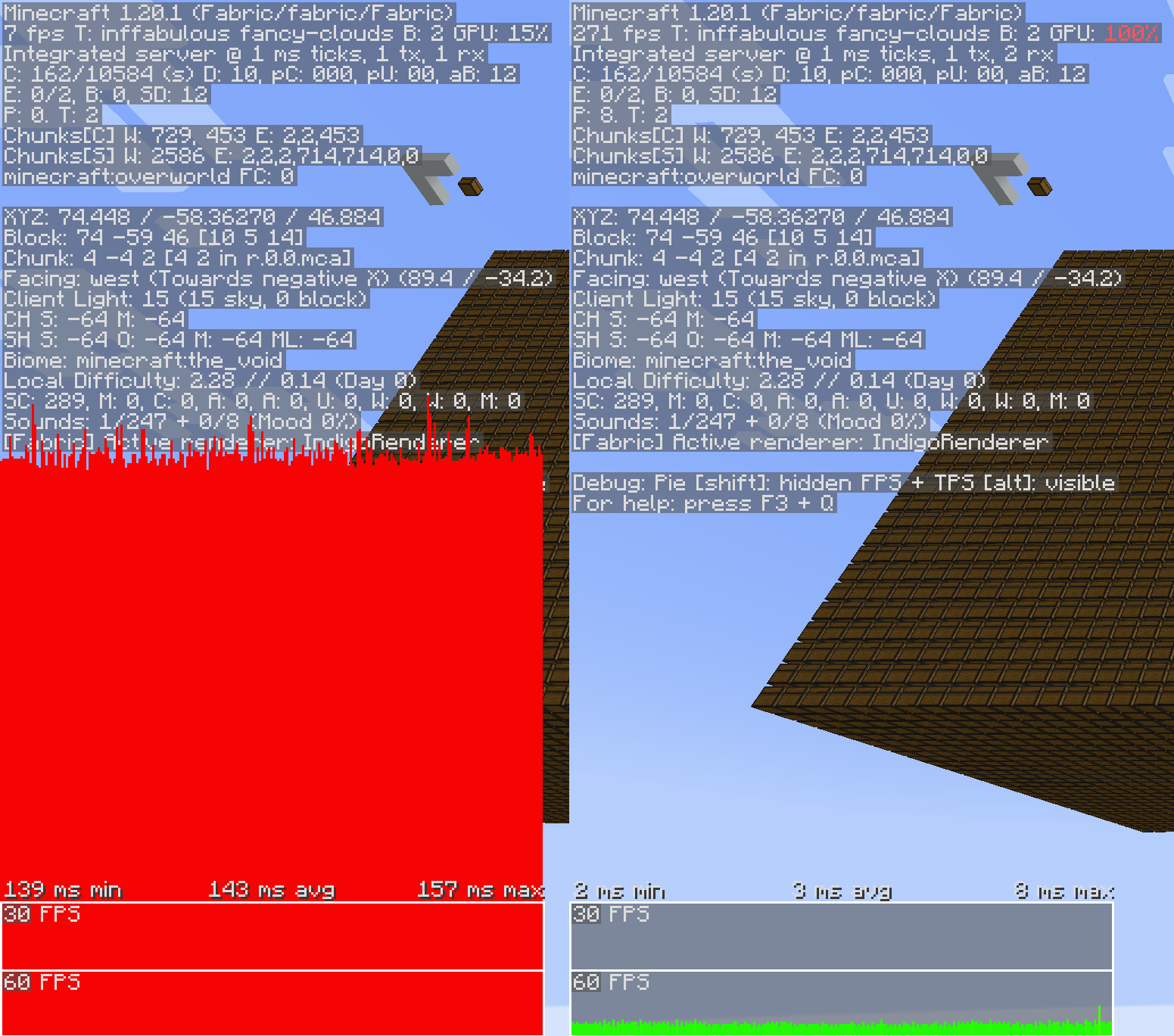
Vanillin optimizes Minecraft by implementing instanced rendering for entities and block entities through Flywheel.
With Flywheel doing the heavy lifting, Vanillin is able to achieve significant performance improvements on all the game objects it affects. The end result is that ten thousand of something have the same frame time impact as one of something.
Shaders
Flywheel 1.0, and therefore Vanillin, is currently incompatible with shaders. Work is underway to make first party compat between Flywheel and shaders a reality, but no time estimates can be made.
Optimizations
Vanillin does not optimize everything by default. Special support needs to be built for each type of entity and block entity. Those that are currently optimized are listed below.
✅ = Stable, enabled by default.
🧪 = Experimental, enabled behind a config.
❌ = Temporarily disabled entirely due to crashes/compat/etc.
Block Entities
- ✅ Chests
- ✅ Shulker boxes
- ✅ Bells
- ❌ Signs
Entities
- ✅ Minecarts (and all variants)
- 🧪 Items
- 🧪 Item Displays
- 🧪 Block Displays
Config
To enable experimental optimizations, edit the config file:
Forge/NeoForge
config/vanillin.toml
[entities] #Allowed Values: DEFAULT, DISABLE, FORCE_ENABLE
- "minecraft:item" = "DEFAULT"
+ "minecraft:item" = "FORCE_ENABLE"
Fabric
config/vanillin.json
{ "entities": {
- "minecraft:item": "default",
+ "minecraft:item": "force_enable", } }
Alternatively, you can disable optimizations that you find to be causing conflict:
Forge/NeoForge
config/vanillin.toml
[entities] #Allowed Values: DEFAULT, DISABLE, FORCE_ENABLE
- "minecraft:minecart" = "DEFAULT"
+ "minecraft:minecart" = "DISABLE"
Fabric
config/vanillin.json
{ "entities": {
- "minecraft:minecart": "default",
+ "minecraft:minecart": "disable", } }
Comment installer Vanillin
With Millida Launcher
Install Millida Launcher
The launcher is free: download it at millida.net/launcher and sign in with any nickname.
Click “Install” on this page
The launcher opens and installs the mod for Minecraft 1.20.1–1.21.1 on Fabric, Forge or NeoForge automatically, together with its dependencies: Fabric API.
Launch the game
A profile with it appears in the launcher: click “Play”.
Manually
Install Fabric, Forge or NeoForge
The loader must match the game version of the mod file, for example Minecraft 1.21.1. After installing it, a separate profile appears in your launcher.
Download the file for your version
In the version list above, pick the file vanillin-neoforge-1.21.1-1.1.3.jar (850 KB) for your game version and loader.
Put it in the mods folder
The folder is inside .minecraft (Windows: %appdata%\.minecraft\mods). If it does not exist, create it. Required dependencies go there too: Fabric API.
Launch the loader profile
Open “Mods” in the main menu: Vanillin should be in the list.
Vanillin works on the player’s side only: there is no need to install it on a server.
Minecraft 1.21.1 runs on Java 21: with a different Java version the game may close right after launch.
Versions
Avec dépendances
| Minecraft | Loader | Fichier | Date | Actions |
|---|---|---|---|---|
| 1.20.1 | Forge | 1.20.11 Mo | ||
| 1.20.1 | Fabric | 1.20.1856 Ko 1 | ||
| 1.21.1 | NeoForge | 1.21.1850 Ko 1 | ||
| 1.21.1 | Fabric | 1.21.1852 Ko | ||
| 1.21.1 | NeoForge | 1.21.1902 Ko | ||
| 1.21.1 | Fabric | 1.21.1904 Ko | ||
| 1.20.1 | Fabric | 1.20.1908 Ko | ||
| 1.21.1 | Fabric | 1.21.1901 Ko |
Ce qu'il faut pour l'exécuter
- Fabric APIobligatoire
FAQ
Which Minecraft versions does Vanillin work on?
There are files for 1.21.1, 1.20.1. The newest is 1.21.1.
What does Vanillin need to work?
Required: Fabric API. Without it the mod will not start: dependencies go into the same mods folder.
Do I need to install Vanillin on a server?
No. Vanillin works on the player’s side only: there is no need to install it on a server.
Which Java does Vanillin need?
Minecraft 1.21.1 runs on Java 21. If the game closes right after launch, the usual cause is the wrong Java version in the profile settings.
Where can I download Vanillin safely?
On this page: the file vanillin-neoforge-1.21.1-1.1.3.jar (850 KB) is stored on Millida’s server, with no link shorteners. SHA-1 checksum: fae8bb9f13cd9d086949b9aca85956bb6fa47f56.
Avis
Soyez le premier à noter Vanillin


