
Transparent Mod pour Minecraft 1.20.1, 1.21.5
Permet aux packs de ressources de faire en sorte que certaines entités prennent en charge la transparence.
 Fabric
 Quilt
Quilt NeoForge
 Forge
ForgeÀ propos du mod Transparent
Transparent permet aux packs de ressources de donner à certaines entités des textures avec des pixels transparents (ou translucides). Pour l'utiliser, il suffit d'installer le mod et d'utiliser ou de créer un pack de ressources qui donne à l'une des entités prises en charge une texture transparente.
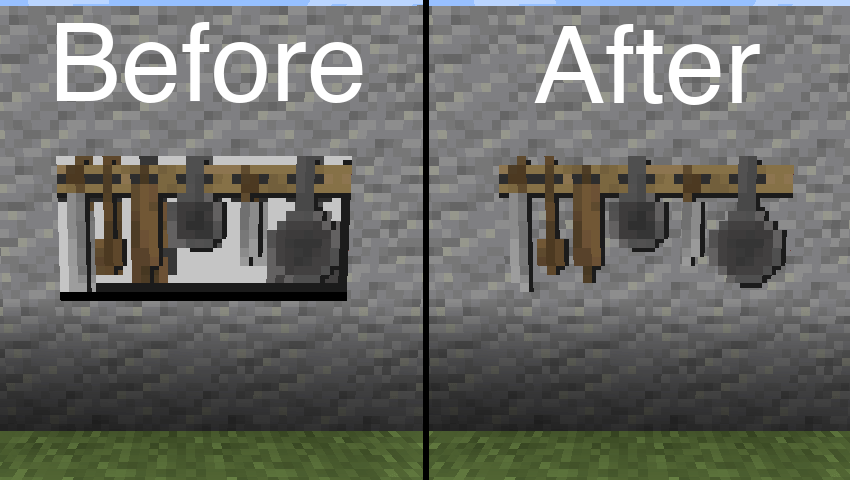
Pack de ressources utilisé dans l'image ci-dessus : BwW Texturepack.
Prend officiellement en charge le mod Paintings++ !
Entités prises en charge
- Armor Stand (1.19.4+)
- End Crystal
- End Crystal Beam (1.21+)
- Item Frame
- Painting
- Player Cape (1.21+)
- Player Armor (1.21+)
- Beacon Beam (désactivé par défaut)
Si vous souhaitez qu'une autre entité soit prise en charge par ce mod, faites-le moi savoir sur Discord ou dans les GitHub Issues.
Configuration
Pour modifier la configuration par défaut, collez le contenu du fichier json suivant dans un fichier de votre pack de ressources situé à l'emplacement /assets/transparent/transparent.json.
{ "armorstand": true, "beaconbeam": false, "endcrystal": true, "endcrystalbeam": true, "itemframe": true, "painting": true, "playercape": true, "playerarmor": true }
Signalez tout problème sur GitHub. Discutez sur Discord dans le canal transparent.
Soutenez le développement de mes mods sur Ko-fi.
Comment installer Transparent
With Millida Launcher
Install Millida Launcher
The launcher is free: download it at millida.net/launcher and sign in with any nickname.
Click “Install” on this page
The launcher opens and installs the mod for Minecraft 1.20.1–1.21.5 on Fabric, Forge, NeoForge or Quilt automatically.
Launch the game
A profile with it appears in the launcher: click “Play”.
Manually
Install Fabric, Forge, NeoForge or Quilt
The loader must match the game version of the mod file, for example Minecraft 1.21.5. After installing it, a separate profile appears in your launcher.
Download the file for your version
In the version list above, pick the file transparent-fabric-21.5.0.jar (35 KB) for your game version and loader.
Put it in the mods folder
The folder is inside .minecraft (Windows: %appdata%\.minecraft\mods). If it does not exist, create it.
Launch the loader profile
Open “Mods” in the main menu: Transparent should be in the list.
Minecraft 1.21.5 runs on Java 21: with a different Java version the game may close right after launch.
Versions
Avec dépendances
| Minecraft | Loader | Fichier | Date | Actions |
|---|---|---|---|---|
| 1.21.5 | Fabric, Quilt | [Fabric 1.21.5] v21.5.035.3 Ko | ||
| 1.21.5 | NeoForge | [NeoForge 1.21.5] v21.5.033.6 Ko | ||
| 1.20.6 | Forge | [Forge 1.20.6] v20.6.125.8 Ko | ||
| 1.20.1 | Quilt | [Quilt 1.20.1] v8.0.129.4 Ko |
FAQ
Which Minecraft versions does Transparent work on?
There are files for 1.21.5, 1.20.6, 1.20.1. The newest is 1.21.5.
Is Transparent for Forge or Fabric?
There are files for Fabric: 1.21.5, for Forge: 1.20.6, for NeoForge: 1.21.5 and for Quilt: 1.20.1–1.21.5.
Does Transparent need other mods?
The author lists no required dependencies: the Fabric, Forge, NeoForge or Quilt loader is enough.
Which Java does Transparent need?
Minecraft 1.21.5 runs on Java 21. If the game closes right after launch, the usual cause is the wrong Java version in the profile settings.
Where can I download Transparent safely?
On this page: the file transparent-fabric-21.5.0.jar (35 KB) is stored on Millida’s server, with no link shorteners. SHA-1 checksum: b1ad3807de859e41029047644e38377a0f023716.
Avis
Soyez le premier à noter Transparent


