

Tool Stats Mod pour Minecraft 1.16.5, 26.3
Fournit des informations supplémentaires dans les infobulles des objets
 NeoForge
 Fabric
 Forge
ForgeÀ propos du mod Tool Stats
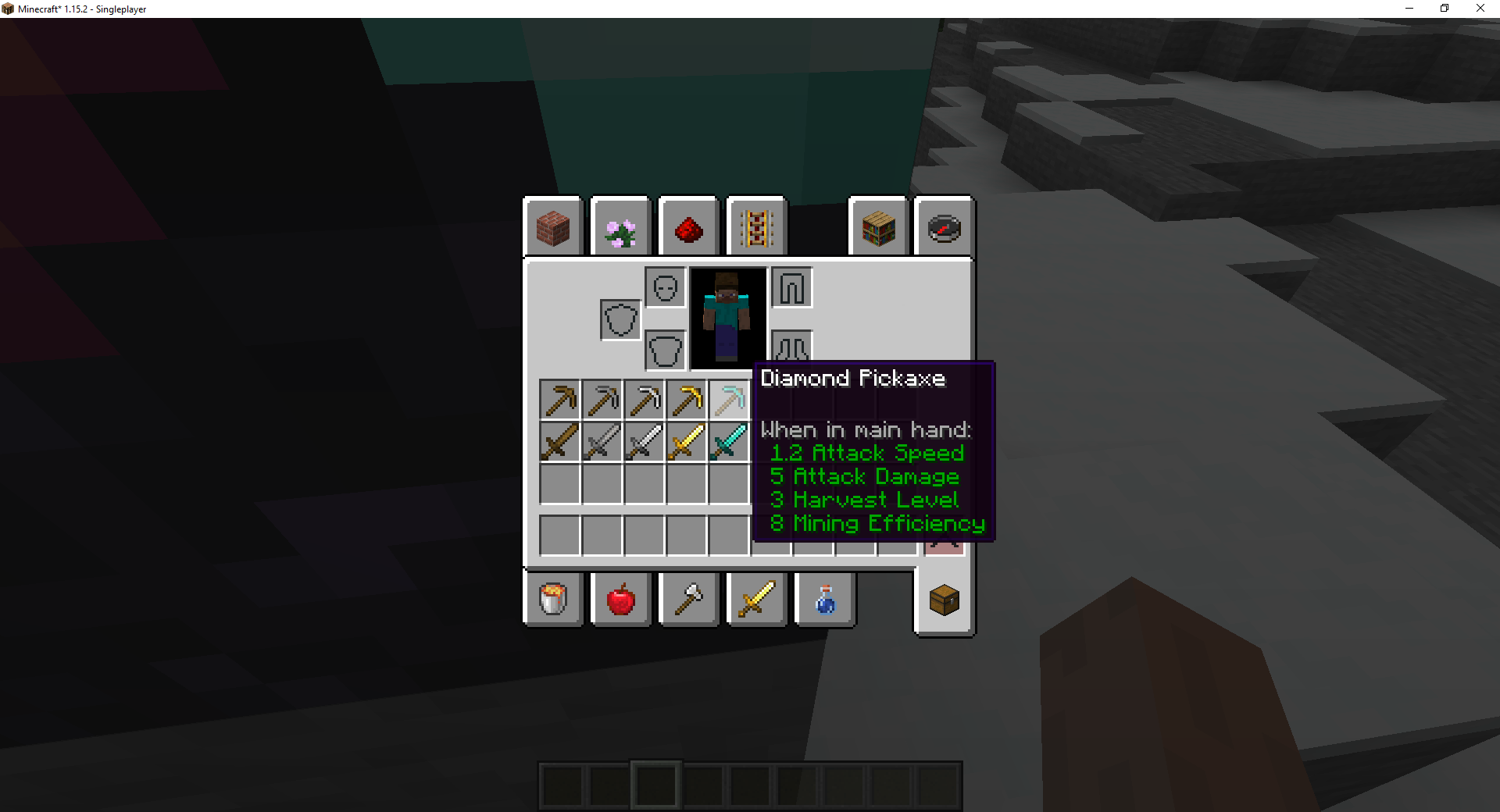
Ce mod ajoute des statistiques d'outils supplémentaires à l'infobulle des différents équipements dans Minecraft. Le mod est configurable, ce qui permet de désactiver certaines informations.
Fonctionnalités actuelles
- Niveau de récolte (uniquement sur les objets à palier comme la pioche)
- Efficacité de minage (uniquement sur les objets à palier comme la pioche)
- Enchantabilité (affichée sur tous les objets enchantables dans l'interface de la table d'enchantement)
- Durabilité de l'outil (affichée sur les outils lorsqu'ils sont endommagés)
Vous aimez le mod et souhaitez me soutenir ?
- Suivez-moi sur Twitter
- Rejoignez mon Discord
- Soutenez-moi sur Patreon
- Découvrez mon site web
Logo par Lorc sur Game Icons et sous licence CC By 3.0.
Ce projet est sponsorisé par Nodecraft. Utilisez le code DARKHAX pour 30 % de réduction sur votre premier mois de service !
Comment installer Tool Stats
With Millida Launcher
Install Millida Launcher
The launcher is free: download it at millida.net/launcher and sign in with any nickname.
Click “Install” on this page
The launcher opens and installs the mod for Minecraft 1.16.5–26.3 on Fabric, Forge or NeoForge automatically, together with its dependencies: Fabric API, Prickle, Bookshelf.
Launch the game
A profile with it appears in the launcher: click “Play”.
Manually
Install Fabric, Forge or NeoForge
The loader must match the game version of the mod file, for example Minecraft 26.3. After installing it, a separate profile appears in your launcher.
Download the file for your version
In the version list above, pick the file ToolStats-neoforge-MC26.3-26.3.0.1.jar (23 KB) for your game version and loader.
Put it in the mods folder
The folder is inside .minecraft (Windows: %appdata%\.minecraft\mods). If it does not exist, create it. Required dependencies go there too: Fabric API, Prickle, Bookshelf.
Launch the loader profile
Open “Mods” in the main menu: Tool Stats should be in the list.
On a server
A server on Fabric, Forge or NeoForge
The mod only works on a server with the same loader and game version, for example 26.3.
File goes into the server’s mods folder
Stop the server, put the mod file into the mods folder and start the server again.
Use the “To server” button
On Millida Hosting, the button at the top of the page uploads the file to your server and restarts it for you.
Versions
Avec dépendances
| Minecraft | Loader | Fichier | Date | Actions |
|---|---|---|---|---|
| 26.3 | NeoForge | 26.322.8 Ko | ||
| 26.3 | Fabric | 26.323.3 Ko 3 | ||
| 26.1 | Fabric | 26.123 Ko | — | |
| 1.16.5 | Forge | 1.16.510.4 Ko | — |
Ce qu'il faut pour l'exécuter
- Fabric APIobligatoire
- Prickleobligatoire
- Bookshelfobligatoire
FAQ
Which Minecraft versions does Tool Stats work on?
There are files for 26.3, 26.1.2, 26.1.1, 26.1, 1.16.5. The newest is 26.3.
Is Tool Stats for Forge or Fabric?
There are files for Fabric: 26.1–26.3, for Forge: 1.16.5 and for NeoForge: 26.3.
What does Tool Stats need to work?
Required: Fabric API, Prickle, Bookshelf. Without them the mod will not start: dependencies go into the same mods folder.
Does Tool Stats work on a server?
Yes. Tool Stats works both in singleplayer and on a server.
Where can I download Tool Stats safely?
On this page: the file ToolStats-neoforge-MC26.3-26.3.0.1.jar (23 KB) is stored on Millida’s server, with no link shorteners. SHA-1 checksum: 5e56b7354fbe9a095ca8daa8b27bb37b69114945.
Avis
Soyez le premier à noter Tool Stats


