
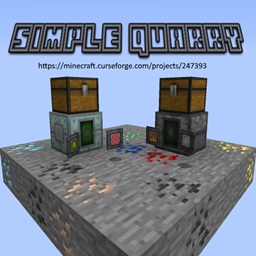
Simple Quarry Mod pour Minecraft 1.20.1, 1.12.2
Ajoute une carrière simple pour miner une zone de blocs
 NeoForge
 Forge
ForgeSimple Quarry adds:
- Fueled Quarry
- Powered Quarry
WARNING:
- Don't place 2+ quarries in 1 chunk, they are going to explode!
- Mod requires
HammerLib
How Fueled Quarry works:
- It uses any fuel to mine.
- 1 Coal (or Charcoal) can mine 96 blocks.
- Quarry mines only 1 chunk.
- No Upgrades can be applied.
How Powered Quarry works:
- It uses either RF or fuel to operate.
- Provide at least 200 RF/tick for it to work.
- Powered quarry also mines only 1 chunk.
- Can hold up to 5 Upgrades
Both Quarrys will output the collected item into an adjacent inventory (i.e. Chest).
Otherwise they will be dropped on the ground.
Quarry Recipes
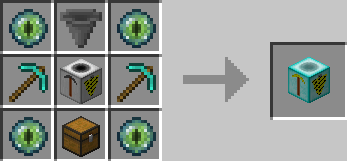
Fueled Quarry recipe:
Default Powered Quarry recipe:
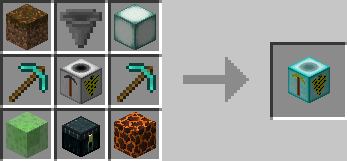
Easy Powered Quarry recipe:
Use the config file to choose between the recipes.
Quarry GUIs
Fueled Quarry GUI
Powered Quarry GUI
Upgrades
With Version "9r" we implemented a new Upgrade System for the Powered Quarry!
Special thanks:
- Ircmaan for the idea and motivation. - EndermanWhoSearchTheBeast for the sprites.
Permissions:
- You can use this mod in your modpack.
- You are not allowed to re-publish this mod to other sites without providing a CurseForge download link and my permission (PM to
Zeitheron, or via Discord)
- You are not allowed to include this (or any other mods of DragonForge team) in your own mod. Building addons, however, is allowed, but a friendly PM would be good.
Note:
- The only supported version of minecraft is the latest one that this mod exists for. DO NOT ASK TO DOWNGRADE!
Want to discuss anything? Need help with APIs?
Join the discord server and follow Zeitheron on Twitter!
If you would like to support my work, you can become a patron via Patreon.
Comment installer Simple Quarry
With Millida Launcher
Install Millida Launcher
The launcher is free: download it at millida.net/launcher and sign in with any nickname.
Click “Install” on this page
The launcher opens and installs the mod for Minecraft 1.9.4–1.21.4 on Forge or NeoForge automatically.
Launch the game
A profile with it appears in the launcher: click “Play”.
Manually
Install Forge or NeoForge
The loader must match the game version of the mod file, for example Minecraft 1.21.4. After installing it, a separate profile appears in your launcher.
Download the file for your version
In the version list above, pick the file SimpleQuarry-1.21.4-21.4.1.jar (178 KB) for your game version and loader.
Put it in the mods folder
The folder is inside .minecraft (Windows: %appdata%\.minecraft\mods). If it does not exist, create it.
Launch the loader profile
Open “Mods” in the main menu: Simple Quarry should be in the list.
Minecraft 1.21.4 runs on Java 21: with a different Java version the game may close right after launch.
Versions
Avec dépendances
| Minecraft | Loader | Fichier | Date | Actions |
|---|---|---|---|---|
| 1.21.4 | NeoForge | [1.21.4] Simple Quarry - 21.4.1178 Ko 1 | ||
| 1.20.1 | Forge | [1.20.1] Simple Quarry - 20.1.6152 Ko 1 | ||
| 1.21 | NeoForge | [1.21] Simple Quarry - 21.0.0164 Ko | ||
| 1.12.2 | — | [1.12.2] Simple Quarry - 12.3.29160 Ko | ||
| 1.9.4 | — | Simple Quarry - 1.9.4_1.0.0136 Ko |
Avis
Soyez le premier à noter Simple Quarry


