

Pineapple Delight Mod pour Minecraft 1.20.1, 1.21.1
Faites des desserts à l'ananas et dégustez des ananas ensemble !
 NeoForge
 Fabric
 Forge
ForgeÀ propos du mod Pineapple Delight
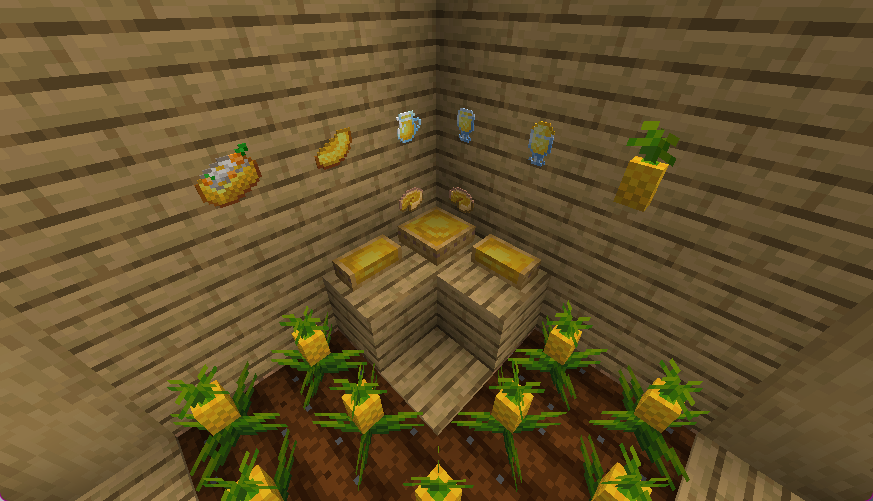
Pineapple Delight is an another addon for Farmers Delight ! That add pineapple and desserts about pineapple !
Start by finding some wild pineapples and collecting pineapples seedlings, than grow more pineapples !

You can feed the dog with pineapples ! And why not do that? It is not recommended to give the dog pineapple in reality ...
Let's make desserts and taste pineapples together !

Screenshots
Comment installer Pineapple Delight
With Millida Launcher
Install Millida Launcher
The launcher is free: download it at millida.net/launcher and sign in with any nickname.
Click “Install” on this page
The launcher opens and installs the mod for Minecraft 1.20.1–1.21.1 on Fabric, Forge or NeoForge automatically.
Launch the game
A profile with it appears in the launcher: click “Play”.
Manually
Install Fabric, Forge or NeoForge
The loader must match the game version of the mod file, for example Minecraft 1.21.1. After installing it, a separate profile appears in your launcher.
Download the file for your version
In the version list above, pick the file pineapple_delight-1.1.4-1.21.1-neoforge.jar (93 KB) for your game version and loader.
Put it in the mods folder
The folder is inside .minecraft (Windows: %appdata%\.minecraft\mods). If it does not exist, create it.
Launch the loader profile
Open “Mods” in the main menu: Pineapple Delight should be in the list.
On a server
A server on Fabric, Forge or NeoForge
The mod only works on a server with the same loader and game version, for example 1.21.1.
File goes into the server’s mods folder
Stop the server, put the mod file into the mods folder and start the server again.
Use the “To server” button
On Millida Hosting, the button at the top of the page uploads the file to your server and restarts it for you.
Minecraft 1.21.1 runs on Java 21: with a different Java version the game may close right after launch.
Versions
Avec dépendances
| Minecraft | Loader | Fichier | Date | Actions |
|---|---|---|---|---|
| 1.21 | Fabric | 1.2196.7 Ko | ||
| 1.21.1 | NeoForge | 1.21.192.8 Ko 2 | ||
| 1.20.1 | Fabric | 1.20.1643 Ko 2 | ||
| 1.20.1 | Forge | 1.20.1656 Ko | ||
| 1.20.1 | Forge | 1.20.198.5 Ko | ||
| 1.20.1 | Fabric | 1.20.199.7 Ko | ||
| 1.21.1 | NeoForge | 1.21.192.5 Ko | ||
| 1.21.1 | Fabric | 1.21.196.4 Ko |
FAQ
Which Minecraft versions does Pineapple Delight work on?
There are files for 1.21.1, 1.21, 1.20.1. The newest is 1.21.1.
Is Pineapple Delight for Forge or Fabric?
There are files for Fabric: 1.20.1–1.21.1, for Forge: 1.20.1 and for NeoForge: 1.21.1.
Does Pineapple Delight need other mods?
The author lists no required dependencies: the Fabric, Forge or NeoForge loader is enough.
Does Pineapple Delight work on a server?
Yes. Pineapple Delight works both in singleplayer and on a server.
Which Java does Pineapple Delight need?
Minecraft 1.21.1 runs on Java 21. If the game closes right after launch, the usual cause is the wrong Java version in the profile settings.
How do I download Pineapple Delight?
With Millida Launcher: it installs Pineapple Delight into a modpack by itself, for the right game version and loader. The launcher is free.
Avis
Soyez le premier à noter Pineapple Delight


