
Multi-Piston Mod pour Minecraft 1.20.1, 1.21.1
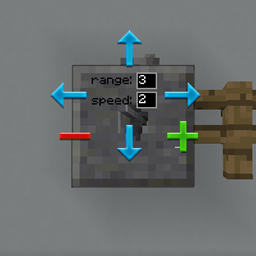
Bloc piston multidirectionnel
 NeoForge
 Forge
ForgeÀ propos du mod Multi-Piston
Multi-piston est un mod créé par la Ldt-team qui crée et maintient également minecolonies, structurize, blockout et armory.
Multi-piston ajoute un bloc multipiston au jeu qui vous permet d'aspirer n'importe quel bloc depuis une direction définie et de le recracher dans n'importe quelle direction avec une vitesse et une portée définissables
Recette :
Horizontal :
Vertical :
Pont :
Configuration :
FAQ :
Comment fonctionne l'interface graphique ?
- Faites un clic droit sur le bloc pour ouvrir l'interface graphique.
- Faites un clic droit sur la direction d'entrée et un clic gauche sur la direction de sortie
- Modifiez la portée et la vitesse, quittez l'interface graphique via le bouton échap.
Comment puis-je augmenter la portée ?
- La portée maximale est de 10, jusqu'à ce qu'elle atteigne un autre type de bloc
Puis-je augmenter la vitesse ?
- Seulement jusqu'à 3, pourrait en supporter plus à l'avenir.
Puis-je changer le son ?
- Pourrait également être ajouté à l'avenir.
Fonctionne-t-il avec la redstone ?
- Oui, il fonctionne avec les boutons, les leviers et toute entrée de redstone comme les pistons normaux.
Comment installer Multi-Piston
With Millida Launcher
Install Millida Launcher
The launcher is free: download it at millida.net/launcher and sign in with any nickname.
Click “Install” on this page
The launcher opens and installs the mod for Minecraft 1.18.2–1.21.1 on Forge or NeoForge automatically.
Launch the game
A profile with it appears in the launcher: click “Play”.
Manually
Install Forge or NeoForge
The loader must match the game version of the mod file, for example Minecraft 1.21.1. After installing it, a separate profile appears in your launcher.
Download the file for your version
In the version list above, pick the file multipiston-1.2.58-1.21.1.jar (33 KB) for your game version and loader.
Put it in the mods folder
The folder is inside .minecraft (Windows: %appdata%\.minecraft\mods). If it does not exist, create it.
Launch the loader profile
Open “Mods” in the main menu: Multi-Piston should be in the list.
Minecraft 1.21.1 runs on Java 21: with a different Java version the game may close right after launch.
Versions
Avec dépendances
| Minecraft | Loader | Fichier | Date | Actions |
|---|---|---|---|---|
| 1.20.1 | Forge | multipiston-1.20-0.0.47-snapshot.jar38.6 Ko 10 | ||
| 1.21 | NeoForge | multipiston-1.2.58-1.21.1.jar33.3 Ko 9 | ||
| 1.21 | NeoForge | multipiston-1.2.55-1.21.1-snapshot.jar32.6 Ko | ||
| 1.20.1 | NeoForge, Forge | multipiston-1.20-1.2.43-RELEASE.jar37.8 Ko | ||
| 1.20.4 | NeoForge | multipiston-1.20.4-1.2.37-ALPHA-universal.jar33 Ko | ||
| 1.20.1 | Forge | multipiston-1.20-1.2.32-ALPHA.jar37.8 Ko | ||
| 1.18.2 | — | multi-piston-1.18.2-1.2.13-ALPHA.jar50.1 Ko |
FAQ
Which Minecraft versions does Multi-Piston work on?
There are files for 1.21.1, 1.21, 1.20.4, 1.20.1, 1.20, 1.18.2. The newest is 1.21.1.
Is Multi-Piston for Forge or Fabric?
There are files for Forge: 1.20–1.20.1 and for NeoForge: 1.20–1.21.1. There are no files for Fabric: a mod for another loader will not start.
Does Multi-Piston need other mods?
The author lists no required dependencies: the Forge or NeoForge loader is enough.
Which Java does Multi-Piston need?
Minecraft 1.21.1 runs on Java 21. If the game closes right after launch, the usual cause is the wrong Java version in the profile settings.
Where can I download Multi-Piston safely?
On this page: the file multipiston-1.2.58-1.21.1.jar (33 KB) is stored on Millida’s server, with no link shorteners. SHA-1 checksum: 2b63be739da24247328e4052ec91c928230d0390.
Avis
Soyez le premier à noter Multi-Piston


