

MobHealthBar Mod pour Minecraft 26.3
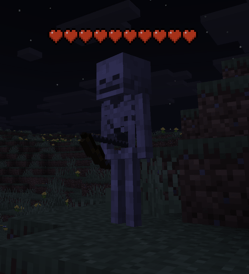
Ce mod ajoute les barres de vie classiques de Minecraft au-dessus des mobs, montrant leur vie restante.
 Quilt
Quilt Forge
Forge NeoForge
 Fabric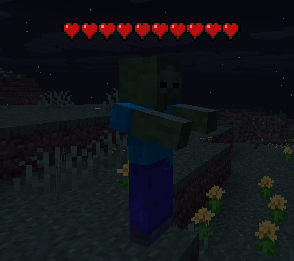
✨Features ✨
Vanilla Hearts in 3D Full, half, and empty hearts rendered above mob heads using the actual vanilla heart sprites. Poison, wither, and absorption variants all included.
Smooth Fade-In & Fade-Out Health bars don't pop in or vanish. They ease in and fade out for a polished, natural feel.
Smart Visibility Hearts appear when you damage any entity or look at a hostile mob. Hostile mobs stay visible for ~20 seconds, friendly entities for ~7 seconds.
Damage Flash & Shake When a mob takes a hit, hearts flash and shake just like vanilla.
Always Faces You Billboard rendering keeps the hearts oriented toward the camera at all times, no matter what angle you're viewing from.
Works on Everything Zombies, cows, bosses, villagers - if it has health, it gets hearts.
Pixel-Perfect Vanilla Logic Heart fill matches vanilla's HUD exactly. A mob with 0.1 HP still shows a half heart.
Full Config Menu Access configurations through mod menu OR set config keybind in vanilla keybind menu.
🎮 How It Works 🎮
Hit a mob - hearts fade in above its head showing current health
Look at a hostile mob - hearts appear automatically, no hit needed
Watch them update - hearts reflect real-time health changes with damage flash on each hit
Hearts fade away - after the timer expires, they smoothly disappearNo keybinds, no config screens to open, no setup. Install and play.
❓ FAQ❓
Does this need to be installed on the server? No, this is a purely client side mod. Install it on your client for use on any server.
Does it conflict with other health bar mods? It shouldn't. This mod uses a render layer on entities, not a HUD overlay.
Can I include this in my modpack? Yes.
Where do I report bugs? Open an issue on the GitHub repository. Please include your loader, MC version, and a latest.log
Comment installer MobHealthBar
With Millida Launcher
Install Millida Launcher
The launcher is free: download it at millida.net/launcher and sign in with any nickname.
Click “Install” on this page
The launcher opens and installs the mod for Minecraft 26.3 on Fabric, Forge, NeoForge or Quilt automatically.
Launch the game
A profile with it appears in the launcher: click “Play”.
Manually
Install Fabric, Forge, NeoForge or Quilt
The loader must match the game version of the mod file, for example Minecraft 26.3. After installing it, a separate profile appears in your launcher.
Download the file for your version
In the version list above, pick the file mobhealthbar-quilt-26.3-1.1.0.jar (71 KB) for your game version and loader.
Put it in the mods folder
The folder is inside .minecraft (Windows: %appdata%\.minecraft\mods). If it does not exist, create it.
Launch the loader profile
Open “Mods” in the main menu: MobHealthBar should be in the list.
Versions
Avec dépendances
| Minecraft | Loader | Fichier | Date | Actions |
|---|---|---|---|---|
| 26.3 | Quilt | mobhealthbar-quilt-26.3-1.1.0.jar70.6 Ko | ||
| 26.3 | Forge | mobhealthbar-forge-26.3-1.1.0.jar70 Ko 6 | ||
| 26.3 | NeoForge | mobhealthbar-neoforge-26.3-1.1.0.jar70.1 Ko 2 | ||
| 26.3 | Fabric | mobhealthbar-fabric-26.3-1.1.0.jar70.5 Ko 38 |
FAQ
Which Minecraft versions does MobHealthBar work on?
Only Minecraft 26.3: there are no files for other versions.
Is MobHealthBar for Forge or Fabric?
There are files for Fabric: 26.3, for Forge: 26.3, for NeoForge: 26.3 and for Quilt: 26.3.
Where can I download MobHealthBar safely?
On this page: the file mobhealthbar-quilt-26.3-1.1.0.jar (71 KB) is stored on Millida’s server, with no link shorteners. SHA-1 checksum: c8b1acd431154e9e62b070b3c6cf61f7a64dddca.
Avis
Soyez le premier à noter MobHealthBar


