
Left Hanging Mod pour Minecraft 1.20.1, 1.21.1
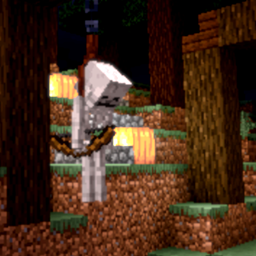
Ce mod ajoute un nœud décoratif dans lequel vous pouvez piéger des entités pour décorer vos champs et/ou votre maison !
 NeoForge
 Fabric
 Quilt
Quilt Forge
ForgeLeft Hanging
Left Hanging is a decorative mod themed around Halloween
Disclaimer
This mod has its full intensions to be used for decorative purposes.
This mod is themed around HALLOWEEN & HALLOWEEN DECOR.
This mod does not engage politically.
Files
FORGE : click here FABRIC : click here
Added to the game are :
- A Noose Block
- A Noose Item
- A Noose Mechanic
Nooses can be crafted with leads:
- Undead Entities will NOT be damage and can be used as decoration.
- Entities that are not undead will take Damage
- Nooses are traps at their core, and Entities have to walk in to them for them to be caught
Check out the config to change the damage values and wether or not entities receive damage or not.
Entities that are affected by the noose are stored in a json file in data/hangman/noose_entities/.
Datapacks can be created to add onto the list and allow for modded entities to be strung up too.
Fan made resource pack : new noose model >
https://legacy.curseforge.com/minecraft/texture-packs/better-noose
For Issue and error reporting, please use the issues tab up top. You can always try and contact me trough Discord for suggestions or help with issues
Comment installer Left Hanging
With Millida Launcher
Install Millida Launcher
The launcher is free: download it at millida.net/launcher and sign in with any nickname.
Click “Install” on this page
The launcher opens and installs the mod for Minecraft 1.17.1–1.21.11 on Fabric, Forge, NeoForge or Quilt automatically.
Launch the game
A profile with it appears in the launcher: click “Play”.
Manually
Install Fabric, Forge, NeoForge or Quilt
The loader must match the game version of the mod file, for example Minecraft 1.21.11. After installing it, a separate profile appears in your launcher.
Download the file for your version
In the version list above, pick the file hangman-neoforge-1.21.11-7.0.0.jar (190 KB) for your game version and loader.
Put it in the mods folder
The folder is inside .minecraft (Windows: %appdata%\.minecraft\mods). If it does not exist, create it.
Launch the loader profile
Open “Mods” in the main menu: Left Hanging should be in the list.
Minecraft 1.21.11 runs on Java 21: with a different Java version the game may close right after launch.
Versions
Avec dépendances
| Minecraft | Loader | Fichier | Date | Actions |
|---|---|---|---|---|
| 1.21.11 | NeoForge | LeftHanging-neo-1.21.11-7.0.0190 Ko | ||
| 1.21.11 | Fabric, Quilt | LeftHanging-fabric-1.21.11-7.0.0188 Ko | ||
| 1.21.5 | NeoForge | Left Hanging-neo-1.21.5-6.0.1190 Ko | ||
| 1.21.5 | Fabric, Quilt | Left Hanging-fabric-1.21.5-6.0.1189 Ko | ||
| 1.21 | Forge | LeftHanging-forge-1.21-6.0.0.jar184 Ko | ||
| 1.20.1 | NeoForge, Forge | LeftHanging-forge-1.20.1-6.0.0.jar184 Ko | ||
| 1.19.2 | Quilt | LeftHanging-quilt-1.19.2-4.3.1.0.jar48.8 Ko | ||
| 1.17.1 | — | hangman-1.17.1-1.0.0.2.jar34.7 Ko |
Avis
Soyez le premier à noter Left Hanging


