

Item Collectors Mod pour Minecraft 1.12.2, 26.3
Item Collectors ajoute des Collectors qui collectent les objets dans une portée spécifiée !
 NeoForge
 Fabric
 Quilt
Quilt Forge
ForgeÀ propos du mod Item Collectors
Item Collectors adds Collectors which collect items in a specified range! Item Collectors range can be changed and items can be whitelisted or blacklisted!

Content:
#### Basic Item Collector
- The Basic Item Collector has a range of up to 5 blocks!
- Right-click a Basic Item Collector to open its GUI
Recipe

#### Advanced Item Collector
- The Advanced Item Collector has a range of up to 7 blocks!
- Right-click an Advanced Item Collector to open its GUI
- The Advanced Item Collector can filter items
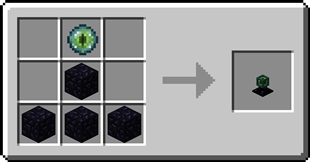
Recipe
Step-by-step Guide:
Placing an Item Collector
- Place down the block you want to items to go into
- Place the Item Collector on top

Setting the range
- Right-Click on the Item Collector
- Change the range for the x-, y-, and z-axis using the arrow buttons
Where do the collected items go? The Item Collectors will place collected items into the block below itself Is there a limit on the amount of items collected? No, the item collectors will instantly collect all items in their range Can I use your mod in my modpack? Yes, feel free to use my mod in your modpack
Discord
For future content, upcoming mods, and discussion, feel free to join the SuperMartijn642 discord server! [ ](https://discord.gg/QEbGyUYB2e)
Comment installer Item Collectors
With Millida Launcher
Install Millida Launcher
The launcher is free: download it at millida.net/launcher and sign in with any nickname.
Click “Install” on this page
The launcher opens and installs the mod for Minecraft 1.12–26.3 on Fabric, Forge, NeoForge or Quilt automatically, together with its dependencies: SuperMartijn642's Config Lib, Fabric API, SuperMartijn642's Core Lib.
Launch the game
A profile with it appears in the launcher: click “Play”.
Manually
Install Fabric, Forge, NeoForge or Quilt
The loader must match the game version of the mod file, for example Minecraft 26.3. After installing it, a separate profile appears in your launcher.
Download the file for your version
In the version list above, pick the file itemcollectors-1.1.12-neoforge-mc26.3.jar (111 KB) for your game version and loader.
Put it in the mods folder
The folder is inside .minecraft (Windows: %appdata%\.minecraft\mods). If it does not exist, create it. Required dependencies go there too: SuperMartijn642's Config Lib, Fabric API, SuperMartijn642's Core Lib.
Launch the loader profile
Open “Mods” in the main menu: Item Collectors should be in the list.
On a server
A server on Fabric, Forge, NeoForge or Quilt
The mod only works on a server with the same loader and game version, for example 26.3.
File goes into the server’s mods folder
Stop the server, put the mod file into the mods folder and start the server again.
Use the “To server” button
On Millida Hosting, the button at the top of the page uploads the file to your server and restarts it for you.
Versions
Avec dépendances
| Minecraft | Loader | Fichier | Date | Actions |
|---|---|---|---|---|
| 26.3 | NeoForge | 26.3111 Ko | ||
| 26.3 | Fabric, Quilt | 26.3104 Ko | ||
| 26.2 | NeoForge | 26.2111 Ko | ||
| 1.12.2 | Forge | 1.12.295.4 Ko | — |
Ce qu'il faut pour l'exécuter
- SuperMartijn642's Config Libobligatoire
- Fabric APIobligatoire
- SuperMartijn642's Core Libobligatoire
Avis
Soyez le premier à noter Item Collectors


