

Food Effect Tooltips (Forge) Mod pour Minecraft 1.20.1, 1.21.1
Ajoute des infobulles aux aliments qui donnent des effets de statut lorsqu'ils sont mangés
 NeoForge
 Forge
ForgeÀ propos
1.21.11+
Ceci est la version Forge non officielle de Food Effect Tooltips, sous licence LGPLv3, merci de soutenir le travail original !
Contenu du mod
Un certain nombre d'aliments accordent au joueur des bonus sous forme d'effets de statut.
Ces effets ne sont toutefois jamais indiqués en jeu. Ce qui est gênant, surtout dans un contexte moddé, où le joueur ne connaît pas toutes les options alimentaires et leurs effets.
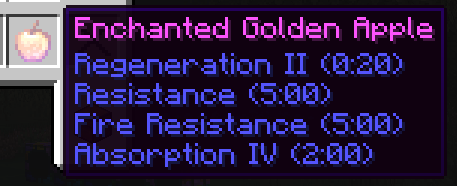
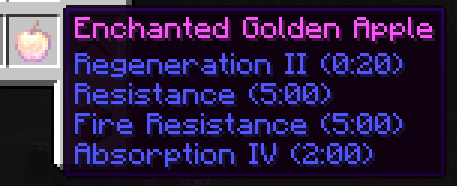
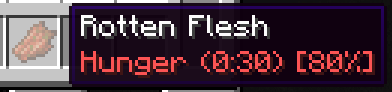
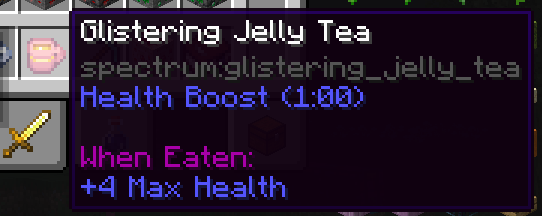
Avec Food Effect Tooltips, tous les effets sont affichés dans l'infobulle des objets !
- inclut les effets qui ne s'appliquent qu'avec un pourcentage de chance
- affiche les changements de statistiques pour les effets
- fonctionne entièrement côté client
- compatible avec d'autres mods qui affichent des informations sur la nourriture, comme AppleSkin
Comment installer Food Effect Tooltips (Forge)
With Millida Launcher
Install Millida Launcher
The launcher is free: download it at millida.net/launcher and sign in with any nickname.
Click “Install” on this page
The launcher opens and installs the mod for Minecraft 1.20.1–1.21.1 on Forge or NeoForge automatically.
Launch the game
A profile with it appears in the launcher: click “Play”.
Manually
Install Forge or NeoForge
The loader must match the game version of the mod file, for example Minecraft 1.21.1. After installing it, a separate profile appears in your launcher.
Download the file for your version
In the version list above, pick the file foodeffecttooltips+neoforge-1.21.1-1.6.0.jar (21 KB) for your game version and loader.
Put it in the mods folder
The folder is inside .minecraft (Windows: %appdata%\.minecraft\mods). If it does not exist, create it.
Launch the loader profile
Open “Mods” in the main menu: Food Effect Tooltips (Forge) should be in the list.
Minecraft 1.21.1 runs on Java 21: with a different Java version the game may close right after launch.
Versions
Avec dépendances
| Minecraft | Loader | Fichier | Date | Actions |
|---|---|---|---|---|
| 1.21.1 | NeoForge | [NEOFORGE]1.6.0+1.21.120.7 Ko 1 | ||
| 1.20.1 | Forge, NeoForge | 1.6.0+1.20.120.5 Ko 1 | ||
| 1.20.5 | NeoForge | [NEOFORGE]1.2.0+1.20.617.6 Ko |
FAQ
Which Minecraft versions does Food Effect Tooltips (Forge) work on?
There are files for 1.21.1, 1.20.6, 1.20.5, 1.20.1. The newest is 1.21.1.
Does Food Effect Tooltips (Forge) need other mods?
The author lists no required dependencies: the Forge or NeoForge loader is enough.
Which Java does Food Effect Tooltips (Forge) need?
Minecraft 1.21.1 runs on Java 21. If the game closes right after launch, the usual cause is the wrong Java version in the profile settings.
Where can I download Food Effect Tooltips (Forge) safely?
On this page: the file foodeffecttooltips+neoforge-1.21.1-1.6.0.jar (21 KB) is stored on Millida’s server, with no link shorteners. SHA-1 checksum: 33b10b6bfbd8af86c6edf298bd1702d5e89249a2.
Avis
Soyez le premier à noter Food Effect Tooltips (Forge)


