

Feather remake Mod pour Minecraft 26.3
Feather Remake Client est conçu pour imiter les fonctionnalités des clients populaires avec une excellente expérience d'interface pour les appareils Linux qui font tourner Minecraft, par ex. Feather client
- téléchargements
- 21 téléchargements
- vues
- 58 vues
- Mis à jour
- Mis à jour 02.10.2026
- 26.1 — 26.3
 Fabric
- Client
Feather Remake
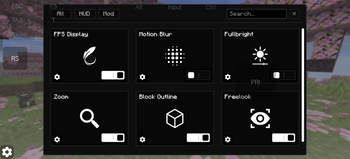
This Client is a utility mod which adds many functions with monochrome UI elements.
this client is generally made for people who use linux devices and want to experience clients eg. feather client

Features
- In game account switcher
- Modrinth downloader Screen (to download content directly from mc)
- Modules eg. Fps hud, Ping hud, Cord hud.
- Mod Menu
- Fog customizer
- Item resizer
- Keybind Scroll
- Titlescreen Switcher (to change titlescreen to vanilla if custom one hurts you)
- Module Resizer and Positioning.
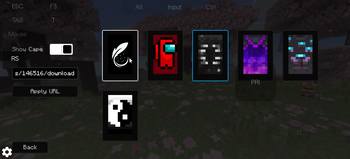
- Skin and Cape options. (only works client-side)
Modules
- Fps
- Ping
- Cordinate
- Speed
- Potion
- Bossbar
- Direction
- Memory
- Cps
- Timer
- Clock
- Playtime
- Many more, idk specifically.
Compatibility
- Fabric loader
- 1.21.1 - 26.2
- Fabric API
- Linux, Windows and even Android
UI
- Monochrome Theme
- Toggle Switches
- Buttons
- Sliders
- Textfields
Optimization this mod is not made to increase fps or performance any kind of
Preview
Comment installer Feather remake
With Millida Launcher
Install Millida Launcher
The launcher is free: download it at millida.net/launcher and sign in with any nickname.
Click “Install” on this page
The launcher opens and installs the mod for Minecraft 26.1–26.3 on Fabric automatically.
Launch the game
A profile with it appears in the launcher: click “Play”.
Manually
Install Fabric
The loader must match the game version of the mod file, for example Minecraft 26.3. After installing it, a separate profile appears in your launcher.
Download the file for your version
In the version list above, pick the file feather_legacy-1.4.0.jar (16 MB) for your game version.
Put it in the mods folder
The folder is inside .minecraft (Windows: %appdata%\.minecraft\mods). If it does not exist, create it.
Launch the loader profile
Open “Mods” in the main menu: Feather remake should be in the list.
Feather remake works on the player’s side only: there is no need to install it on a server.
Versions
Avec dépendances
| Minecraft | Loader | Fichier | Date | Actions |
|---|---|---|---|---|
| 26.3 | Fabric | 26.315.5 Mo 17 | ||
| 26.2 | Fabric | 26.215.5 Mo 4 | ||
| 26.1.2 | Fabric | 26.1.215.5 Mo | ||
| 26.1.2 | Fabric | 26.1.29.8 Mo | ||
| 26.1.2 | Fabric | 26.1.29.8 Mo | ||
| 26.1.2 | Fabric | 26.1.29.5 Mo | ||
| 26.1.2 | Fabric | 26.1.29.3 Mo | ||
| 26.1.2 | Fabric | 26.1.29.3 Mo |
Avis
Soyez le premier à noter Feather remake


