

Dark Paintings Mod pour Minecraft 1.20.1, 1.19.2
Ajoute de nouvelles peintures à Minecraft
 NeoForge
 Fabric
 Forge
Forge Quilt
QuiltÀ propos du mod Dark Paintings
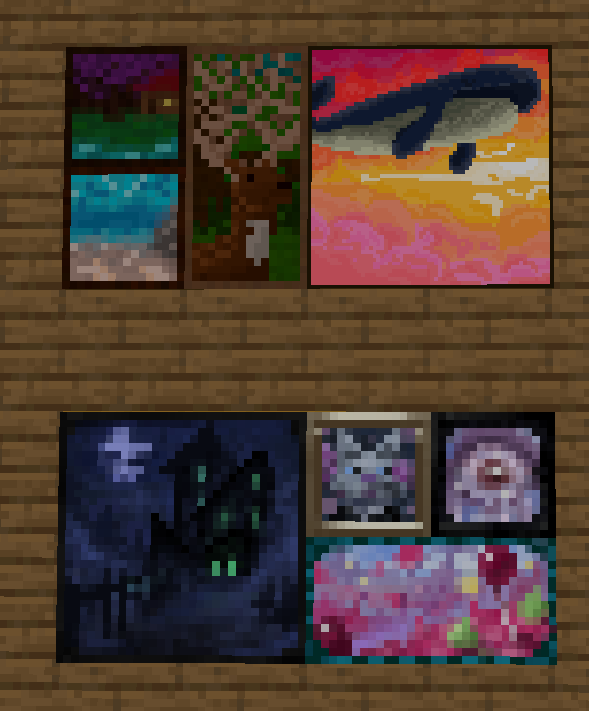
Ce mod ajoute de nombreuses nouvelles peintures au jeu ! Ces peintures existent en diverses tailles et styles artistiques. Chaque peinture a été conçue et illustrée par un membre de notre communauté ! Ces peintures s'intègrent parfaitement aux peintures vanilla et peuvent être placées dans le monde à l'aide de l'objet peinture habituel. Il y a aussi des objets dans l'onglet créatif qui permettent de placer un motif précis exactement là où vous le souhaitez !
Merci aux nombreux artistes talentueux qui ont collaboré avec moi sur ce mod, notamment mmg28rtt, FuryDev, Axeonlotl, Wouter, Absolem Jackdaw, Punpudle, Superkat32, et moi-même Darkhax lol.
Ce projet est sponsorisé par Nodecraft. Utilisez le code DARKHAX pour obtenir 30 % de réduction sur votre premier mois de service !
Comment installer Dark Paintings
With Millida Launcher
Install Millida Launcher
The launcher is free: download it at millida.net/launcher and sign in with any nickname.
Click “Install” on this page
The launcher opens and installs the mod for Minecraft 1.15.2–26.3 on Fabric, Forge, NeoForge or Quilt automatically.
Launch the game
A profile with it appears in the launcher: click “Play”.
Manually
Install Fabric, Forge, NeoForge or Quilt
The loader must match the game version of the mod file, for example Minecraft 26.3. After installing it, a separate profile appears in your launcher.
Download the file for your version
In the version list above, pick the file DarkPaintings-neoforge-MC26.3-26.3.0.1.jar (55 KB) for your game version and loader.
Put it in the mods folder
The folder is inside .minecraft (Windows: %appdata%\.minecraft\mods). If it does not exist, create it.
Launch the loader profile
Open “Mods” in the main menu: Dark Paintings should be in the list.
Versions
Avec dépendances
| Minecraft | Loader | Fichier | Date | Actions |
|---|---|---|---|---|
| 26.3 | NeoForge | DarkPaintings-neoforge-MC26.3-26.3.0.1.jar55.3 Ko 1 | ||
| 26.3 | Fabric | DarkPaintings-fabric-MC26.3-26.3.0.1.jar57.8 Ko 24 | ||
| 1.20.1 | Forge, NeoForge | DarkPaintings-Forge-1.20.1-17.0.6.jar51.4 Ko 6 | ||
| 1.19.2 | Forge | DarkPaintings-Forge-1.19.2-13.1.4.jar38.6 Ko | ||
| 1.19.2 | Fabric, Quilt | DarkPaintings-Fabric-1.19.2-13.1.4.jar33.8 Ko | ||
| 1.17 | Fabric | DarkPaintings-fabric-1.17-rc2-3.0.5.jar12.7 Ko | ||
| 1.15.2 | — | DarkPaintings-1.15.2-1.0.2.jar7.1 Ko | ||
| 1.15.2 | — | DarkPaintings-1.15.2-1.0.1.jar28.8 Ko |
FAQ
Which Minecraft versions does Dark Paintings work on?
There are files for 26.3, 1.20.1, 1.19.2, 1.17, 1.15.2. The newest is 26.3.
Is Dark Paintings for Forge or Fabric?
There are files for Fabric: 1.17–26.3, for Forge: 1.19.2–1.20.1, for NeoForge: 1.20.1–26.3 and for Quilt: 1.19.2.
Does Dark Paintings need other mods?
The author lists no required dependencies: the Fabric, Forge, NeoForge or Quilt loader is enough.
Where can I download Dark Paintings safely?
On this page: the file DarkPaintings-neoforge-MC26.3-26.3.0.1.jar (55 KB) is stored on Millida’s server, with no link shorteners. SHA-1 checksum: 15c9f13e2fa48507f646c9f0b133940516f6350c.
Avis
Soyez le premier à noter Dark Paintings


